

Shopify Phishing Attack: Fake Checkout Hijack and What to Check


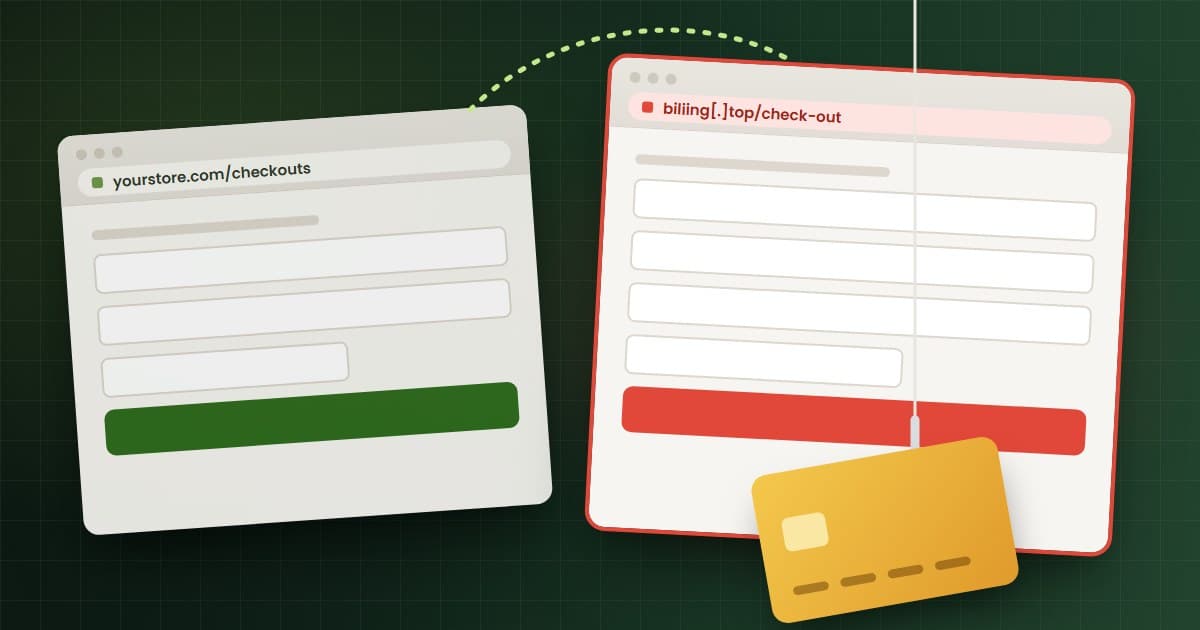
A Shopify phishing attack has been sending shoppers on real Shopify stores to fake checkout pages that collect card details. Developer Roman Zipp caught it on October 10, 2026, and traced it to JavaScript delivered through a store app's configuration.1 By October 15, merchants were reporting the same fake checkout through other apps, and Zipp says five to seven merchants had contacted him.12
If your storefront runs third-party apps, here is how to check your store today and what to do if you find it.
The short version
- On October 10, 2026, a shopper on a mechanical keyboard retailer's Shopify store clicked Checkout and landed on a fake checkout at biliing[.]top. The fake page sent the card details to the attacker, then forwarded the shopper to the real checkout.1
- Zipp traced the redirect code to the configuration that the Hulk Product Options app loads from HulkApps' API. HulkApps says "unauthorized configurations" were introduced into that app.1
- Swym Wishlist Plus and Selleasy were named in later reports. Selleasy's statement, shared by an affected merchant, says an unauthorized party used an internal Selleasy tool to add a malicious script to several stores' settings.24
- On October 16, the App Store listings for Hulk Product Options, Swym Wishlist Plus and Selleasy all read "This app is not currently available on the Shopify App Store."567
- No source we found says Shopify's own checkout was breached. The fake pages ran on outside domains. The root cause across apps was still unknown on October 16.
- The redirect fires once per browser session, so a store can look clean on a second test.12 Test in a fresh private window.
What happened in the Shopify phishing attack?
Zipp was shopping from Germany. He added a keyboard to his cart, pressed Checkout, and got a page that looked like a Shopify checkout. His password manager offered to fill the "First name" field with his card's first name. That looked wrong, so he checked the URL and found an unfamiliar domain.1
He reproduced it in a private window and submitted test details. The form posted his data to the attacker's server, which returned a record ID. Shortly after, the page sent him on to the store's real checkout.1
Zipp found three domains in the configuration at the end of the script: biliing[.]top, checkout-confirm[.]top and order-confirm[.]top.1 A developer posting on LinkedIn reported two more on a store he investigated: account-confirm[.]top and billing-confirm[.]top.4 Do not visit any of them.
How did the fake checkout hijack work?
The attack ran on your storefront, before checkout starts. The redirect fired when the shopper clicked Checkout, before Shopify's checkout page loaded.
Per Zipp's analysis:1
- The Hulk Product Options app loads a file called hulkcode.js on store pages. It is served from Shopify's CDN as part of the app's extension.
- That script calls HulkApps' API for the store's configuration. The response included a custom JavaScript field holding about 22.7 KB of code.
- The custom code contained a hijack function. When a shopper clicked Checkout, it redirected them to the fake domain.
- It set a session storage flag (
__ctf_shim_handoff_done_v1) so it fired only once per session.
The app's own file was legitimate and came from Shopify's servers. The malicious part arrived inside data the app fetched at runtime. You would not find it by searching your theme code.
Shopify lets apps add code to storefront pages through app embed blocks, which Shopify says can target the page head or body and load scripts on specific pages.9 Checkout is locked down differently. Checkout UI extensions "run in an isolated sandbox," have no access to the DOM, and "don't have access to sensitive payment information or the checkout page itself."8
Which Shopify apps were involved?
Here is what each source says, and how firm it is. None of the vendors below has been shown to have written the malicious code, and the way the attackers got in was not public on October 16.
Hulk Product Options (HulkApps). Zipp traced the code he found to this app's configuration.1 In a statement posted in the comments of Zipp's post on October 15, HulkApps said an exploit introduced unauthorized configurations into Hulk Product Options on October 10, that the redirect did not succeed on every visit, and that its sweep found the redirects came only from that app's theme extension. HulkApps says Shopify temporarily disabled the extension, then restored it after the code was removed. It also says it strengthened authentication and hired an independent security firm.1 Zipp lists four possible origins and has not confirmed any: a compromised merchant account, a compromised HulkApps employee account, a compromise of HulkApps itself, or another app changing the configuration.1
Swym Wishlist Plus (Swym Corporation). A developer on LinkedIn wrote that the malicious string on a store he investigated came from Swym's configuration endpoint. He suspected a Hulk app first, and removing it did not stop the redirect.4 That is one developer's analysis. We found no public statement from Swym. A commenter on Zipp's post believes a Swym update deployed around October 14 fixed an escaping issue. Neither Swym nor Zipp has confirmed that.1
Selleasy (Logbase). A merchant on the Shopify Community says a customer was sent to biliing[.]top on October 13. The merchant does not have HulkApps installed. Selleasy confirmed an incident to that merchant for a window on October 13. Its statement, as the merchant shared it, says an unauthorized party accessed an internal Selleasy tool and added a malicious script to the settings of several stores. Selleasy says it removed the script, locked its Custom JS setting, and reported the incident to Shopify and local authorities.2
Qikify (July) and Hextom (August). Zipp lists both as earlier, resolved incidents.1 Qikify's own notice says that on July 22, 2026, an unauthorized third party redirected some checkouts from its Sticky Add to Cart and Mega Menu apps to a fraudulent page not hosted by Shopify. Qikify says the code was injected into HTML fields in the app settings. It says it reset authentication for all its apps on July 29, and the two apps returned to the App Store on August 21.3 Qikify asked Zipp to mark its case as July and resolved, separate from this wave.1 We could not find a Hextom notice, so we have no details to add.
In every vendor account above, a storefront app pulled settings from its vendor's servers, and someone placed checkout redirect code inside those settings.
What has Shopify said?
Shopify had not issued a public statement as of October 15, per Zipp.2 We found none on October 16.
Shopify did act on individual stores. Zipp reported the store he found at 15:27 on October 10. Shopify escalated at 16:21, and the hijack was gone by 16:37, 16 minutes later. Shopify could not tell him how many other stores were affected.1 The merchant in the Community thread says the store had been closed for almost 48 hours on the advice of Shopify's security team, with no timeframe for reopening.2
Shopify says it is "certified Level 1 PCI DSS compliant."15 That covers Shopify's checkout. It does not cover a script on your product page that sends shoppers somewhere else.
Timeline
Times are as listed in Zipp's post, which gives no time zone.
| Date | Event |
|---|---|
| July 22, 2026 | Qikify detects checkout redirects from two of its apps and fixes them the same day.3 |
| August 21, 2026 | Qikify's two apps return to the App Store after a security review with Shopify.3 |
| About 18 days before Oct 10 | A vape shop owner posts on Reddit about the same domain, per Zipp and a Community member.12 |
| Oct 10, 12:10 | Zipp hits the fake checkout on a keyboard retailer's store.1 |
| Oct 10, 15:27 to 16:37 | Zipp reports to Shopify. Shopify escalates at 16:21. The hijack is gone at 16:37.1 |
| Oct 10, 18:46 | The retailer confirms in a Reddit comment, linked by Zipp, that it removed the app after being notified.1 |
| Oct 13 | A customer on another store is redirected to biliing[.]top. Selleasy later confirms an incident from 7:47 to 15:00 that day.2 |
| Oct 15 | HulkApps posts its statement. Zipp reports five to seven merchants and some domains listed on Spamhaus.1 |
| Oct 16 | Zipp: "all affected apps have been fixed or de-listed." All three App Store listings show as unavailable.1567 |
How to tell if your Shopify store is affected
You can run all of these checks without a developer. Start with the first two.
1. Check your installed apps. Go to Settings > Apps and open the Installed tab.12 Look for Hulk Product Options, Swym Wishlist Plus, Selleasy, or any Qikify app. Note every app you don't recognize.
2. Check your app embeds. Go to Online Store, click Edit theme on your live theme, then click the App embeds icon in the sidebar.10 Every switched-on embed can run code on your storefront. Write down which ones are on.
3. Run a clean checkout test. Open a new private or incognito window. Add a product, go to the cart, and click Checkout. Use the plain Checkout button, not Shop Pay, PayPal or other express buttons, which can open the provider's own window (practitioner judgment). Watch the address bar. Since 2017, Shopify checkout has run on the store's own domain, or on its free myshopify.com address for stores without a custom domain.11 If the address changes to any other domain before you pay, stop and treat it as an incident. Close the window and repeat the test in a fresh one, because the script only fires once per session.1 Test from a phone too, and from the add-to-cart drawer if you use one. Qikify's redirect fired from the cart drawer.3
4. Look for the session flag. In Chrome, after a test checkout, open DevTools (F12), then Application > Session storage, and select your store. A key starting with __ctf_ matches the code Zipp found.12 It is a marker for this campaign only. A clean result does not clear you of other attacks.
5. Watch network requests. In DevTools, open the Network tab, then load a product page and your cart. Type .top in the filter box, since every domain reported so far ends in .top, then clear it and scan the domain column for anything you don't recognize. Your store, Shopify's CDN and your known app vendors are normal. A domain you can't explain is worth asking your developer about.
6. Read your signals. Two signals are worth checking (our practitioner judgment). Customers may email about a checkout page that looked odd, or about card charges they don't recognize after an order. Your abandoned checkouts, under Orders > Abandoned checkouts, may also look unusual.19 Because the fake page forwarded shoppers to the real checkout, your order volume may look normal even while cards are being copied.
If you find it: Shopify incident response
Work in this order. Evidence first, then removal.
- Preserve evidence. Screenshot the fake page with the address bar visible. Copy the full URL. In DevTools, save the Network log (right-click > Save all as HAR) and note the time. Copy the script URL that made the redirect. Screenshot the app's custom code settings and duplicate your live theme before changing anything (practitioner judgment). You will need all of this for Shopify, the vendor and your payment processor.
- Stop the code. Switch off the app's embed in App embeds and save, or uninstall the app from Settings > Apps.1012 Shopify warns that some apps leave code in your theme after uninstalling, so check the theme too.12 Retest in a fresh private window.
- Contact the app vendor in writing. Ask for the injected script, the time window it was live on your store, and their incident statement. A Community member advised quoting the vendor's written confirmation when asking Shopify to reopen a closed store.2
- Contact Shopify Support. Send your evidence. Shopify may advise closing the store while it investigates.2
- Tell your payment processor. If you use Shopify Payments, raise it in your Shopify Support case. If you use another gateway, contact it directly. Shoppers' cards may have been copied even when the order went through normally.
- Lock down access. Change your Shopify password and the passwords for each app vendor account, and turn on two-step authentication.114 Review collaborators under Settings > Users, filtered by Collaborators, and remove anyone you don't need. Generate a new collaborator request code so old ones stop working.13
- Report the domains. Zipp reported his to Google Safe Browsing and URLhaus.1
- Assess notification duties. Card data entered on a fake page tied to your store may trigger customer notification duties under the laws where you and your customers are. Talk to a lawyer and your payment processor about what applies to your case. This is not legal advice.
Your Shopify app security checklist
Today
- Run the clean checkout test above in two fresh private windows and on a phone.
- List your installed apps and switched-on app embeds.
- If you run Hulk Product Options, Swym Wishlist Plus, Selleasy or a Qikify app, check the vendor's current guidance and test checkout from both the product page and the cart. Zipp's own advice is to disable as many apps as possible, especially the named ones.1
- Turn on two-step authentication for your own Shopify login.14
This week
- Remove apps you no longer use, then check the theme for leftover code.12 Our guide on decommissioning a Shopify app walks through the cleanup.
- For each storefront app with a "custom JavaScript" or "custom HTML" setting, open it and confirm you recognize everything in it. Qikify, HulkApps and Selleasy all describe malicious code arriving through settings fields like these.123
- Review staff and collaborator access, and ask every staff member to turn on two-step authentication. Stores on Shopify Plus can require a secure sign-in method for all users.1314 Our post on Shopify admin permissions covers the roles.
- Change passwords on your app vendor accounts and turn on 2FA where vendors offer it.1
Ongoing
- Repeat the clean checkout test weekly and after every app install or update (practitioner judgment).
- Keep a written list of every app that runs code on your storefront, with the reason you need it. PCI DSS 4.0 requirement 6.4.3 asks for exactly this on payment pages: an inventory of all scripts, with "written justification as to why each is necessary," plus a way to confirm each one is authorized and intact.16
- Consider script monitoring. PCI DSS requirement 11.6.1 calls for a change and tamper detection mechanism that alerts on unauthorized changes to payment pages as the shopper's browser receives them, run at least once every seven days or at a frequency set by a targeted risk analysis.16 Both requirements became mandatory after March 31, 2025.1617 Our app audit process is a practical starting point.
Does PCI DSS apply to your storefront scripts?
Shopify handles PCI compliance for its own checkout.15 Your storefront is a different question, and this attack ran there.
In January 2025, the PCI Security Standards Council removed requirements 6.4.3 and 11.6.1 from SAQ A, the short questionnaire many merchants with fully outsourced payments use. It replaced them with an eligibility criterion: merchants must "confirm their site is not susceptible to attacks from scripts that could affect the merchant's e-commerce system(s)."17 The Council says the change does not weaken the underlying requirements.17 In March 2025 it published guidance on payment page security, noting that "Scripts running in consumers' browsers are now a significant target for attackers."18
Which questionnaire applies to your store is a question for your acquirer or payment provider. The Council itself tells merchants to check with them.17 Our post on what you're responsible for in Shopify PCI compliance has more background. This is not legal or compliance advice.
What to tell your customers
Give your support team a short script. The real checkout stays on your store's domain or its myshopify.com address.11 If a customer saw another address at payment, they should contact their card issuer and ask about blocking the card. Don't promise anything about refunds or liability until your payment processor has looked at your case.
What we still don't know
- How the attackers got in. HulkApps calls it an exploit and Selleasy describes unauthorized access to an internal tool.12 Neither has published a full root cause.
- How many stores were affected. Shopify has not said.1
- Whether the apps are linked. Several apps were hit in the same weeks, using the same domains in some cases.12 No source we found explains the connection.
- Swym's account. We found no Swym statement.
We will update this post when Shopify or the vendors publish more.
If you want a second pair of eyes on your storefront apps and scripts, start here and we'll send a scoped security audit estimate within 48 hours.
Frequently asked questions
Was Shopify hacked?
No source we found says Shopify's own systems or checkout were breached. The malicious code arrived through third-party app configuration on storefront pages, and the fake checkouts ran on outside domains. We found no public Shopify statement as of October 16, 2026.
Which Shopify apps were affected by the checkout phishing attack?
Hulk Product Options, Swym Wishlist Plus and Selleasy were named in reports from October 10 to 15, 2026, and their App Store listings showed as unavailable on October 16. Qikify had a similar incident in July 2026. How the attackers reached each app's settings was not public at the time of writing.
Do I need to uninstall Hulk Product Options?
HulkApps says the unauthorized code was removed. Zipp still advises disabling the named apps where possible. Check the vendor's current guidance, test your checkout, and remove any app you don't actively need.
Why did my checkout test look normal?
The script set a session flag and fired only once per browser session.1 HulkApps also says some browsers blocked the redirect.1 Test in a new private window each time, on more than one device.
What happens to customers who entered their card on the fake page?
Their card details went to the attacker, even if the real order then went through. They should contact their card issuer. You should tell your payment processor and get advice on your notification duties. This is not legal advice.
Sources
- Roman Zipp, "Shopify shops hit with ongoing Checkout Hijack attack," published October 10, 2026, updated October 16, 2026, including the HulkApps statement and reader comments. romanzipp.com
- Shopify Community, thread "URGENT: checkout phishing redirect, anyone else affected?", October 15, 2026, including Selleasy's statement as shared by the original poster. community.shopify.com
- Qikify, Updates on Security Incident, checked October 16, 2026. qikify.com
- Dan S., LinkedIn post on a Shopify checkout phishing attack, October 2026. linkedin.com
- Shopify App Store, Hulk Product Options listing, checked October 16, 2026. apps.shopify.com
- Shopify App Store, Swym Wishlist Plus listing, checked October 16, 2026. apps.shopify.com
- Shopify App Store, Upsell & Cross Sell, Selleasy listing, checked October 16, 2026. apps.shopify.com
- Shopify.dev, Checkout UI extensions, checked October 16, 2026. shopify.dev
- Shopify.dev, Theme app extension configuration, checked October 16, 2026. shopify.dev
- Shopify Help Center, Apps in themes (app blocks and app embeds), checked October 16, 2026. help.shopify.com
- Shopify blog, Richard Btaiche, "Introducing checkout on your own domain," July 14, 2017. shopify.com
- Shopify Help Center, Uninstalling apps, checked October 16, 2026. help.shopify.com
- Shopify Help Center, Collaborator accounts, checked October 16, 2026. help.shopify.com
- Shopify Help Center, Securing your account with two-step authentication, checked October 16, 2026. help.shopify.com
- Shopify, Security, checked October 16, 2026. shopify.com
- PCI Security Standards Council, PCI DSS v4.0 SAQ A-EP, requirements 6.4.3 and 11.6.1, April 2022. pcisecuritystandards.org
- PCI Security Standards Council blog, "Important Updates Announced for Merchants Validating to Self-Assessment Questionnaire A," January 30, 2025. blog.pcisecuritystandards.org
- PCI Security Standards Council blog, "New Information Supplement: Payment Page Security and Preventing E-Skimming," March 10, 2025. blog.pcisecuritystandards.org
- Shopify Help Center, Recovering abandoned checkouts, checked October 16, 2026. help.shopify.com
Facts checked on October 16, 2026.
Building or fixing a Shopify store?
Tell us what you are working with. You get a scoped plan and a straight answer on whether you need a rebuild or just a fix.
- New builds, replatforms, and migrations
- Speed, checkout, and conversion fixes
- Scoped estimate within 48 hours
Working on something in Shopify & Ecommerce?
Tell us what you are working on. You get a scoped estimate within 48 hours.
Keep reading
More from Shopify & Ecommerce.
- Shopify & Ecommerce
October 1, 2026
Google AI Mode Checkout on Shopify: Why GA4 Misses These Sales
Google AI Mode checkout is rolling out to eligible US Shopify stores, on by default, and GA4 tags don't fire in it. How to check, decide and fix reporting.
- Shopify & Ecommerce
September 29, 2026
Shopify Agentic Checkout: What Changed and Your To-Do List
Shopify agentic checkout is live: AI agents in a shopper's browser can now complete your checkout. What changed, what you control, and a 16-step to-do list.
- Shopify & Ecommerce
September 28, 2026
Shopify Horizon Theme: What It's Actually Built From, and the 100KB Ceiling Nobody Mentions
Shopify Horizon's real CSS budget, measured byte by byte. What Theme Check's 100,000 byte rule checks, why it is off by default, and what limit really binds your theme.