

Shopify Agentic Checkout: What Changed and Your To-Do List


On September 28, 2026, Shopify let AI agents in a shopper's own browser read, fill in and submit your checkout, Shop Pay included, once the buyer approves the purchase.12 TechCrunch covered it the same day.3
You didn't switch anything on. Shopify says the tools "don't expose a new API or require merchant configuration."1 Shopify's Gil Greenberg says the launch covers "all eligible Shopify merchants."4
Amazon blocked Meta's Muse assistant the week before.5 Shopify went the other way. This guide covers what Shopify agentic checkout means for your store, starting with the short answers.
The short version
- Browser AI agents can now read, update and submit your checkout, including Shop Pay. Shopify requires them to get the buyer's approval of the order and total first.12
- You don't need to do anything. There is nothing to install or switch on.1 The to-do list below is optional hardening, and most of it helps human buyers too.
- No new fee is documented. Agents pay with Shop Pay, which carries "no additional fees" on Shopify Payments, so an agent order costs what the same Shop Pay order costs today.6
- There's no documented way to turn off browser agents on your checkout as of September 29, 2026.1 You can turn off direct checkout inside AI apps, channel by channel, in Sales channels > Agentic.7
- Shopify hasn't documented how agent orders appear in your admin, and the agent can't set attribution.2 Because the agent works in the buyer's own browser session, we expect these orders to look like ordinary online store orders. That is our inference, not Shopify's statement.
Plus stores get the same rules with three differences. B2B checkout is excluded.8 Blocking extensions, such as a required checkbox, hand the agent back.19 How bot protection treats agents is undocumented.10 For UK stores, Shopify documents no country limit but hasn't confirmed availability either way. UK stores can offer Shop Pay through Shopify Payments.11 Shopify Protect is US-only.12
What Shopify shipped on September 28
Shopify's checkout now registers four tools: get_checkout, update_checkout, complete_checkout and navigate_to_storefront. They run inside checkout and share its state.1 They extend storefront tools that went live on August 5 on every Liquid storefront and the Hydrogen developer preview.1314 The technology is WebMCP, which lets a page register tools for an in-browser agent. It works only in Chromium browsers, through Chrome's origin trial, which started in Chrome 149.1513
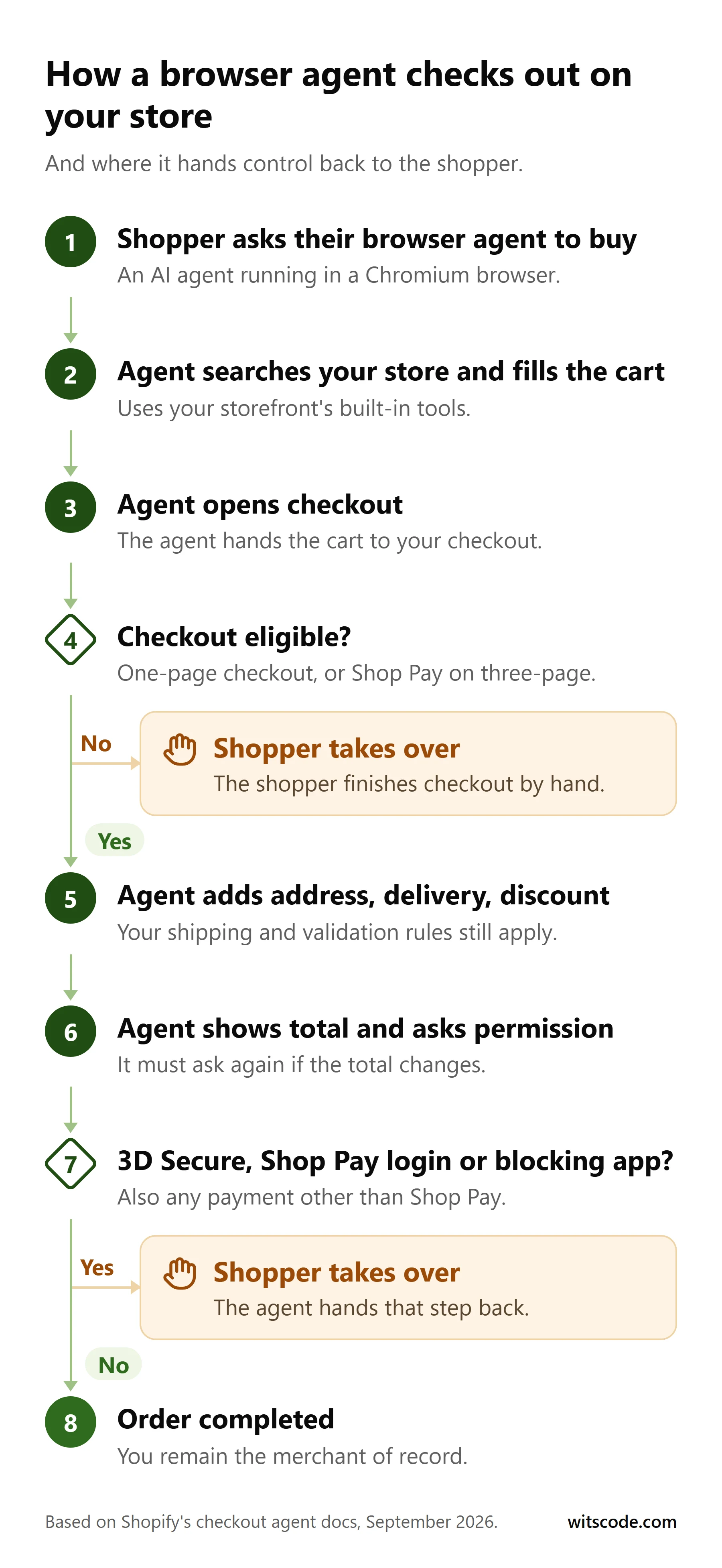
The buyer keeps control of the money:
- Before complete_checkout, the agent must show the order and total and get explicit permission. A Shop Pay approval or a Web Bot Auth signature doesn't count, and a changed total means asking again.2
- The agent hands control back for 3D Secure, Shop Pay login, blocking checkout UI extensions and review steps.12
- The agent can't enter new card details. It pays only with a saved Shop Pay card or a Shop Pay approval, and any other method is left to the buyer.2
Agents should identify themselves with Web Bot Auth. Without it, Shopify says bot detection "might deprioritize or block" their requests.2
The tools don't run on three-page checkout (unless the buyer uses Shop Pay), B2B checkout, embedded checkout, mobile checkout SDKs, checkouts with another shop's merchandise, draft orders, order edits or payment collection.8 Greenberg's post says "all eligible Shopify merchants,"4 but no Shopify page we checked defines "eligible" by plan or region as of September 29, 2026.
Two doors: browser agents on your checkout vs AI apps selling your catalog
Agentic commerce means software agents that shop and buy on a person's behalf. It now reaches your Shopify store two ways.
Door 1 is the shopper's own browser agent on your checkout. Your checkout settings, apps, discounts, shipping rules and fraud tools all still apply, and there is no documented toggle.18
Door 2 is an AI app selling from your catalog. Shopify calls these agentic storefronts. ChatGPT, Microsoft Copilot and Meta (including Muse) get your products through Shopify Catalog, and Google AI Mode and Gemini get them through Google Merchant Center or the Google & YouTube channel. Some offer direct checkout inside the chat, on by default for eligible stores.716 ChatGPT has no direct checkout. It sends buyers to your own checkout in an in-app browser.17
Your Agentic settings control Door 2. Your existing checkout setup is the only thing that controls Door 1.
The checkout tools in Door 1 implement the Universal Commerce Protocol (UCP).2 We covered UCP, agentic storefronts and Shopify Catalog in our composable commerce guide. Developers also get a server-side Checkout MCP, which Shopify recommends unless the agent already runs in the buyer's browser.8 ChatGPT's Sponsored Agents put your agent inside their chat. Door 1 puts their agent on your checkout. Getting recommended is a separate job, covered in our ChatGPT optimization playbook.
Can you turn it off?
For Door 1, Shopify documents no switch as of September 29, 2026.1 Three-page checkout removes the tools for everyone except Shop Pay buyers, but Shopify doesn't present it as an opt-out, and we don't recommend it as one. It changes checkout for every human buyer and still leaves Shop Pay open.
For Door 2, yes. Go to Sales channels > Agentic, turn off "Allow Shopify to manage for me," then open Meta, Microsoft Copilot or Google and set Direct checkout.7161819 Turning off Catalog access takes up to 7 days and disables direct checkout with it. Once you leave "manage for me," new channels follow a separate "Auto enroll new storefronts" setting, so check that too.7
What early testing shows
Use so far is mostly tests and partner launches. We found no confirmed merchant sales data for browser-agent checkout.
- Amazon blocked Muse on September 20. GeekWire reports Amazon said Muse didn't identify itself and appeared to store credentials. Meta has said Muse has no visibility into people's passwords or payment methods.5 TechCrunch says Adidas apparently blocks agents too.3
- Tobi Lütke announced a Muse partnership on September 21 for "agentic checkout with Shop Pay on all Shopify stores."20 Shopifreaks calls it "almost-agentic" because Muse hands shoppers to an in-app browser to pay.21 Instinct launched Shopify discovery and Shop Pay checkout on September 28.22 Whether either uses WebMCP is unconfirmed.
- Greenberg, who works at Shopify, published a personal benchmark on LinkedIn: 10.3 seconds per attempt against 27.4, 58% lower cost at OpenAI list price, and 60/60 successes against 56/60, across 10 tasks on 2 test shops.23
- Community testers, mostly vendors and consultants, reported AI shopping agents stalling on icon-only add-to-cart buttons, prices rendered by JavaScript after load, consent walls, required variant picks and password mode. They also reported agents landing on the default .com and quoting USD to a UK buyer.24
- A scripted headless buyer (not an AI agent) reached checkout on 13 of 20 "agent-ready" Shopify stores, and 5 failed silently at add-to-cart.25
- No merchant in one Community thread had a confirmed example of how agent orders go after shipping.26
Your Shopify agentic checkout to-do list
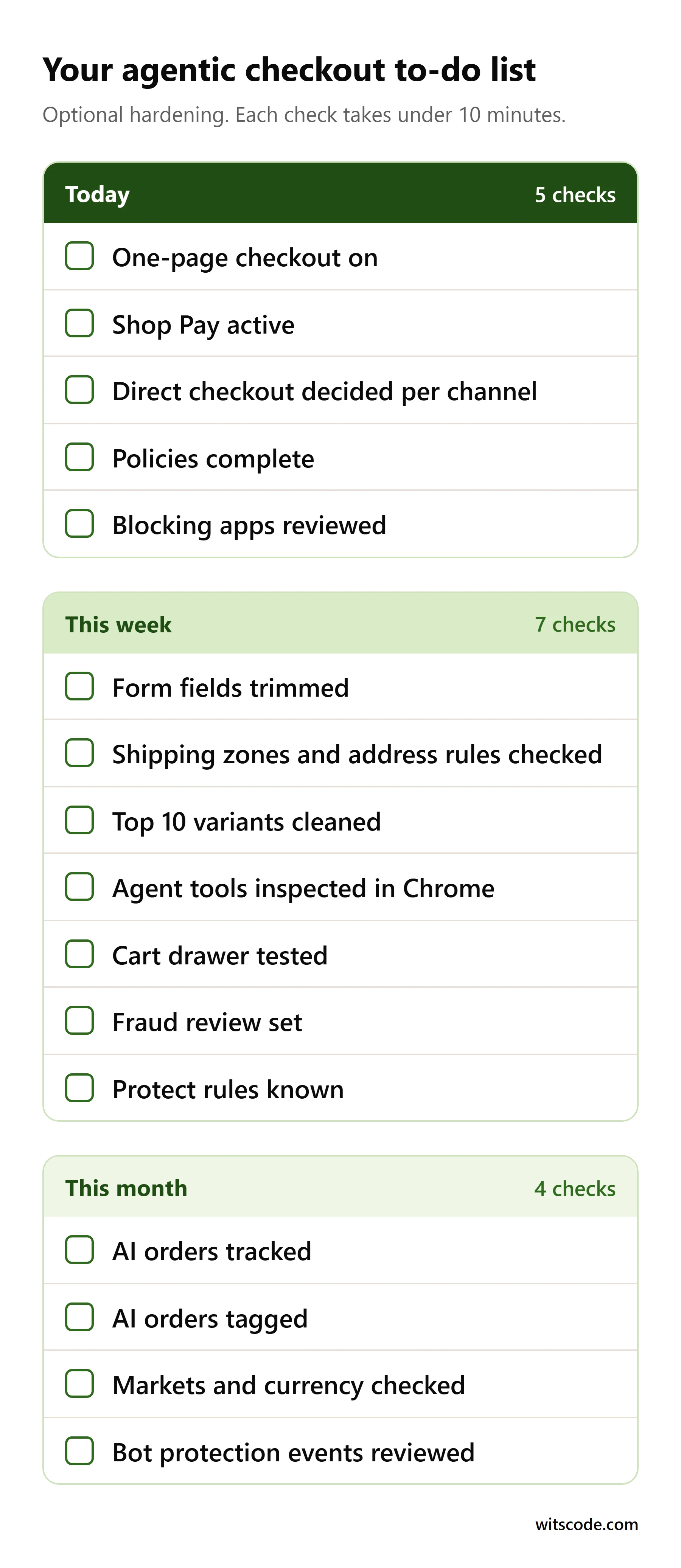
The list runs in order of impact, then effort. Each check takes under 10 minutes. "Practitioner judgment" marks our advice, not Shopify's.
Today
1. Confirm your checkout is one-page.
- Where: Settings > Checkout > Configurations > Edit > gear icon > Checkout layout.
- Why: Checkout tools don't register on three-page checkout unless the buyer pays with Shop Pay. One-page is the default.827
- Check (2 min): Read the value. More on one-page vs three-page checkout.
2. Make sure Shop Pay is on.
- Where: Settings > Payments > Shopify Payments > Manage, then check Shop Pay and save.28
- Why: Agents can't type card details. They pay only with a saved Shop Pay card or a Shop Pay approval.2 Stores off Shopify Payments can add Shop Pay through a third-party gateway only if located in Australia, France or the US.28
- Check (3 min): Confirm the Shop Pay button shows on checkout alongside your accelerated checkout setup. Don't place a Shop Pay test order. Shopify says Shop Pay can't be simulated.28
3. Decide on AI-channel direct checkout.
- Where: Sales channels > Agentic, using the steps above.
- Why: Direct checkout doesn't support subscriptions, bundles, customizable or B2B-only products, local delivery or pickup, and GA and custom pixels don't fire in it.71819 Google's version needs a US store selling to the US and a Merchant Center account, and it is still rolling out.16 Shopify's terms also let it add per-channel fees later.29
- Check (5 min): List active channels. Leaving direct checkout on suits simple physical products. Turn it off if you rely on subscriptions, bundles, personalization, pickup or ad pixels (practitioner judgment).
4. Complete your store policies.
- Where: Settings > Policies.
- Why: The storefront tool search_shop_policies_and_faqs answers return and shipping questions from your own policies.14 ChatGPT, Copilot and Meta also require terms, privacy and refund policies.171819
- Check (5 min): Confirm none is blank or templated, and that the return window matches what you honor.
5. Find checkout apps that can block checkout.
- Where: Settings > Checkout > Configurations > Edit, click each app, then Checkout behavior > "Allow app to block checkout."9
- Why: A blocking UI extension hands the agent back to the shopper.1 Shopify deprecated the blocking API in version 2026-07 in favor of validation Functions, which it says run on every checkout surface, agentic checkout included.30
- Check (5 min): List apps with blocking on and ask vendors about Functions. Don't switch blocking off wholesale. Shopify's own example is a required checkbox the buyer must tick,9 and checks like age verification are the same kind of legitimate hand-back (practitioner judgment). Background on checkout UI extensions and apps.
This week
6. Review checkout form options.
- Where: Settings > Checkout, customer contact and information.
- Why: Required sign-in hides accelerated checkouts such as Apple Pay. A required company name hides some too. A required or removed address line 2 can stop buyers.31 How sign-in affects the checkout tools is undocumented.
- Check (5 min): Keep only the fields you need, and have a reason if you're forcing account sign-in.
7. Check shipping zones and address rules.
- Where: Settings > Shipping and delivery, plus address validation in Apps > Checkout Blocks > Functions, or Settings > Checkout > Checkout rules if you migrated Address Blocker rules.32
- Why: Checkout rejects addresses you don't ship to, and checkouts split between shipping and pickup reject agent updates.2 Shopify warns that strict validation patterns block valid addresses.32
- Check (10 min): Start a checkout with a normal home address in each market and stop at the payment step. For the wider view, run a full checkout friction audit.
8. Clean variant names and stock on your top 10 products.
- Where: Products > [product] > Variants and Inventory.
- Why: get_product returns variants, prices and in-stock combinations, and show_variant picks a variant from partial options such as color.14 Vague names and stale stock lead to the wrong item or a stall. If every item in a cart is marked non-physical, checkout skips the shipping step, so a variant wrongly marked non-physical can skip it.31
- Check (10 min): Read option names as a stranger would, and confirm stock and any product facts in metafields.
9. See your store the way an agent does (optional, hand it to your developer).
- Where: Chrome with chrome://flags/#enable-webmcp-testing and Google's Model Context Tool Inspector extension, or DevTools > Application > WebMCP.1533
- Why: It lists the tools your pages register. Eligible checkouts swap storefront tools for checkout tools after proceed_to_checkout.14
- Check (10 min): Run harmless calls only, such as search, get_cart and the read-only get_checkout. Never run complete_checkout on a live store. It places a real order on a real card. Missing checkout tools usually mean an ineligible checkout, or a stale tool list.
10. Test your cart drawer and upsell apps (with your developer, alongside item 9).
- Where: Online Store > Themes and app embeds.
- Why: Agent cart changes call your theme's standard storefront actions, so a custom cart action, such as opening a drawer, fires for agents too.14
- Check (5 min): During item 9, call update_cart and watch the theme and any checkout upsell blocks (practitioner judgment). If several apps touch the cart, audit the apps touching cart and checkout.
11. Set up fraud review for unusual orders.
- Where: Order risk on each order, Shopify Flow, Settings > Payments for capture, and Orders > Abandoned checkouts > Blocked.34
- Why: You remain merchant of record, and Shopify documents nothing on agent-order disputes.8
- Check (10 min): Review risk on your last 5 high-value orders and set your own review threshold (practitioner judgment). Manual capture hits every order, and Shopify Payments authorizations last 7 days,35 so keep automatic capture and hold risky orders with Flow. Agents can apply any code the buyer gives them,2 so make high-value codes single-use (practitioner judgment). See which fraud tool to use when.
12. US stores: know the Shopify Protect rules.
- Where: Settings > Payments > Shopify Payments.
- Why: Protect covers fraudulent and unrecognized chargebacks on eligible Shop Pay orders. The order must hold only shipped physical items. You must fulfill it with tracking within 7 days, it must be in transit within 10, and the address can't change after checkout.12 It needs a US location, a US Shopify Payments account and Shop Pay, and Shopify says it is free.1236 Shopify doesn't say whether agent orders qualify. UK and other non-US stores don't get Protect.
- Check (5 min): Confirm your fulfillment speed meets the 7-day rule. More on chargeback signals.
This month
13. Decide how you'll spot agent and AI orders.
- Where: An order's Conversion summary, Sales channels > Agentic, and the "Human or bot session" filter in Analytics > Reports.3738
- Why: WebMCP ignores attribution.2 AI-channel direct checkouts don't fire GA4 or custom pixels, so GA4 undercounts them.19 Since September 21 to 23, Shopify filters bot sessions out of session reports by default, which can shift conversion-rate baselines but not orders or sales.38
- Check (10 min): Open 5 recent conversion summaries and compare sessions with the filter on and off. Add an AI assistant option to a post-purchase "How did you hear about us?" question (practitioner judgment). Know what GA4 actually tracks on Shopify and where server-side order data helps.
14. Tag AI orders and brief support.
- Where: Order tags and a saved view in Orders.
- Why: No merchant in one Community thread had solid data yet on returns or support rates for agent orders.26 Door 2 orders show their channel, and Meta orders, for example, are attributed to Meta.18 Door 1 orders have no documented signal beyond your survey answer.
- Check (10 min): Save a view filtered by sales channel and tag survey-flagged orders by hand. If you use Flow, confirm the field exists before building on it. Tell support: normal return policy applies to AI-assisted orders. Review in 30 days (practitioner judgment).
15. UK and multi-market stores: check what a new visitor sees.
- Where: Settings > Markets and Online Store > Preferences.
- Why: Testers report agents landing on the default store and quoting USD to UK buyers.24 AI-channel direct checkout is US-focused, with Meta covering the US, Canada and Mexico.1819
- Check (5 min): Open your UK domain or subfolder in a clean browser profile and confirm currency and prices without relying on a redirect (practitioner judgment).
16. Plus stores running drops: review bot protection events.
- Where: Settings > Bot protection (Plus only; Plus Support turns it on).
- Why: During an event, which lasts up to 60 minutes and covers the Online Store only, "Don't allow bots to auto-complete checkouts" is on by default.10 How Shopify bot protection treats signed agents is undocumented, so expect hand-backs or challenges during drops (our inference).
- Check (5 min): Review scheduled events and which products they cover.
What not to do
- Don't put your own proxy in front of Shopify to manage AI traffic. Shopify doesn't recommend it and can't support it.39
- Don't rely on robots.txt. It doesn't stop Catalog syndication to channels you've turned on,39 and it doesn't govern checkout.
- Don't test agent payments in Shopify Payments test mode on a live store, where it blocks real card orders.40 Use a development store.
What Shopify hasn't said yet
Watch for these. We'll update this post as Shopify documents them.
- Attribution. No channel, source or tag is documented for Door 1 orders.2 Merchants already report AI-referred sessions from copied links showing up as Direct.41
- Chargebacks and Protect. Nothing says who bears disputes on agent orders or whether Protect covers them. Startup Fortune argues legitimate agent orders can look like card testing, which is its opinion.42 Ask your payments provider. This is not legal advice.
- Eligibility and the UK. No Shopify page we checked defines "eligible" by plan, region or gateway, or confirms UK availability.
- Bot protection and analytics. Shopify hasn't said how Plus bot protection and the bot-session filter treat agents, or whether GA4 fires when an agent completes checkout.1038
- Product types. The Checkout WebMCP reference doesn't mention subscriptions, gift cards or customer accounts.2
- Custom headless storefronts. Storefront tools are documented only for Liquid and Hydrogen.14
For the checkout fixes on this list, see our Shopify optimization work. For builds, see Shopify development.
Frequently asked questions
Can I turn off AI agent checkout on Shopify?
Not for browser agents on your own checkout. Shopify documents no switch as of September 29, 2026, and three-page checkout is not an opt-out Shopify offers. For AI apps with in-chat checkout, such as Meta and Microsoft Copilot, you can turn direct checkout off per channel in your Agentic sales channel settings.
Do I need to do anything?
No. There is nothing to install or switch on. The to-do list in this guide is optional hardening, and most of it also helps human buyers.
Does Shopify charge a fee on AI agent sales?
Shopify documents no fee for browser-agent checkout. Agents pay with Shop Pay, which adds no fee on top of Shopify Payments rates. For AI channels, Shopify's terms let it set per-channel fees later, but none is documented today for Meta, Microsoft Copilot or Google beyond payment processing.
How do I know if an order was placed by an AI agent?
Orders from AI channels such as Meta show that channel in your admin. For browser agents on your checkout, Shopify hasn't documented any label. We expect those orders to look like ordinary online store orders, which is our inference. A post-purchase survey with an AI assistant option is the most practical marker.
Who is liable if an AI agent places an order the customer didn't want?
You remain the merchant of record. Shopify has not published how disputes on agent orders are handled or whether Shopify Protect covers them, so treat them like any other order and ask your payments provider. This is not legal advice.
Can AI agents enter my customers' card details?
No. A browser agent can't enter new card details. It pays only with a saved Shop Pay card or a Shop Pay approval, and it must show the buyer the order and total and get permission first.
Does this work for UK stores?
Shopify documents no country limit, and nothing confirms UK availability either way. UK stores on Shopify Payments can offer Shop Pay, the payment path agents need. Shopify Protect is US-only.
What do I do if a customer says their AI assistant bought the wrong thing?
Apply your normal return and refund policy. The agent had to show the buyer the order and total and get permission before placing it. Log these contacts so you can compare agent orders with the rest. This is not legal advice.
Sources
- Shopify developer changelog, WebMCP support for checkout, September 28, 2026. shopify.dev
- Shopify.dev, Checkout WebMCP, checked September 29, 2026. shopify.dev
- TechCrunch, Sarah Perez, "Shopify opens checkout to browser-based AI agents," September 28, 2026. techcrunch.com
- Gil Greenberg on X, September 28, 2026. x.com
- GeekWire, Todd Bishop, report on Amazon blocking Meta's Muse assistant, September 20, 2026. geekwire.com
- Shopify, Shop Pay, checked September 29, 2026. shopify.com
- Shopify Help Center, Agentic storefronts, checked September 29, 2026. help.shopify.com
- Shopify.dev, Carts and checkout for agents, checked September 29, 2026. shopify.dev
- Shopify Help Center, Checkout apps, checked September 29, 2026. help.shopify.com
- Shopify Help Center, Bot protection, checked September 29, 2026. help.shopify.com
- Shopify Help Center, Shopify Payments payment methods in the United Kingdom, checked September 29, 2026. help.shopify.com
- Shopify Help Center, Protecting orders with Shopify Protect, checked September 29, 2026. help.shopify.com
- Shopify developer changelog, WebMCP support for Liquid and Hydrogen storefronts, August 5, 2026. shopify.dev
- Shopify.dev, WebMCP API reference, checked September 29, 2026. shopify.dev
- Chrome for Developers, WebMCP, checked September 29, 2026. developer.chrome.com
- Shopify Help Center, Agentic storefronts: Google AI Mode and Gemini, checked September 29, 2026. help.shopify.com
- Shopify Help Center, Agentic storefronts: ChatGPT, checked September 29, 2026. help.shopify.com
- Shopify Help Center, Agentic storefronts: Meta, checked September 29, 2026. help.shopify.com
- Shopify Help Center, Agentic storefronts: Microsoft, checked September 29, 2026. help.shopify.com
- Tobi Lütke on X, September 21, 2026. x.com
- Shopifreaks, report on the Shopify and PayPal partnership with Muse, September 2026. shopifreaks.com
- Noah Shinn on X, September 28, 2026. x.com
- Gil Greenberg, LinkedIn article on browser agents checking out on Shopify, September 2026. linkedin.com
- Shopify Community, thread on testing Shopify's AI shopping agent against live stores, September 2026. community.shopify.com
- GitHub, MythrilS/agent-ready-checkout, checked September 29, 2026. github.com
- Shopify Community, thread on customer experience with AI shopping orders, 2026. community.shopify.com
- Shopify Help Center, One-page checkout, checked September 29, 2026. help.shopify.com
- Shopify Help Center, Activating Shop Pay, checked September 29, 2026. help.shopify.com
- Shopify, Agentic Storefronts Supplemental Terms of Service, updated July 7, 2026. shopify.com
- Shopify developer changelog, deprecation of the useBuyerJourneyIntercept API on checkout UI extensions, July 2, 2026. shopify.dev
- Shopify Help Center, Checkout form options, checked September 29, 2026. help.shopify.com
- Shopify Help Center, Address format validation, checked September 29, 2026. help.shopify.com
- Chrome for Developers, DevTools Application panel: WebMCP, checked September 29, 2026. developer.chrome.com
- Shopify Help Center, Fraud analysis, checked September 29, 2026. help.shopify.com
- Shopify Help Center, Payment authorization, checked September 29, 2026. help.shopify.com
- Shopify Help Center, Shopify Protect, checked September 29, 2026. help.shopify.com
- Shopify Help Center, Conversion summary, checked September 29, 2026. help.shopify.com
- Shopify Help Center, Session measurement update, checked September 29, 2026. help.shopify.com
- Shopify Help Center, Agentic storefronts: products, checked September 29, 2026. help.shopify.com
- Shopify Help Center, Activating a payment gateway in test mode, checked September 29, 2026. help.shopify.com
- Shopify Community, thread on AI-referred orders in Shopify analytics, 2026. community.shopify.com
- Startup Fortune, opinion on Shopify letting AI agents finish checkout, September 2026. startupfortune.com
Facts checked on September 29, 2026.
Building or fixing a Shopify store?
Tell us what you are working with. You get a scoped plan and a straight answer on whether you need a rebuild or just a fix.
- New builds, replatforms, and migrations
- Speed, checkout, and conversion fixes
- Scoped estimate within 48 hours
Want to discuss ecom for your business?
Start a project and we'll talk through where you are, what's working, and the highest-leverage moves for the next 90 days.
Keep reading
More from the Ecom archive.
- Ecom

September 28, 2026
Shopify Horizon Theme: What It's Actually Built From, and the 100KB Ceiling Nobody Mentions
Shopify Horizon's real CSS budget, measured byte by byte. What Theme Check's 100,000 byte rule checks, why it is off by default, and what limit really binds your theme.
- Ecom

September 28, 2026
Horizon vs a Custom Shopify Theme in 2026: The Decision With Real Numbers
Horizon is free and capable, but its license restricts what you can do with a derived theme. Here is the Shopify Horizon vs custom theme decision, with real numbers.
- Ecom
July 27, 2026
Composable Commerce on Shopify in 2026: Architecture, Real Costs, and the Agentic Shift
What composable commerce really costs on Shopify in 2026, when headless is worth it, and how the new agentic stack changes the answer. With real numbers.