

ClickFix: The Fake Cloudflare Page Hijacking Thousands of WordPress Sites, Explained


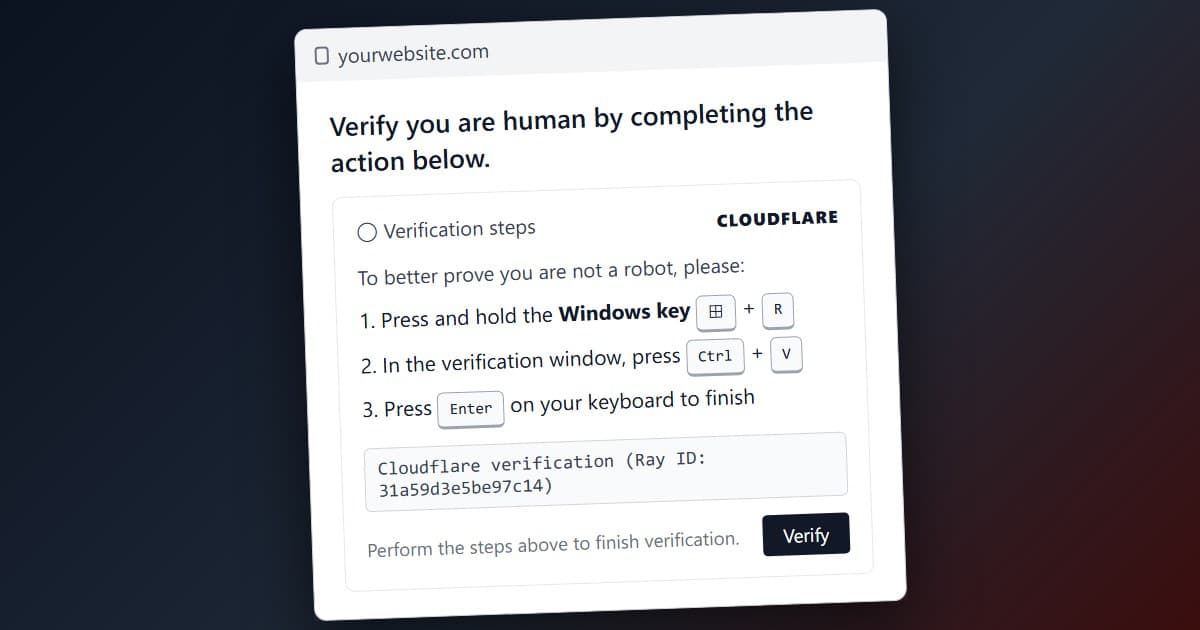
A visitor opens a normal business website. Instead of the homepage they get a Cloudflare logo, a spinner, and the words "Verify you are human." Then four numbered steps: press a key, open a terminal, paste, press Enter. Nothing about it looks wrong. It is one of the most effective malware delivery tricks on the internet right now, and the website it appears on almost never belongs to the attacker.
The technique is called ClickFix. In 2025 GoDaddy's security team counted 33,290 WordPress sites carrying one variant or another.1 Check Point Research traced a single criminal operation running it across roughly 2,000 hacked sites.2 Sophos found more than 500 compromised WordPress sites feeding one campaign in a two-day window in June.3 Huntress, which monitors thousands of small business networks, reported that ClickFix made up more than half of all malware loader activity it saw in 2025.4
Over the past month we have had a run of enquiries from businesses whose sites suddenly showed this page. Some had been told by a customer. Some found out when Chrome turned their address bar red. One found out from an antivirus alert on a staff laptop. In every case the owner's first question was the same: "Is this Cloudflare doing something?" It is not. This article explains what the page is, how the sites got hacked to host it, what it does to the people who follow the instructions, why criminals bother, how to clean a site, and how to keep it from happening. It is long. The short versions leave out how the attackers get in.
What the visitor sees
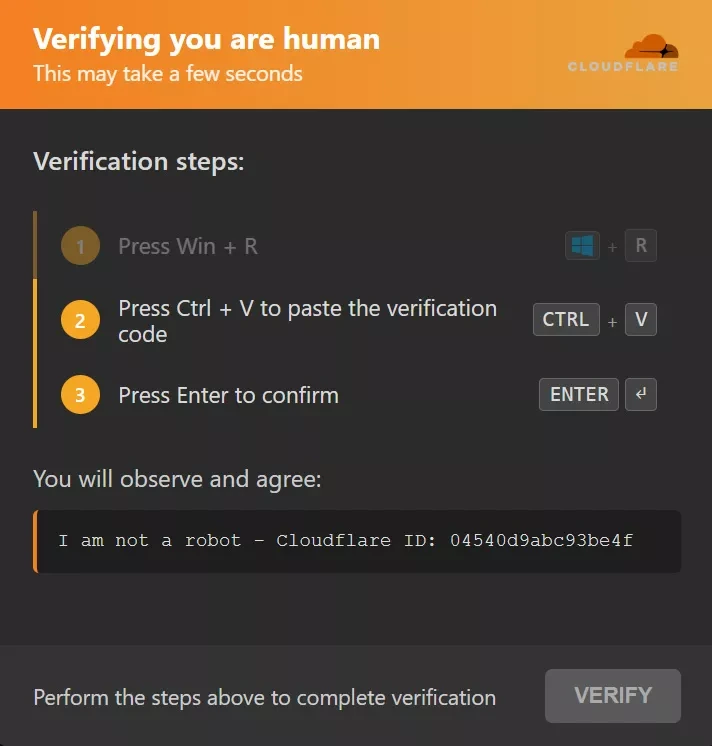
The page borrows Cloudflare's look because millions of people pass through genuine Cloudflare checks every day and have learned to click through them without thinking. After the spinner, the fake version says additional verification is required and gives keyboard instructions.
When the visitor clicks the checkbox or lands on the page, JavaScript quietly writes a command to their clipboard. On Windows it is usually a PowerShell one-liner of the form powershell -w hidden -ep bypass -c IEX(...), which fetches and runs a script from the attacker's server without showing a window.2 The numbered steps then get the visitor to open the Run dialog or Windows Terminal, paste, and press Enter. The visitor never sees the command. They think they pressed a few keys to pass a bot check.
The script also reads the browser's User-Agent string to find out what operating system the visitor is on. Windows users get Win+R or Win+X. Mac users get Command+Space, type Terminal, Command+V, Enter, and the command is a shell script instead of PowerShell.5 Some versions show the page only to Windows visitors and serve the normal site to everyone else, which is why a site owner checking on a phone sees nothing wrong while a customer on a laptop gets infected.2
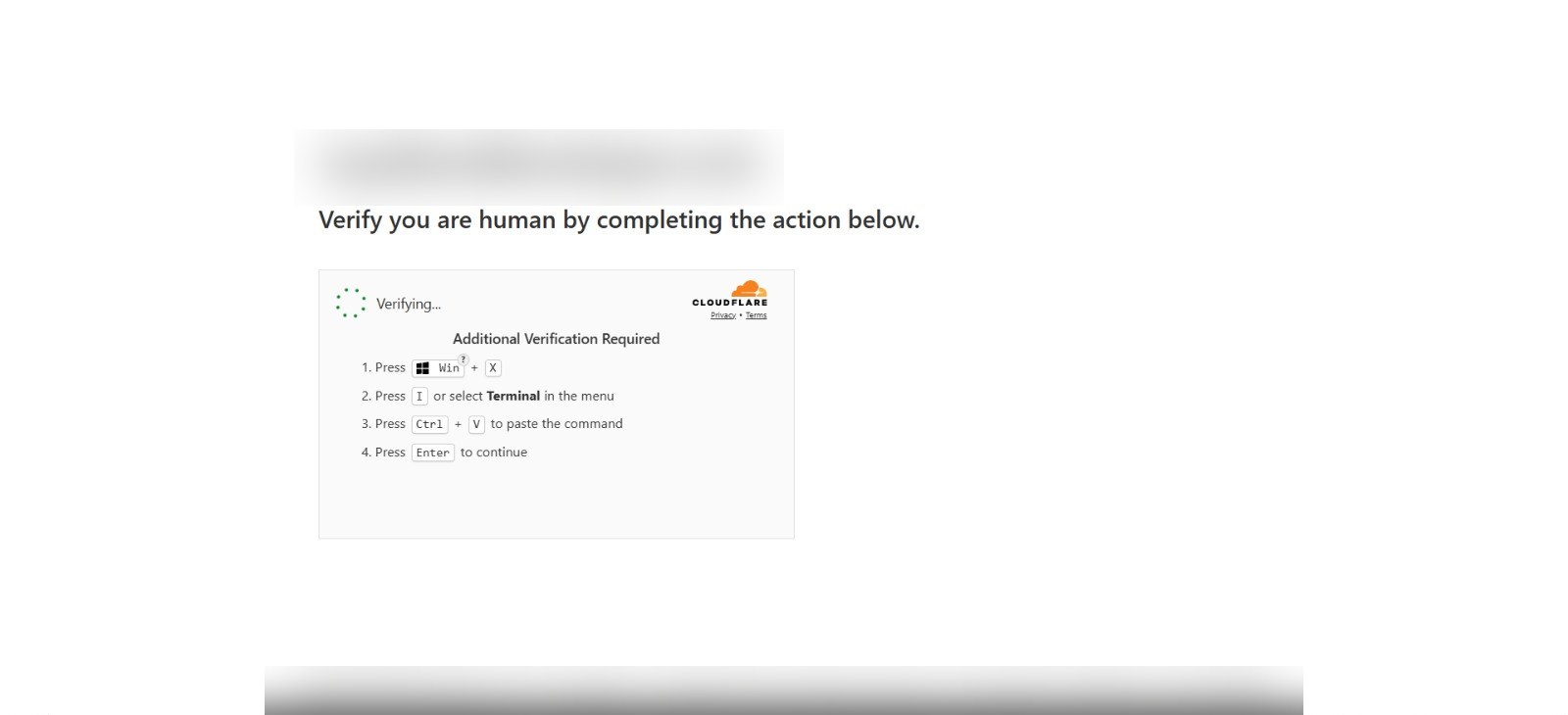
What makes the trick work, from the attacker's side, is that nothing gets downloaded through the browser and no attachment is opened. The visitor runs the payload with their own hands, so browser download warnings, email attachment filters and most security training never fire. Microsoft's threat intelligence team put it plainly: the technique is designed to get around conventional and automated security solutions by making the user do the work.6
Real Cloudflare or fake: how to tell
Cloudflare's real challenge pages exist and are harmless. The differences are visible in a few seconds.
| Real Cloudflare check | Fake ClickFix page |
|---|---|
| A checkbox or spinner that finishes on its own in a few seconds | A spinner that never finishes, then "Additional verification required" |
| Never asks you to leave the browser | Tells you to press Win+R, Win+X or Command+Space |
| Never mentions Terminal, PowerShell, Run, or pasting | Numbered steps ending in Ctrl+V or Command+V and Enter |
| Passes you through once, then you are on the site | Loops: site, verification page, site, verification page |
| Only appears on sites that actually use Cloudflare | Appears on sites that have never used Cloudflare |
One rule covers every variant, past and future: no legitimate website will ever ask you to open a terminal and paste a command to continue. Not Cloudflare, not Google, not Microsoft, not your bank, not a document viewer. If a page asks, close the tab.
What ClickFix is and where it came from
ClickFix is a family of social engineering lures, all built on the same move: convince the user there is a small problem, hand them a "fix" that is really a command, and have them run it. The fake CAPTCHA is only the most common costume. Others include a fake browser error ("your browser could not display this page, click to fix"), a fake document viewer error, a fake Discord or Telegram verification, and a fake Windows update.6
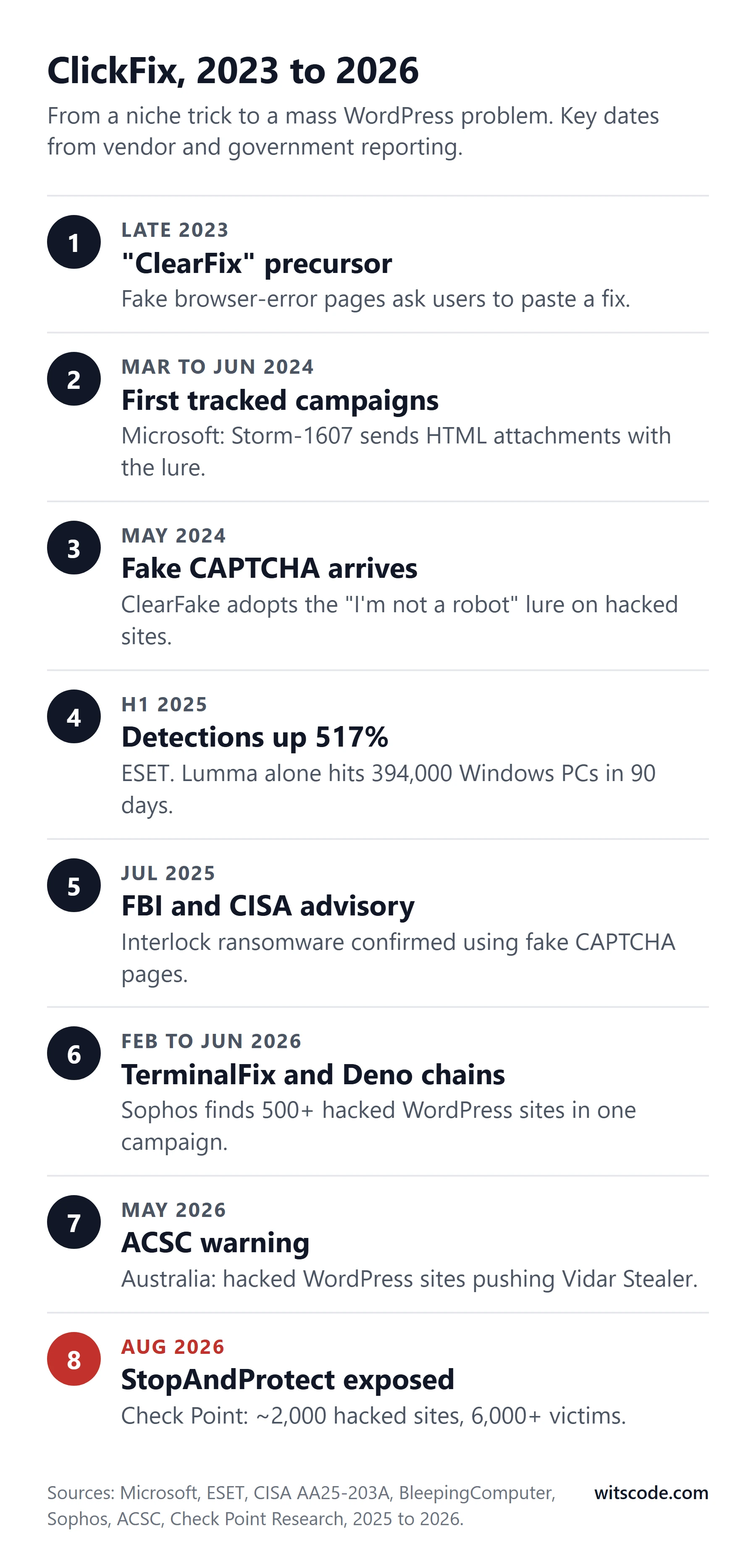
Microsoft dates the first campaigns to early 2024, when a group it tracks as Storm-1607 sent emails with HTML attachments that displayed the fake error. A malware distribution operation called ClearFake, which had previously used fake browser update pages injected into hacked websites, adopted the fake CAPTCHA around May 2024.6 That was the moment the technique moved from email to compromised websites at scale, because ClearFake already controlled thousands of them.
The fake browser update trick that ClearFake replaced deserves a mention, because it is the direct ancestor of what we see today. Sucuri tracked the SocGholish campaign (also known as NDSW) from 2019: injected JavaScript on hacked WordPress sites that showed a fake "update your browser" prompt and delivered a trojan. In 2021 it found the injection on more than 61,000 sites.7 In June 2026 a coordinated law enforcement action, Operation Endgame, seized over 100 SocGholish servers and domains and remotely cleaned 14,971 WordPress sites.8 The same criminal playbook, hack the site and inject a lure, has simply swapped the lure.
The growth since 2024 has been steep. ESET's threat report for the first half of 2025 measured a 517 percent rise in ClickFix detections.9 In July 2025 the FBI and CISA issued a joint advisory on the Interlock ransomware group, confirming that its operators used fake CAPTCHA pages to get their first foothold in victim networks.10 In May 2026 the Australian Cyber Security Centre warned of an active campaign using compromised WordPress sites to push the Vidar information stealer at Australian organisations.11
New variants keep appearing. "FileFix" uses the Windows File Explorer address bar instead of the Run dialog. "TerminalFix", which Microsoft reported in early 2026, targets Windows Terminal specifically and has been seen deploying reverse tunnels that give attackers a persistent way back into the machine.12
How big the problem is
Nobody has a complete count, because the sites involved are owned by thousands of unrelated businesses who mostly never report anything. The partial counts are large enough.
- 33,290 WordPress sites were found carrying ClickFix variants in 2025, and another 27,349 carrying ClearFake, according to GoDaddy's annual report.1
- Around 2,000 hacked WordPress domains were used as infrastructure by one operation, StopAndProtect, with more than 6,000 infected computers logged as of July 2026.2
- More than 500 compromised WordPress sites hosted the injection for a single campaign that Sophos tracked over 3 and 4 June 2026.3
- Around 14,000 web pages were serving fake verification lures for the group Google's Mandiant tracks as UNC5142 in June 2025.13
- 5,200 sites shared a single fake reCAPTCHA injection in a wave Sucuri documented in February 2025, and roughly 1,000 more in a fake Cloudflare wave the following month.14, 15
- 394,000 Windows computers were infected with the Lumma information stealer, the most common ClickFix payload, in a 90-day window ending May 2025, per Microsoft.16
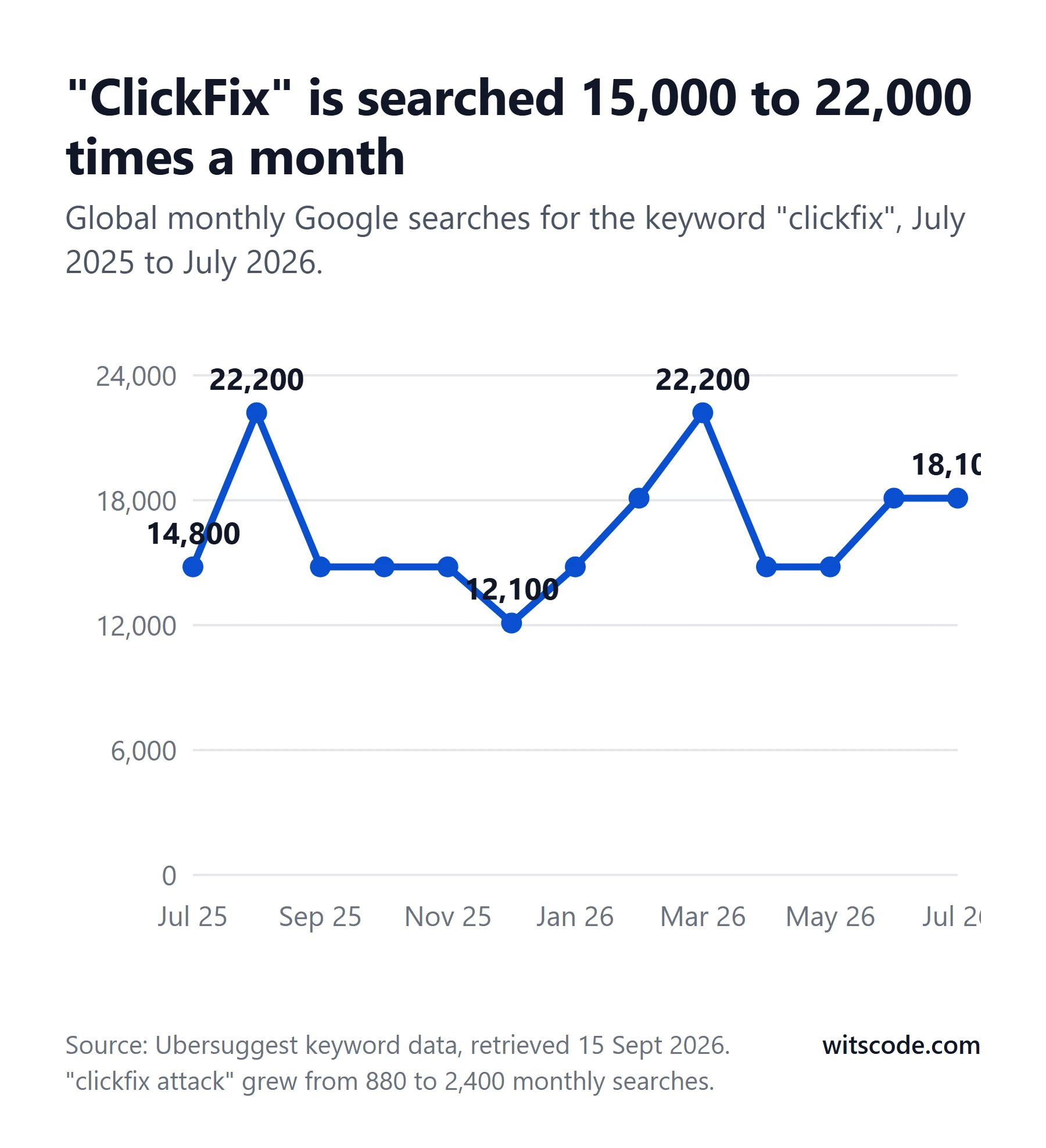
Five documented campaigns
Security firms have published detailed teardowns of individual operations. Five of them, taken together, show every part of the machine.
StopAndProtect: the full picture of one operator
In August 2026 Check Point Research published the most complete account of a ClickFix operation to date.2 They named it StopAndProtect after its ransomware component. The operators left directories open on hacked sites, exposing their own infection logs, roughly 31,000 screenshots taken from victims' screens, over 700 archives of stolen data, and the source code of the tooling they used to manage thousands of sites at once. One recovered artefact was a folder path from the developer's own Windows machine: G:\a_new_hack\0a_botnet\fake-capcha\.
On each hacked site, the operators installed a custom must-use plugin that opened a hidden upload endpoint, so they could push new files at will without logging in again. A config file on each site let them turn the fake CAPTCHA on or off per domain, and it was shown only to Windows visitors.
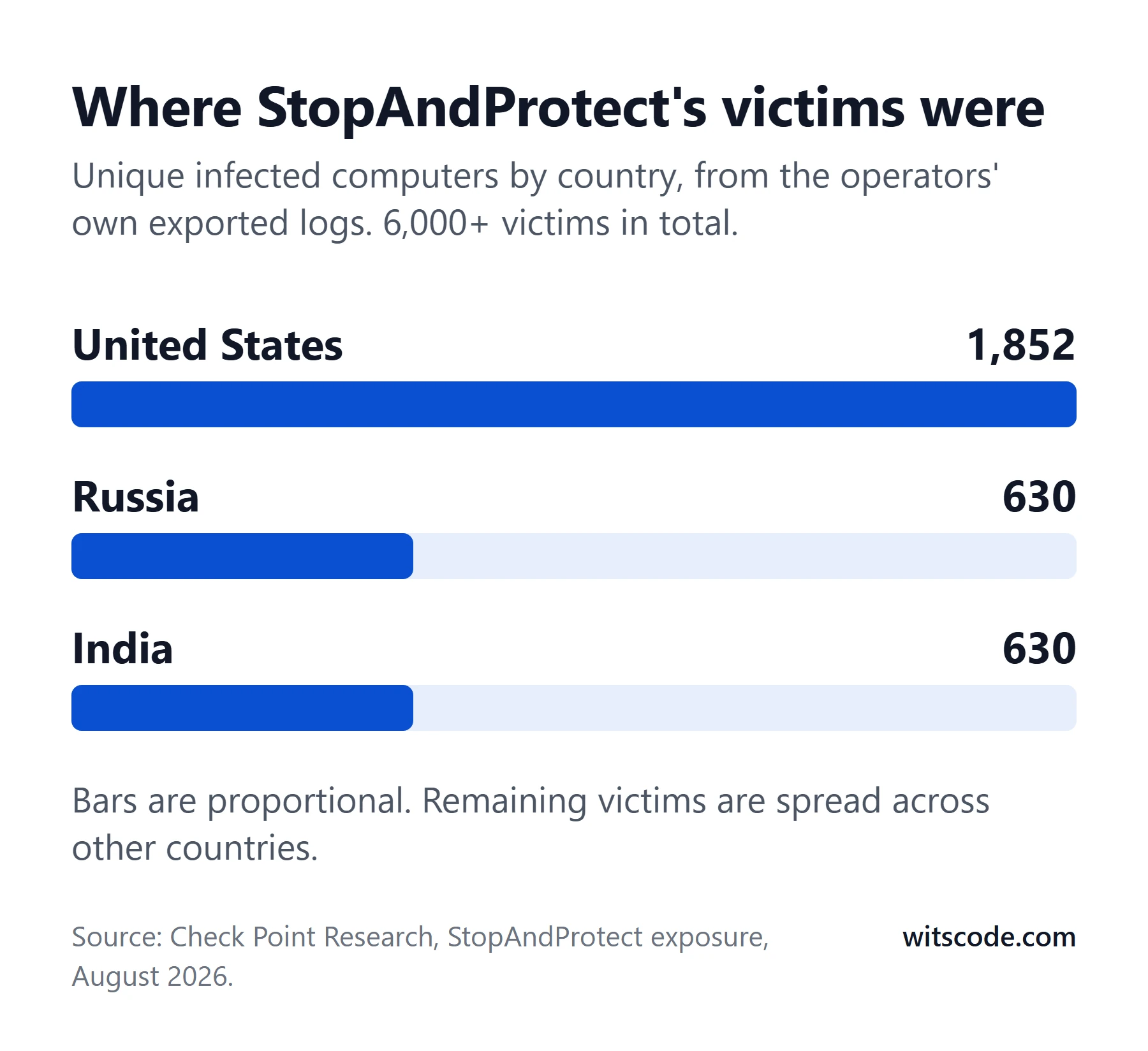
Check Point's report is thorough on what the malware does and thin on how the sites were broken into. It notes that many ran outdated WordPress installations, one on a 2021 build with around 40 known vulnerabilities, and leaves it there. Almost every published write-up of these campaigns has the same gap.
The Deno campaign: 500 sites in two days
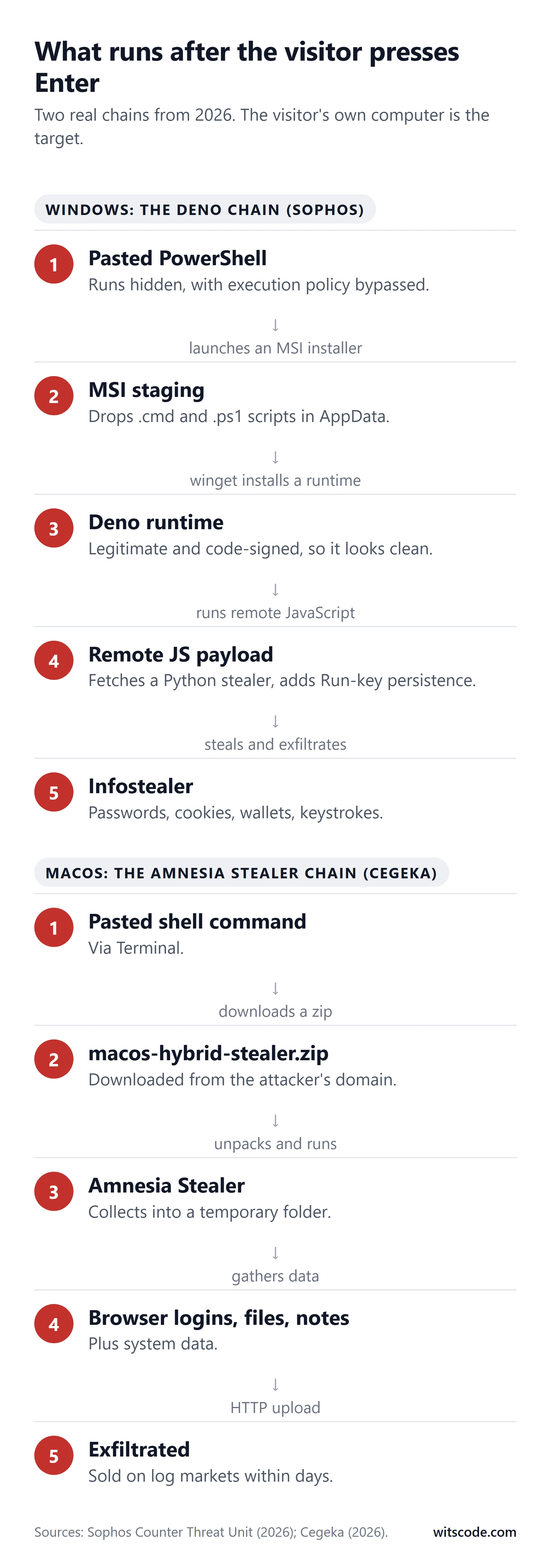
Sophos's Counter Threat Unit documented a campaign that ran on 3 and 4 June 2026.3 The injected script, served from a domain registered two days earlier, displayed a Cloudflare-themed prompt. The pasted PowerShell command launched an MSI installer, which dropped scripts into the user's AppData folder. Those scripts used Windows' own package manager, winget, to install Deno, a legitimate and code-signed JavaScript runtime, and then used Deno to run a remote script from a second attacker domain. That script fetched a Python-based infostealer that collected system information, browser data, cryptocurrency wallet data and keystrokes, and set up persistence through registry Run keys and scheduled tasks.
The interesting choice is Deno. Because it is a signed, legitimate binary installed through a Microsoft-blessed channel, security tools are far less likely to flag it. Sophos identified more than 500 compromised WordPress sites hosting the same injection and concluded the operators were injecting at scale rather than picking targets.
The dual-platform campaign: Windows and Mac in one script
Cegeka's security team published a case in which the injected script on WordPress sites profiled each visitor by User-Agent and served a different ClickFix prompt for each operating system.5 Windows visitors received HijackLoader, a loader that hides inside legitimate signed applications and runs .NET code in memory. Mac visitors received a zip file called macos-hybrid-stealer.zip containing Amnesia Stealer, which collects browser credentials, files, notes and system data into a temporary folder and uploads it. The Windows variant also talked to BNB Smart Chain endpoints, a pattern where attackers store instructions on a public blockchain so there is no server to take down.
The fake reCAPTCHA wave: 5,200 sites and a blockchain
Sucuri's February 2025 analysis covered an injection that had been active since December 2024 and was present on more than 5,200 sites.14 The loader hid in fake plugins with random five-character names, in theme functions.php files, and in .htaccess files dropped into plugin folders. It pulled its second stage from a smart contract on the Binance Smart Chain, and the final command used Windows' built-in mshta tool to run a payload disguised as an MP4 file. Sucuri titled the post after its two visible symptoms: Google warnings on the site, and infected computers among its visitors.
The scanner-dodging campaign: 250 sites that looked clean
Rapid7 documented a campaign, active since December 2025, that served the fake Cloudflare CAPTCHA only to browsers that looked like real people.17 Security scanners, search engine crawlers and anyone with an unusual User-Agent got the clean page. The injection was delivered three ways: through WordPress's own admin-ajax.php endpoint, as direct HTML, and as an external script. More than 250 sites were affected, and any owner who tested their own site with a remote scanner would have been told it was fine.
How WordPress sites actually get hacked
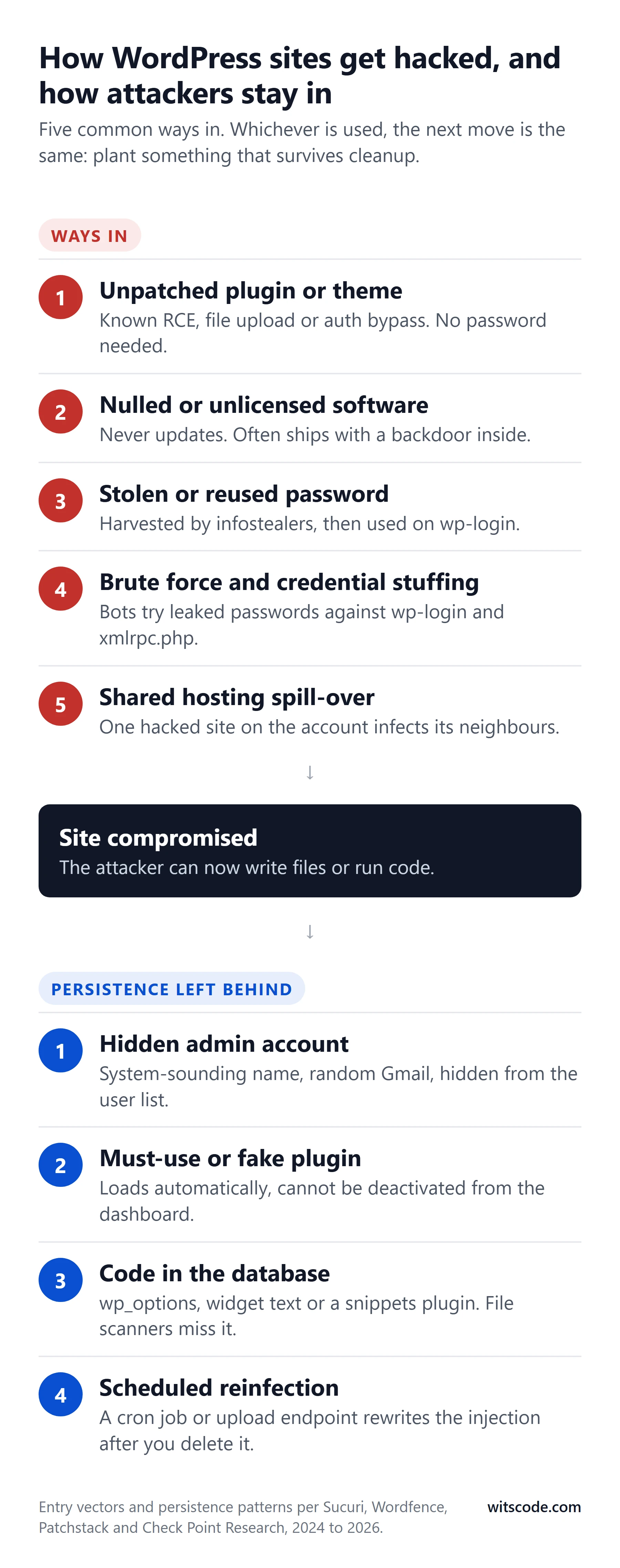
WordPress runs 40.3 percent of all websites and 58.8 percent of those with a known content management system.18 Its plugin directory lists over 68,000 plugins. That scale is exactly why it is targeted: a bot that finds a bug in one popular plugin has, in effect, a key to hundreds of thousands of sites. Sucuri's last full remediation report found WordPress accounted for 95.5 percent of the infected sites it cleaned.19
The numbers behind the entry points
Patchstack, which runs one of the two main WordPress vulnerability databases, recorded 11,334 new vulnerabilities in the WordPress ecosystem in 2025, up 42 percent on 2024. Ninety-one percent were in plugins, nine percent in themes, and only six in WordPress core itself, all low risk.20 Forty-six percent had no patch available at the time they were publicly disclosed. The weighted median time between a vulnerability becoming public and the first exploitation attempt was five hours.
Wordfence, which runs the other database and a firewall installed on millions of sites, logged 54 billion malicious requests in 2024 and blocked 55 billion password attacks.21 It found just under one million distinct sites infected with malware during the year, with 325,000 to 350,000 infected on any given day. In the first quarter of 2026 alone its firewall blocked 9.1 billion exploit attempts and 16 billion brute-force login attempts, and it counted 474,000 infected sites.22
Patchstack's 2025 report attributed roughly half of infections to vulnerability exploitation and the rest to what it called poor security hygiene: hijacked sessions from infected devices, and leaked usernames and passwords used to get admin access.23
1. An unpatched plugin or theme with a known bug
This is the largest single route and the one that needs no password. A vulnerability is published, often with proof-of-concept code. Within hours, automated scanners are probing every WordPress site on the internet for the vulnerable version. Any site that has not updated gets exploited without a human ever looking at it.
The past two years supply a long list. Each of these was mass-exploited within days of disclosure:
| Plugin or theme | Bug | Sites exposed | What happened |
|---|---|---|---|
| LiteSpeed Cache (Aug 2024) | Unauthenticated privilege escalation, CVSS 9.8 | 5 million+ | 48,500 attacks blocked in 24 hours; Wordfence's most-targeted bug of 202424 |
| WP Automatic (Mar 2024) | Unauthenticated SQL injection creating admin users | 40,000 | 5.5 million attack attempts recorded by WPScan25 |
| GiveWP (Aug 2024) | Unauthenticated remote code execution, CVSS 10.0 | 100,000+ | Still in Patchstack's top-ten exploited list for 202526 |
| Motors theme (May 2025) | Unauthenticated admin password reset | 22,000 sales | 23,000+ attempts blocked by Wordfence27 |
| Alone theme (Jun 2025) | Unauthenticated plugin upload to RCE | 9,000 sales | 120,900+ attempts blocked in 17 days28 |
| OttoKit / SureTriggers (Apr 2025) | Authentication bypass, then privilege escalation | 100,000 | First exploit four hours after disclosure26 |
| Post SMTP (Oct 2025) | Unauthenticated account takeover via email logs | 400,000 | Exploitation began three days after the patch29 |
| Everest Forms Pro (Mar 2026) | Unauthenticated RCE, added to CISA's exploited list | 4,000 | 17,900 attacks in a single day in May30 |
| Burst Statistics (May 2026) | Unauthenticated authentication bypass, CVSS 9.8 | 200,000 | 7,400+ attacks in 24 hours31 |
| Elementor Pro (Aug 2026) | Unauthenticated file upload to RCE, CVSS 9.8 | 6 million+ | 200,000 attempts blocked in four days32 |
| Avada theme and Fusion Builder (Aug 2026) | Unauthenticated zero-click RCE, CVSS 9.8 | 1 million+ sales | Six-step exploit chain; patched in 7.16.133 |
| All-in-One WP Migration (Aug 2026) | SQL injection to RCE | 5 million; 3.25 million unpatched two weeks later | Public exploit code available34 |
The biggest names are on the list: Elementor Pro, LiteSpeed Cache, Avada. Popular software is a bigger prize, so it gets more attention from attackers, not less. And the exploitation window is measured in hours, while most site owners update on a schedule measured in months, if at all.
2. A stolen or reused password
Patchstack's "other half" is mostly this. In October 2024, GoDaddy's security researchers documented over 6,000 WordPress sites where attackers had logged in with valid admin credentials and installed a malicious plugin in a single automated request, with no visit to the login page beforehand. The credentials came from earlier brute-force attacks, phishing, and information stealers.35
That last source creates a loop. Hudson Rock, which indexes data from infostealer infections, cross-referenced 1,635 domains actively serving ClickFix pages against its database in December 2025 and found that 220 of them, 13 percent, had their own WordPress admin credentials sitting in stealer logs.36 The site serves the malware, the malware steals passwords, the passwords are used to hack more sites, and sometimes the site that gets hacked with a stolen password is one that was already serving the malware.
3. Brute force and credential stuffing
The 55 billion password attacks Wordfence blocked in 2024 are mostly bots trying leaked passwords against wp-login.php. In the fourth quarter of 2025 alone it blocked 13.8 billion attempts from 40.9 million distinct IP addresses.37 WordPress's legacy xmlrpc.php endpoint makes this worse: its system.multicall method lets one HTTP request carry hundreds of login guesses, a trick Sucuri documented in 2015 that still works on sites that have not disabled the endpoint.38
4. Cracked and unlicensed software
Pirated ("nulled") themes and plugins are such a large part of this story that they get their own section below. They frequently ship with backdoors already inside, and they cannot receive security updates, so every vulnerability discovered after you install them stays open for as long as the site exists.
5. Supply-chain compromise of the plugin itself
Sometimes the update is the attack. In June 2024, five plugin developers' accounts on wordpress.org were taken over through password reuse, and malicious versions of their plugins were pushed to around 35,000 sites, creating hidden admin accounts.39 In 2025 a buyer acquired a portfolio of more than 20 plugins under the EssentialPlugin brand through a marketplace listing, committed a dormant backdoor disguised as a compatibility fix, and activated it in April 2026 across roughly 247,000 installations.40 In June 2026 the build pipeline of another vendor, ShapedPlugin, was compromised and its paid plugin releases shipped code that stole admin credentials and two-factor codes.41
6. Neglect: abandoned plugins, old PHP, shared hosting
Nearly half the plugins in the WordPress directory, 26,167 of 57,383 in a June 2026 crawl, had not been updated in over two years.42 In 2024, 1,614 plugins and themes were removed from the directory for unpatched security issues, and WordPress does not warn site owners when a plugin they are running has been pulled.23 Around 38 percent of WordPress sites run a PHP version that no longer receives security fixes.43 And on shared hosting, one neglected site on an account is enough: Sucuri has described "soup kitchen servers" where a single outdated install gets exploited and the attacker walks sideways into every other site under the same account.44 The server itself can be the way in, too. In September 2026 cPanel fixed a flaw that let any cPanel account run code as root, and a WP Toolkit bug that let one account change another account's WordPress database. See our cPanel vulnerability breakdown.
The Avada lesson: updates, licences and cracked themes
Avada is worth singling out, not because it is uniquely bad, but because it is the best-selling WordPress theme in history, with over 1.07 million sales on ThemeForest,73 and because what happened to it in August 2026 shows exactly how the licence model of premium software turns into a security problem.
The vulnerability
On 25 August 2026, ThemeFusion released Avada 7.16.1 and Fusion Builder 3.16.1 to fix CVE-2026-18431, an unauthenticated remote code execution vulnerability rated 9.8 out of 10.33 It was found by Wordfence's automated vulnerability research system, which chained six separate weaknesses in authorisation, input validation and file handling into a working exploit in roughly two hours. Because Fusion Builder ships with every copy of Avada, effectively every Avada site on the internet was exploitable until it updated. We cover the flaw itself, how to check all three Avada components and what to do if you were already behind in Avada's zero-click RCE (CVE-2026-18431): what every Avada site owner needs to do this week. "Unauthenticated" means no login. "Remote code execution" means the attacker can write files to the server. That is all an injection campaign needs.
Among the enquiries we handled, Avada sites several versions behind were a recurring theme. In each case the owner believed the site was being kept up to date.
Why the site had not updated
Avada, like most premium themes sold through ThemeForest, only delivers updates through the WordPress dashboard when the site is registered with a valid purchase code. ThemeFusion's documentation states that registration is required to receive updates, and that each purchase code registers one website plus a staging copy of that same domain.45 Envato's regular licence says the same: one licence, one end product.46
So a very common sequence plays out. A developer builds the site using an Avada licence they already own, or one bought for a different project. The site launches and works. Later the developer moves on, or uses the same purchase code on another client's site. The original site's registration silently drops, or was never valid to begin with. Avada's settings page shows "Unregistered" in red, but nobody looks at the Avada settings page once the site is live. Updates stop. Nothing breaks. A year later the theme is five releases and one critical vulnerability behind, and the owner has no idea.
There is a legitimate fix for a code that is registered elsewhere: ThemeFusion provides a way to unregister a licence from a site you no longer control, and after that the code can be registered on the new domain.45 But someone has to know to do it.
If you run Avada, Elementor Pro, WP Rocket, or any other premium theme or plugin: open its settings page today and confirm it shows as registered or activated. If it does not, the site is not receiving security updates, whatever the WordPress updates screen says.
Why cracked copies are worse than lapsed ones
A lapsed licence means no updates. A nulled copy means no updates plus whatever the person who cracked it decided to add.
The evidence on this goes back over a decade and has never changed. In 2014, Fox-IT documented CryptoPHP, a backdoor distributed inside pirated themes and plugins for WordPress, Joomla and Drupal, on more than 23,000 sites.47 In 2019, Wordfence published a whitepaper on WP-VCD, a malware family spread entirely through a network of "free premium theme" download sites. Once installed, it injected a backdoor into every theme on the server, created a hidden admin user, scanned the hosting account for other WordPress installs and infected those too, and injected spam and malvertising into every page.48 Wordfence's 2020 threat report found WP-VCD alone on 154,928 infected sites, 13 percent of everything it cleaned that year, and put malware originating from a nulled plugin or theme at 206,000 sites, over 17 percent of all infections.49 Sucuri's 2022 report said the most persistent backdoor it removed that year, from more than 180,000 files, was one concealed within nulled themes.50
The techniques are not subtle. Sucuri analysed a nulled plugin bundle from one popular piracy site in 2020 and found it set the WordPress admin cookie to log the attacker straight in, sent the site's database credentials to a remote server, and dropped a must-use plugin to survive cleanup.51 A 2023 case found a web shell inside a nulled theme that could disable the site's security plugins and send the contents of wp-config.php to the attacker.52
Then there is the update problem. Sucuri's March 2026 guidance describes it precisely: premium plugins rely on a valid licence key to authenticate with the developer's update server, and when you run a cracked copy, that connection is severed.53 Some hosts will not even help. Kinsta's malware removal policy states its security pledge only applies to WordPress sites that do not have nulled plugins or themes.54
A legitimate Avada licence is 69 US dollars.73 A cleanup after a compromise costs many times that, before counting the traffic lost while Google shows a red warning on your domain.
How attackers stay in after you clean up
The single most common mistake in dealing with a hacked site is to remove the visible injection and declare victory. Attackers know that is what most people do, so the first thing they do after getting in is plant something that survives it. Sucuri's remediation data found at least one backdoor on 49 percent of the sites it cleaned in 2023, and 70 percent the year before.19
The hiding places, drawn from Sucuri, GoDaddy and Wordfence case reports:
Hidden administrator accounts. A user with a system-sounding name and a random email address, created with full admin rights. The better versions hook WordPress's user query so the account does not appear in the Users screen at all, and a companion script deletes and recreates it on every run so it comes back if you remove it.55 One plugin Sucuri analysed in 2025 created the account on demand when a specific URL was visited, hid itself from the plugin list, and blocked deletion of the user.56
Must-use plugins. Files in wp-content/mu-plugins load automatically, cannot be deactivated from the dashboard, and do not appear in the normal plugins list. Sucuri documented three separate mu-plugin backdoors in 2025: one that ran code read from a text file in the uploads folder, one that served a fake browser update redirect, and one that reset the passwords of any user named admin or root.57, 58 StopAndProtect's upload endpoint was an mu-plugin.2
Fake plugins with plausible names. "WP Runtime Cache" harvested admin logins.59 A plugin posing as an anti-malware tool exposed an "emergency login" for the attacker and modified wp-cron.php to reinstall itself.60 SocGholish used "Woo Title Limit", "Performance Lab" and "Flexible SSL for CloudFlare".61
Code in the database, not in files. The Sign1 campaign, on 39,000 sites, stored its entire injection in WordPress settings and the Simple Custom CSS and JS plugin, with nothing on disk for a file scanner to find.62 DollyWay hid its configuration in options with 32-character hexadecimal names and re-obfuscated itself on every page load.63 One 2024 reinfector stored copies of itself in wp_options, wp_posts, WPCode snippets and every active plugin, and re-inserted the snippets if they were deleted.64
Scheduled reinfection. A WordPress cron event or a server cron job that rewrites the injection every few minutes or every day.65 You clean the site at 3pm; it is infected again at 3:10.
Modified core files. Sucuri found a wp-settings.php altered to load PHP out of a zip archive, and a fake JavaScript data file under wp-admin that logged the attacker in as admin when visited.66, 67
Cloaking. Not persistence, but the reason persistence works: the injection shows itself only to real visitors. Sign1 checked the referrer and only fired for visitors arriving from Google or Facebook.62 Rapid7's campaign checked the User-Agent and served scanners a clean page.17 StopAndProtect showed the CAPTCHA only to Windows.2 The owner, logged in, on a phone, or running a scanner, sees nothing.
What happens on the visitor's computer
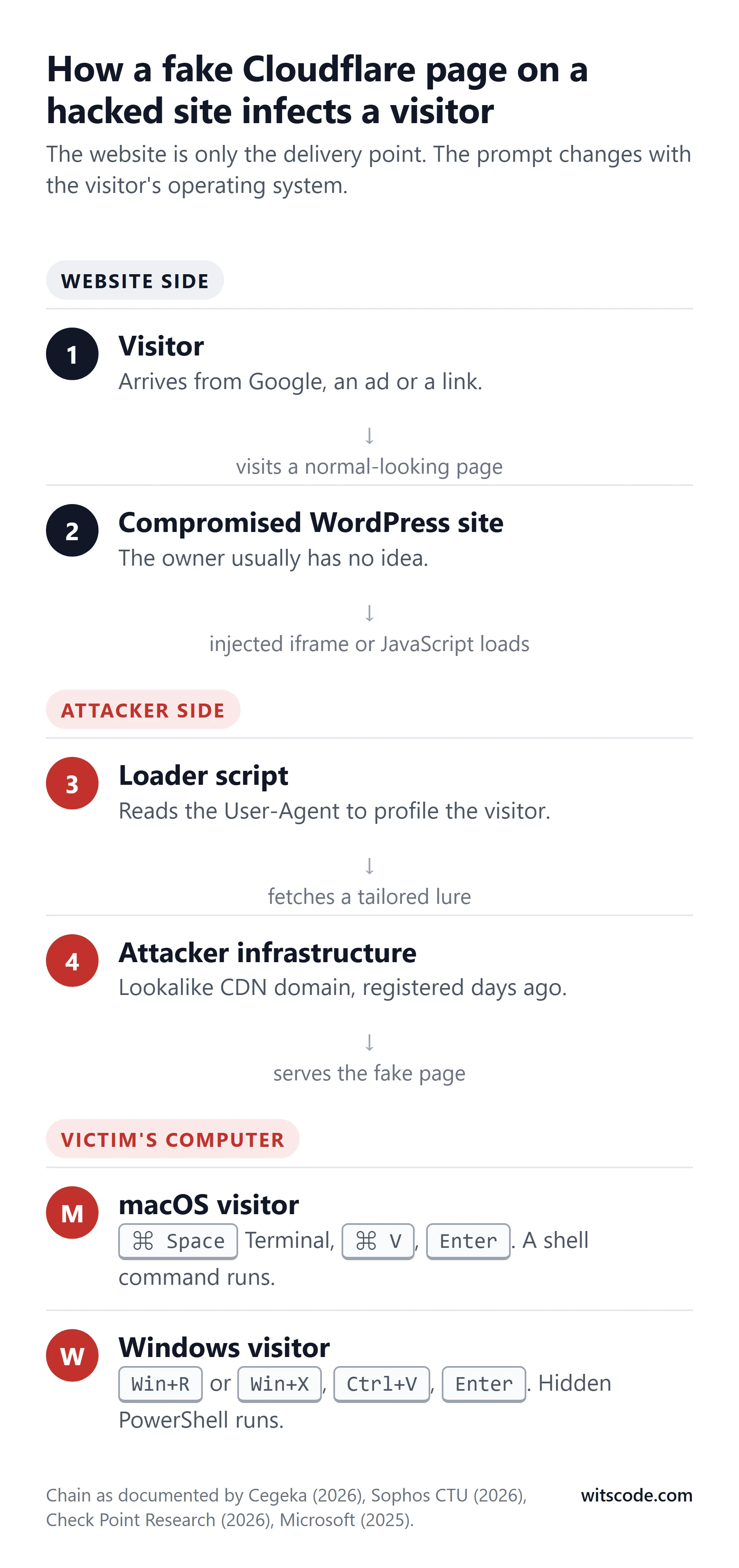
The harm lands on the visitor's machine, which turns a hacked website from an inconvenience for the owner into a liability towards every person who visited it.
Most ClickFix campaigns deliver an information stealer. A stealer runs once, in seconds, and copies out everything of value: saved browser passwords, active session cookies (which let an attacker use accounts without knowing the password and without triggering two-factor prompts), cryptocurrency wallet files, documents, and sometimes keystrokes. Then it deletes itself. The victim usually never knows anything happened. Lumma, the most prolific, ran as a subscription service for other criminals; Microsoft counted 394,000 infected Windows machines in a 90-day window ending May 2025.16 Vidar, Amnesia, Atomic macOS Stealer and Infiniti fill the same role in other campaigns.5, 11, 68
Some deliver remote access tools such as NetSupport or AsyncRAT, which give the attacker an ongoing foothold on the machine and, through it, on the company network. Unit 42 reported almost a dozen incident response cases in which a ClickFix lure was the initial access vector for a full corporate intrusion.69 The FBI and CISA advisory ties the Interlock ransomware group to the same entry point.10
StopAndProtect went further than most. Check Point's teardown of its modules found a file encryptor (ransomware), a data collector, a scanner that spread the infection across network shares and USB drives, a lock screen, a script-based spreader, and a chat window so the attacker could talk to the victim directly.2
For a business, the consequence is easy to state. One employee visits one hacked site, follows the instructions, and every account they are logged into is now for sale.
Why criminals do this
Nobody hacks a regional accountancy firm's website because they care about accountancy. The website is a delivery truck. What it delivers, and how that turns into money, varies.
Stolen credentials are the product. Stealer output is sold in bulk on "log" markets. Buyers include initial access brokers, who search the logs for corporate VPN and email credentials and resell those to ransomware groups. The stealer itself is rented: Lumma was malware-as-a-service, available to anyone with a few hundred dollars.16
The lure is a product. Microsoft found ClickFix builder kits for sale on underground forums for between 200 and 1,500 US dollars a month, with templates for fake Cloudflare, reCAPTCHA and browser update pages.6 The barrier to entry is a payment card.
Installs are a product. Pay-per-install networks are over a decade old and well documented: whoever controls infected machines sells "installs" to other criminals, who deploy their own malware on them.70
Traffic is a product. A parallel ecosystem never runs malware at all. The DollyWay campaign, on more than 20,000 WordPress sites since 2016, redirected visitors through traffic distribution systems into scam and affiliate offers, generating around 10 million impressions a month.63 Infoblox documented the affiliate network behind much of it, VexTrio, serving 4.5 million DNS responses across roughly 25,000 hacked sites in five months of 2024.71 The same hacked site can be sold for redirects one week and malware the next.
Extortion is a product. StopAndProtect combined everything above and added ransomware and a chat window. One operator ran the whole stack.
In every one of these models the site owner is the unpaid infrastructure rather than the target, and that is why the cleanup cost, the reputational damage and any legal exposure land on them.
What it costs the site owner
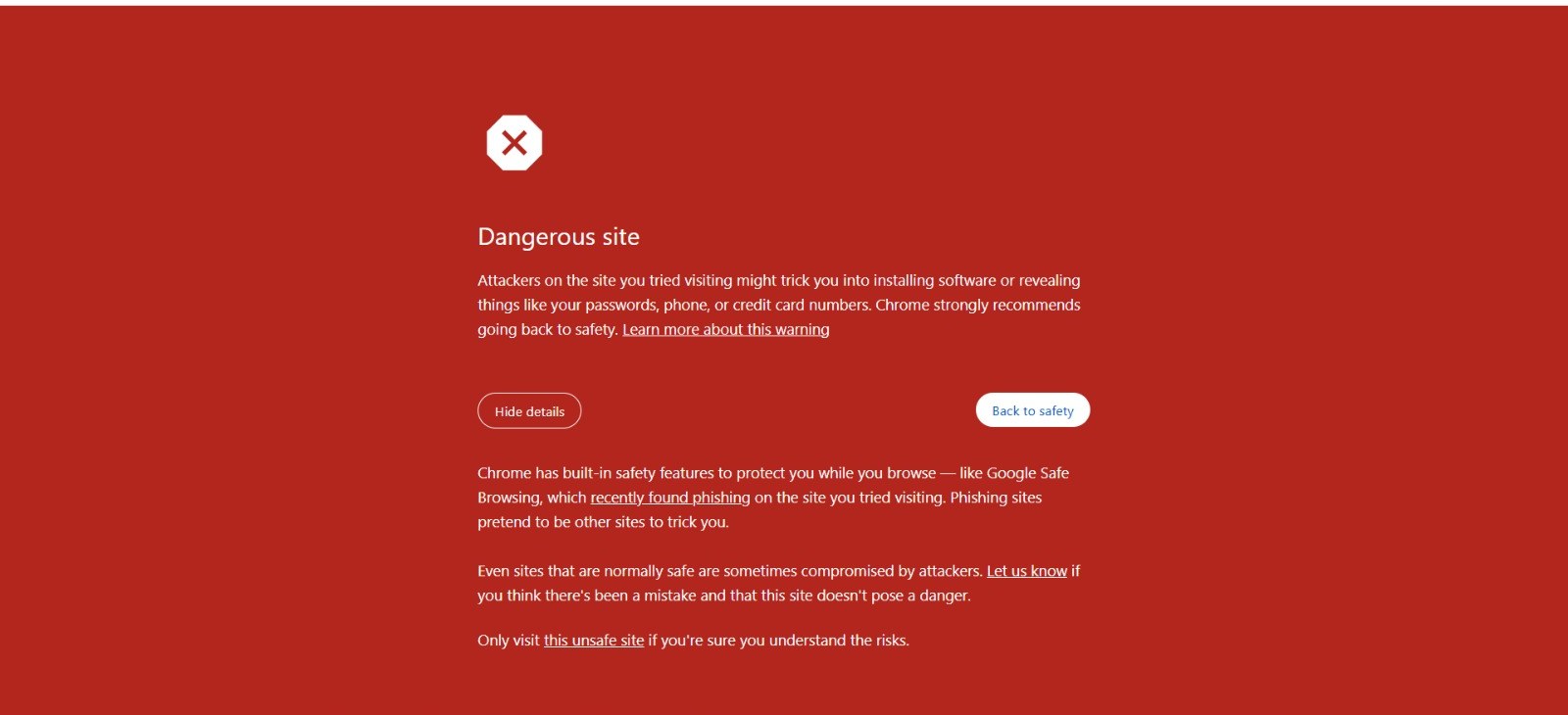
Google Safe Browsing tends to flag a site serving ClickFix within days, sometimes hours. From that point every visitor on Chrome, Firefox or Safari sees a full-page red warning before the site loads. Organic search traffic collapses. Google Ads disapproves any campaign pointing at the domain. Antivirus vendors add the domain to their blocklists, so visitors on protected machines get blocked at the network level before the browser is even involved. Email providers may start filtering messages that link to the domain.
Getting delisted requires a clean site plus a manual review request through Google Search Console, and the review takes days. If the site is reinfected during the review, which is common when persistence has not been removed, the process starts again. Meanwhile, if any visitor followed the instructions and was infected, the site owner has distributed malware to their own customers, which is a conversation nobody wants to have.
If you already pasted the command
Do this now, in this order.
- Disconnect from the internet. Turn off Wi-Fi or pull the cable. Do not just close the terminal window. The malware has already run.
- From a different device, change the passwords for every account you were logged into on that machine. Email first, then banking, then anything holding money or crypto, then work accounts. Turn on two-factor authentication as you go. Sign out of all sessions where the service offers it, because stolen cookies work until the session is ended.
- Tell your IT team or your bank if the machine is used for work or has ever been used for banking.
- Run a full antivirus scan, and do not trust a clean result. Stealers finish and delete themselves in seconds; the scan may find nothing and the damage is already done.
- Reinstall the operating system. It is the only way to be certain. Back up documents first, not programs or browser profiles.
How to check whether your site is affected
Remote scanners are useful but limited, because the campaigns above are built to hide from them. Check in this order.
- Visit your site the way a customer would. Not logged in, in a private browser window, on a Windows laptop if you have one, arriving from a Google search result rather than typing the address. Try a Mac too. If you see a verification page you did not set up, stop here: the site is compromised.
- Check Google Search Console. The Security Issues report will show if Google has already flagged the site.
- Check the domain on VirusTotal. It shows which of ninety-odd security vendors currently list your domain as malicious.
- Look at your WordPress user list. Any administrator you do not recognise, especially with a system-sounding name or a random email address, is a red flag. Then compare the count against the database directly, because the better backdoors hide their user from the dashboard.
- Look in
wp-content/mu-plugins. On most sites this folder should be empty or contain only files from your host. Anything else needs explaining. - Search your theme's
footer.php,header.phpandfunctions.phpfor script tags pointing to domains you do not recognise. Lookalikes of legitimate CDNs are common. - Search the database for
<script,base64_decodeandeval(inwp_optionsandwp_posts, and check the stored entries of any header-footer or code-snippet plugin. - Check every premium theme and plugin's settings page for its registration or licence status.
What the infection looks like on the server
There is no single "ClickFix file" to search for. Malcure's teardown of three infected sites in August 2026 found three different implementations producing the same fake page, which is why a scan for one known string keeps missing it.74 What they had in common is more useful than any one signature:
- A plugin you did not install, with a boring name. One sample was a plugin called "Page Database Optimizer" by "Cloud Studio," in a folder named
page-database-optimizer-c339. Generic words like optimizer, cache, health or database in a plugin you do not remember adding are the tell.74 - An encoded config file next to the plugin. The same sample kept its payload in
storage/config.cache, XOR-encoded with a single-byte key, then base64, then gzinflate. Searchwp-contentfor.cacheand.datfiles that are not from a plugin you recognise.74 - A WP-Cron hook with a random name. Something like
wp_09da81b0_tick, firing every 15 minutes, is the reinfection timer. Runwp cron event listand read every hook name.74 - Config fetched from a blockchain. Rather than a domain you could block, the loader called a Polygon smart contract through
eth_callto fetch its current instructions, the EtherHiding technique. If your site's outbound requests include an RPC endpoint you have never heard of, that is it.74 - A
wp_footerhook that injects JavaScript which decodes itself withatob()andTextDecoder()and builds a full-screen iframe with theclipboard-writepermission. That permission is what puts the PowerShell command on the visitor's clipboard.74
The reason owners rarely see any of this themselves: the injected code checks the visitor first. It skips anyone logged in as administrator, editor or author, skips Googlebot, Bing, Ahrefs, Semrush and Lighthouse by User-Agent, sets a cookie so the page appears once, and only fires for Windows.74 Checking the site while logged in proves nothing. Malcure's phrasing is the one to remember: "Do not verify the cleanup only while logged into WordPress."74
How to clean a hacked WordPress site
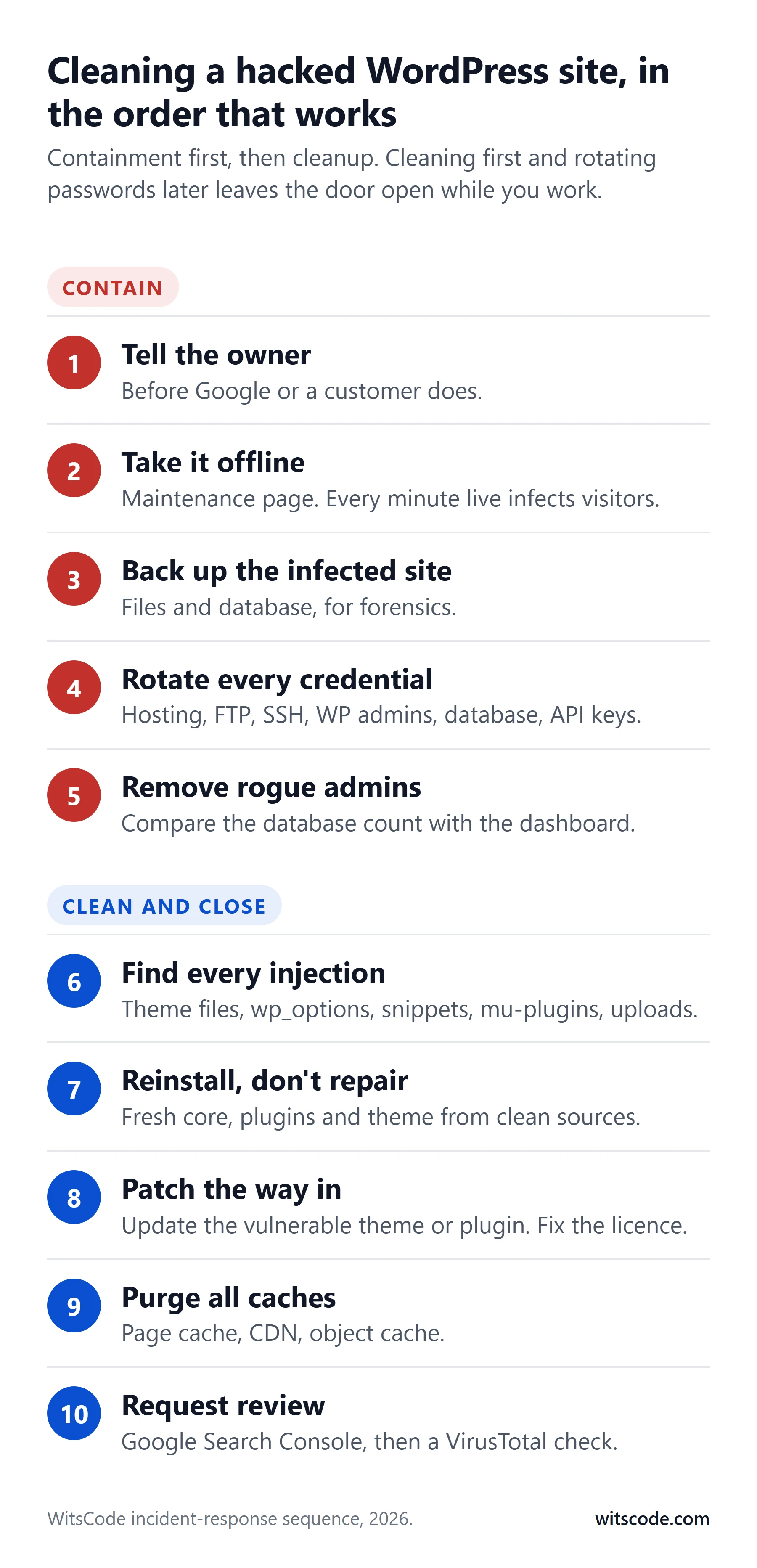
The order matters. Cleaning first and changing passwords later means the attacker, who still has a valid login, watches you clean and reinfects when you finish.
- Tell the owner or the client immediately. The site is serving malware, it is being taken down to fix, it will be back in hours. If a customer or Google surfaces it first, it looks like concealment.
- Take the site offline or put up a maintenance page. Every minute it is live, it is infecting visitors.
- Back up the infected site, files and database, before touching anything. You will want it for forensics, and as a fallback if the cleanup breaks something.
- Rotate every credential. Hosting control panel first, because it can undo everything else. Then FTP and SSH users, every WordPress administrator, the database password in
wp-config.php, the WordPress security keys and salts in the same file (which invalidates every existing login session), and any API keys stored in plugins. - Remove administrator accounts you cannot vouch for. Check the database count against the dashboard count.
- Find every copy of the injection. Theme files, especially
footer.php,header.php,functions.phpand any custom template includes. Thenwp-content/mu-plugins. Then the plugins folder, looking for plugins you did not install, especially ones with random names or names that sound like performance or security tools. Then the database:wp_options,wp_posts, widget content, and the stored entries of any snippet plugin. Thenwp-content/uploadsfor any.phpfile at all, and for text files that look like code. Then.htaccessfiles, including ones inside plugin folders. Then the WordPress cron list and the server's cron jobs. - Reinstall rather than repair. Replace WordPress core, every plugin and the parent theme from fresh downloads. Keep only the child theme and the uploads folder, after inspecting both line by line. Do not try to hand-clean a modified core or plugin file; you will miss something.
- Close the way in. Update the vulnerable theme or plugin. If it is a premium product, that means a valid, registered licence first. If it is a nulled copy, replace it with a licensed one or remove it. If the entry was a password, the rotation in step 4 has handled it, but check whether the same password was reused anywhere else.
- Purge every cache. Page caches such as LiteSpeed and WP Rocket, any CDN, and the object cache. A cached copy of the infected page will keep being served long after the source is clean, and Google's crawler will keep seeing it.
- Request a review. In Google Search Console, under Security Issues, request a review once you are confident the site is clean. Re-check VirusTotal over the following days as vendors clear their listings.
Then keep watching. Recheck the user list, the mu-plugins folder and the theme files daily for two weeks. If anything comes back, you missed a persistence mechanism, and it is usually in the database or the cron list.
Two things after step ten. Verify in a private window, logged out, from more than one device, because the injection cloaks itself from logged-in users. Then schedule a daily malware scan for the next seven days; reinfection from a missed cron job or upload endpoint usually shows up inside that window.74
Prevention for site owners
Know your licences. Every premium theme and plugin on every site should be registered and current. Put it on a quarterly checklist. "Unregistered" means "unpatched" whatever the updates screen says.
Patch within days, not months. The median time from disclosure to exploitation is five hours.20 Turn on automatic updates for plugins and themes where you can, and subscribe to Patchstack or WPScan alerts for the ones you cannot. If a plugin you use has been removed from the directory, WordPress will not tell you; a vulnerability feed will.
Remove what you do not use. Every inactive plugin is attack surface with no benefit. Every plugin not updated in two years is a liability. If a plugin's developer has gone quiet, find a replacement before someone else finds the bug.
Turn off the file editor. One line in wp-config.php removes the theme and plugin editor from the dashboard, so a stolen admin login cannot be used to edit files through the browser:
define('DISALLOW_FILE_EDIT', true);
Disable XML-RPC unless something specifically needs it (the Jetpack mobile app and some remote publishing tools do). Most security plugins have a switch for this. It removes the amplified brute-force route.
Fewer administrators, stronger logins. Content staff get the Editor role, not Administrator. Every administrator has two-factor authentication. No account is named "admin". Remove accounts for people who no longer work with you. Sites with six or eight administrators are common and every one of them is a way in.
Watch the user list and the database, not only the files. File integrity scanning is necessary and no longer sufficient. Alert on any new user with administrator capability. Periodically search the database for script tags and encoded blobs.
Put a firewall in front of the site. Wordfence or Sucuri at the application layer, and a real Cloudflare plan in front of that. A firewall with virtual patching can block exploitation of a published vulnerability before you have installed the update, which is what matters in a five-hour window.
Keep PHP current. Around 38 percent of WordPress sites run a PHP version that no longer gets security fixes.43 Your host's control panel has a dropdown for this.
Keep backups off the server. A backup archive sitting in the public web folder is downloadable by anyone who guesses the filename, and it contains your database. Backups belong in a separate storage service, with retention long enough that you can restore from before the compromise.
One site per hosting account where you can. If that is not practical, at least know that every site on the account has to be treated as compromised when one is.
Protection for your staff and your own computer
The hacked website is the delivery truck. The visitor's computer is the target. A few settings and one habit block almost all of it.
The habit. No legitimate website will ever ask you to open a terminal and paste a command. Teach that one sentence to every employee. It covers every ClickFix variant that exists and every one that will exist next year, because the technique depends on the victim doing that one thing.
Windows settings, from Microsoft's own guidance:6
- Disable the Run dialog through Group Policy for users who do not need it. This alone stops the most common variant.
- Turn on Windows Terminal's warning for pasting multi-line text.
- Keep SmartScreen on.
- Enable the Defender attack surface reduction rules that block execution of obfuscated scripts and block scripts from launching downloaded executables.
- Turn on PowerShell script block logging, so if it does happen your security team can see exactly what ran.
- Sophos adds a 2026-specific one: monitor for unexpected installations of the Deno runtime and for
deno.exerunning from user-writable folders.3
On a Mac there is no Run dialog to disable. Keep Gatekeeper and XProtect on, restrict Terminal through device management where you can, and rely on the habit.
In the browser, a free extension called ClickFix Block from Eye Security detects fake CAPTCHA pages and blocks clipboard writes from them.72 It is not a substitute for the habit, but it is a cheap second layer.
Tools worth knowing
- Wordfence for on-server file scanning, a web application firewall and login auditing. Its automated research system is what found the Avada vulnerability chain.
- Sucuri SiteCheck for a quick, free external scan. It sees only what the page shows a visitor, so a clean result does not prove a clean site, particularly against campaigns that cloak.
- Patchstack and WPScan for vulnerability intelligence on every plugin and theme you run, with alerts.
- Google Search Console for the Security Issues report and the review request once you are clean.
- VirusTotal to check a suspicious domain or file against dozens of engines at once, and urlscan.io to safely render a suspect page and see every request it makes, with the ability to vary the User-Agent so cloaking shows up.
Frequently asked questions
What is a ClickFix attack?
A web page pretends there is a small problem to fix, such as a human verification check, and walks you through opening a terminal, pasting a command that was silently copied to your clipboard, and pressing Enter. The command downloads and runs malware. Because you run it yourself, browser download warnings never trigger.
Is the Cloudflare "Verify you are human" page real or fake?
A real Cloudflare check never asks you to leave your browser, press keyboard shortcuts, open a terminal, or paste anything. If the page gives you numbered steps involving Win+R, Win+X, Command+Space, Terminal, Ctrl+V or Command+V, it is fake. Close the tab.
Why does my WordPress site show a Cloudflare verification page I never set up?
The site has been compromised and a script has been injected, usually into a theme file, the database, or a hidden must-use plugin. Take the site offline, clean it using the steps above, and close the vulnerability that let the attacker in.
How do hackers get into WordPress sites?
Mostly through unpatched plugins and themes with published vulnerabilities, which bots exploit automatically within hours. Then stolen or reused admin passwords, brute-force logins, cracked themes that arrive with backdoors and never update, compromised plugin developer accounts, and cross-contamination between sites on one hosting account.
Are cracked or nulled themes safe if I scan them first?
No. Security firms have found backdoors, hidden admin users and spam injectors inside pirated themes and plugins for over a decade, and in 2020 Wordfence attributed 17 percent of all infected sites it saw to malware that arrived through nulled software. A scan can miss a backdoor. And even a clean nulled copy cannot receive updates, so every vulnerability found after you install it stays open.
Does removing the injected code fix it?
Not on its own. If the theme or plugin that let the attacker in is still unpatched, or a hidden admin account, must-use plugin or cron job is still in place, the site will be reinfected, sometimes within minutes.
Will Google flag or de-index my hacked site?
Google Safe Browsing usually flags a site serving ClickFix within days. Chrome then shows a full-screen red warning, organic traffic drops sharply, and Google Ads disapproves ads pointing at the domain. Once clean, request a review in Search Console under Security Issues.
Can Mac users be affected?
Yes. The injected script reads the browser's identification and serves Mac-specific instructions. Documented macOS payloads include Amnesia Stealer, Atomic macOS Stealer and Infiniti Stealer.
Does Cloudflare have anything to do with this?
No. The attackers copy Cloudflare's branding because people recognise and trust it. Most affected sites never used Cloudflare at all. Real Cloudflare, put in front of a site properly, is one of the defences we recommend.
If you run a WordPress site and have ten minutes today: open each premium theme and plugin's settings page and confirm it is registered, look at your user list for anyone you do not recognise, and add
DISALLOW_FILE_EDITtowp-config.php. Those three checks would have prevented most of the cases we have seen this month.
- GoDaddy, "GoDaddy Annual Cybersecurity Report" (2025 data, published June 2026). godaddy.com
- Check Point Research, "Thousands of Hacked WordPress Sites, One Operation: Unmasking StopAndProtect," August 2026. research.checkpoint.com
- Sophos Counter Threat Unit, "ClickFix campaign abuses Deno runtime for infostealer delivery," 2026. sophos.com
- Huntress, "That 'Friendly' Prompt is ClickFix." huntress.com
- Cegeka, "ClickFix campaign: WordPress sites, Windows and macOS information stealers," 2026. cegeka.com
- Microsoft Security Blog, "Think before you Click(Fix): Analyzing the ClickFix social engineering technique," 21 August 2025. microsoft.com
- Sucuri, "Analysis of the Massive NDSW/NDSX Malware Campaign," June 2022. blog.sucuri.net
- Proofpoint, "Sayonara SocGholish: Operation Endgame disrupts major cybercrime operation," June 2026. proofpoint.com
- ESET Threat Report H1 2025, as cited by Infosecurity Europe, "What is ClickFix and How to Prevent It." infosecurityeurope.com
- CISA and FBI, Joint Cybersecurity Advisory AA25-203A, "#StopRansomware: Interlock," 22 July 2025. cisa.gov
- Security Boulevard, "Australia Warns of ClickFix Attacks Pushing Vidar Stealer Malware," May 2026. securityboulevard.com
- BleepingComputer, "Microsoft warns of TerminalFix attacks deploying reverse tunnels," 2026. bleepingcomputer.com
- Google Cloud / Mandiant, "UNC5142 uses EtherHiding to distribute malware," October 2025. cloud.google.com
- Sucuri, "WordPress ClickFix Malware Causes Google Warnings and Infected Computers," February 2025. blog.sucuri.net
- Sucuri, "Fake Cloudflare Verification Results in LummaStealer Trojan Infections," March 2025. blog.sucuri.net
- Microsoft Security Blog, "Lumma Stealer: Breaking down the delivery techniques and capabilities of a prolific infostealer," 21 May 2025. microsoft.com
- Rapid7, "Malicious websites: WordPress compromise advances global stealer operation," March 2026. rapid7.com
- W3Techs, "Usage statistics and market share of WordPress," retrieved 15 September 2026. w3techs.com
- Sucuri, "2023 Hacked Website and Malware Threat Report," June 2024. blog.sucuri.net
- Patchstack, "State of WordPress Security in 2026." patchstack.com
- Wordfence, "2024 Annual WordPress Security Report," April 2025. wordfence.com
- Wordfence, "Quarterly WordPress Threat Intelligence Report: Q1 2026," June 2026. wordfence.com
- Patchstack, "State of WordPress Security in 2025." patchstack.com
- Wordfence, "Over 5,000,000 Site Owners Affected by Critical Privilege Escalation Vulnerability Patched in LiteSpeed Cache Plugin," August 2024. wordfence.com
- WPScan, "New malware campaign targets WP-Automatic plugin," 2024. wpscan.com
- Patchstack, "Q3 2025's most exploited WordPress vulnerabilities." patchstack.com
- SecurityWeek, "Motors Theme Vulnerability Exploited to Hack WordPress Websites," 2025. securityweek.com
- BleepingComputer, "Hackers actively exploit critical RCE in WordPress Alone theme," 2025. bleepingcomputer.com
- SecurityWeek, "Exploited Post SMTP Plugin Flaw Exposes WordPress Sites to Takeover," 2025. securityweek.com
- Cyber Security News, "Everest Forms Pro WordPress plugin vulnerability exploited," 2026. cybersecuritynews.com
- Wordfence, "200,000 WordPress Sites at Risk from Critical Authentication Bypass Vulnerability in Burst Statistics Plugin," May 2026. wordfence.com
- Wordfence, "Attackers Actively Exploiting Critical Vulnerability in Elementor Pro Plugin," September 2026. wordfence.com
- BleepingComputer, "Critical Avada WordPress theme flaw enables zero-click RCE," August 2026. bleepingcomputer.com
- SecurityWeek, "Over 3 Million WordPress Sites Affected by Migration Plugin Vulnerability," September 2026. securityweek.com
- BleepingComputer, "Over 6,000 WordPress sites hacked to install plugins pushing infostealers," October 2024. bleepingcomputer.com
- Hudson Rock, December 2025 analysis of ClickFix domains against infostealer logs. hudsonrock.com
- Wordfence, "Quarterly WordPress Threat Intelligence Report: Q4 2025," February 2026. wordfence.com
- Sucuri, "Brute Force Amplification Attacks Against WordPress XMLRPC," October 2015. blog.sucuri.net
- Wordfence, "Developer Accounts Compromised Due to Credential Reuse in WordPress.org Supply Chain Attack," June 2024. wordfence.com
- Patchstack, "Critical supply chain compromise on 20+ plugins by EssentialPlugin," April 2026. patchstack.com
- The Hacker News, "ShapedPlugin WordPress Pro plugins compromised," June 2026, citing Wordfence. thehackernews.com
- Chris Morris, "Almost half the WordPress plugin directory has not been updated in two years," June 2026 (independent crawl). dev.to
- WordPress.org PHP version statistics, retrieved 15 September 2026. wordpress.org
- Sucuri, "Why Website Reinfections Happen," March 2015. blog.sucuri.net
- ThemeFusion, "Avada Registration and Licensing FAQ" and "Your purchase code is being used on another domain." avada.com, avada.com
- Envato, "Regular License" terms and licence FAQ. themeforest.net
- Fox-IT, "CryptoPHP: analysis of a hidden threat inside popular content management systems," November 2014. blog.fox-it.com
- Wordfence, "WP-VCD: The Malware You Installed On Your Own Site," November 2019. wordfence.com
- Wordfence, "The Wordfence 2020 WordPress Threat Report," January 2021. wordfence.com
- Sucuri, "2022 Hacked Website Threat Report." sucuri.net
- Sucuri, "Pirated WordPress Plugins Bundled with Backdoors," July 2020. blog.sucuri.net
- Sucuri, "The Dangers of Installing Nulled WordPress Themes and Plugins," February 2023. blog.sucuri.net
- Sucuri, "The Security Risks of Using Nulled WordPress Plugins," March 2026. blog.sucuri.net
- Kinsta, "Malware removal" service documentation. kinsta.com
- Sucuri, "Hidden WordPress Backdoors Creating Admin Accounts," September 2025. blog.sucuri.net
- Sucuri, "Malicious WordPress Plugin Creates Hidden Admin User Backdoor," June 2025. blog.sucuri.net
- Sucuri, "Hidden Malware Strikes Again: Mu-Plugins Under Attack," March 2025. blog.sucuri.net
- Sucuri, "Uncovering a Stealthy WordPress Backdoor in Mu-Plugins," July 2025. blog.sucuri.net
- Sucuri, "Fake WordPress Caching Plugin Used to Steal Admin Credentials," June 2025. blog.sucuri.net
- The Hacker News, "Fake Security Plugin on WordPress Enables Remote Admin Access," May 2025, citing Wordfence. thehackernews.com
- Sucuri, "New Wave of SocGholish Infections Impersonates WordPress Plugins," March 2024. blog.sucuri.net
- Sucuri, "Sign1 Malware: Analysis, Campaign History and Indicators of Compromise," March 2024. blog.sucuri.net
- GoDaddy, "DollyWay World Domination," March 2025. godaddy.com
- Sucuri, "PHP Reinfector and Backdoor Malware Target WordPress Sites," November 2024. blog.sucuri.net
- Sucuri, "Attackers Abuse Cron Jobs to Reinfect Websites," February 2023. blog.sucuri.net
- Sucuri, "Stealthy PHP Malware Uses ZIP Archive to Redirect WordPress Visitors," July 2025. blog.sucuri.net
- Sucuri, "WordPress Auto-Login Backdoor Disguised as JavaScript Data File," December 2025. blog.sucuri.net
- SecurityWeek, "Cloudflare-Themed ClickFix Attack Drops Infiniti Stealer on Macs," March 2026. securityweek.com
- Palo Alto Networks Unit 42, "Fix the Click: Preventing the ClickFix Attack Vector." unit42.paloaltonetworks.com
- Caballero et al., "Measuring Pay-per-Install: The Commoditization of Malware Distribution," USENIX Security 2011. software.imdea.org
- Infoblox, "Vexing and Vicious: The Eerie Relationship Between WordPress Hackers and an Adtech Cabal," June 2025. infoblox.com
- Eye Security, "ClickFix Block: protect your organisation from fake CAPTCHA attacks." eye.security
- Envato ThemeForest, Avada item page (price and sales count), retrieved 16 September 2026. themeforest.net
- Malcure, "Fake Cloudflare Verification ClickFix WordPress Malware: removal guide," 17 August 2026. malcure.com
Screenshots are from compromised sites encountered in September 2026, with identifying details removed. The fake page illustration is a recreation, not a real Cloudflare page. Ubersuggest search volume data retrieved 15 September 2026.
Seeing this page on your site?
Send us the URL. We find how they got in, remove the injection and every backdoor, rotate the credentials, and get the Google warning lifted.
- Entry point found, not just the symptom removed
- Rogue admins, cron jobs and hidden files cleared
- You hear back within 24 hours
Working on something in Guides & Insights?
Tell us what you are working on. You get a scoped estimate within 48 hours.
Keep reading
More from Guides & Insights.
- Guides & Insights
October 23, 2026
PHP2Shell: How to Patch the PHP Vulnerability on Any Server
PHP2Shell (CVE-2026-109618, CVE-2026-109619) lets attackers run code on unpatched PHP servers. Check your real PHP build, patch any host, and look for a breach.
- Guides & Insights
September 27, 2026
cPanel Vulnerability CVE-2026-87899: Any Hosting Account Can Run Code as Root. What to Do Now
A cPanel CalDAV flaw lets any logged-in hosting account run code as root, and a WP Toolkit bug lets one account change another's WordPress database. Fixed builds, how to check yours, and what...
- Guides & Insights

September 15, 2026
Avada's Zero-Click RCE (CVE-2026-18431): What Every Avada Site Owner Needs to Do This Week
A 9.8-rated flaw lets anyone on the internet write PHP to an unpatched Avada site. Which versions are exposed, why your dashboard may be hiding the update, how to check all three Avada components,...