

Avada's Zero-Click RCE (CVE-2026-18431): What Every Avada Site Owner Needs to Do This Week



Avada is the best-selling WordPress theme ever made, with over a million sales on ThemeForest.9 On 25 August 2026 its maker, ThemeFusion, shipped a security release that closes a hole rated 9.8 out of 10: an attacker with no login, no password and no help from anyone on your side can write a PHP file to your server and run it.1 If your site runs Avada and has not updated since late August, this article is for you. It is short on theory and long on what to check.
If you are here because your site is already showing a fake Cloudflare "Verify you are human" page, read our ClickFix explainer alongside this one. That campaign is one of the things an unpatched Avada site gets used for, and the cleanup sequence there applies here.
The short version
- What: CVE-2026-18431, a chain of six weaknesses across the Avada theme and its bundled Fusion Builder plugin that ends in unauthenticated remote code execution.1
- Who: Every site running Avada 7.16 or earlier with Fusion Builder 3.16 or earlier. Fusion Builder ships with every copy of Avada, so in practice that is every Avada site that has not updated.2
- Fix: Avada 7.16.1 and Fusion Builder 3.16.1, released 25 August 2026.3
- Catch: Avada only shows you updates when the site is registered with a valid purchase code. An unregistered site does not see the patch at all.7
- Do today: Check all three Avada components, register or re-register the license if needed, update, then verify the version numbers actually changed.
What CVE-2026-18431 actually is
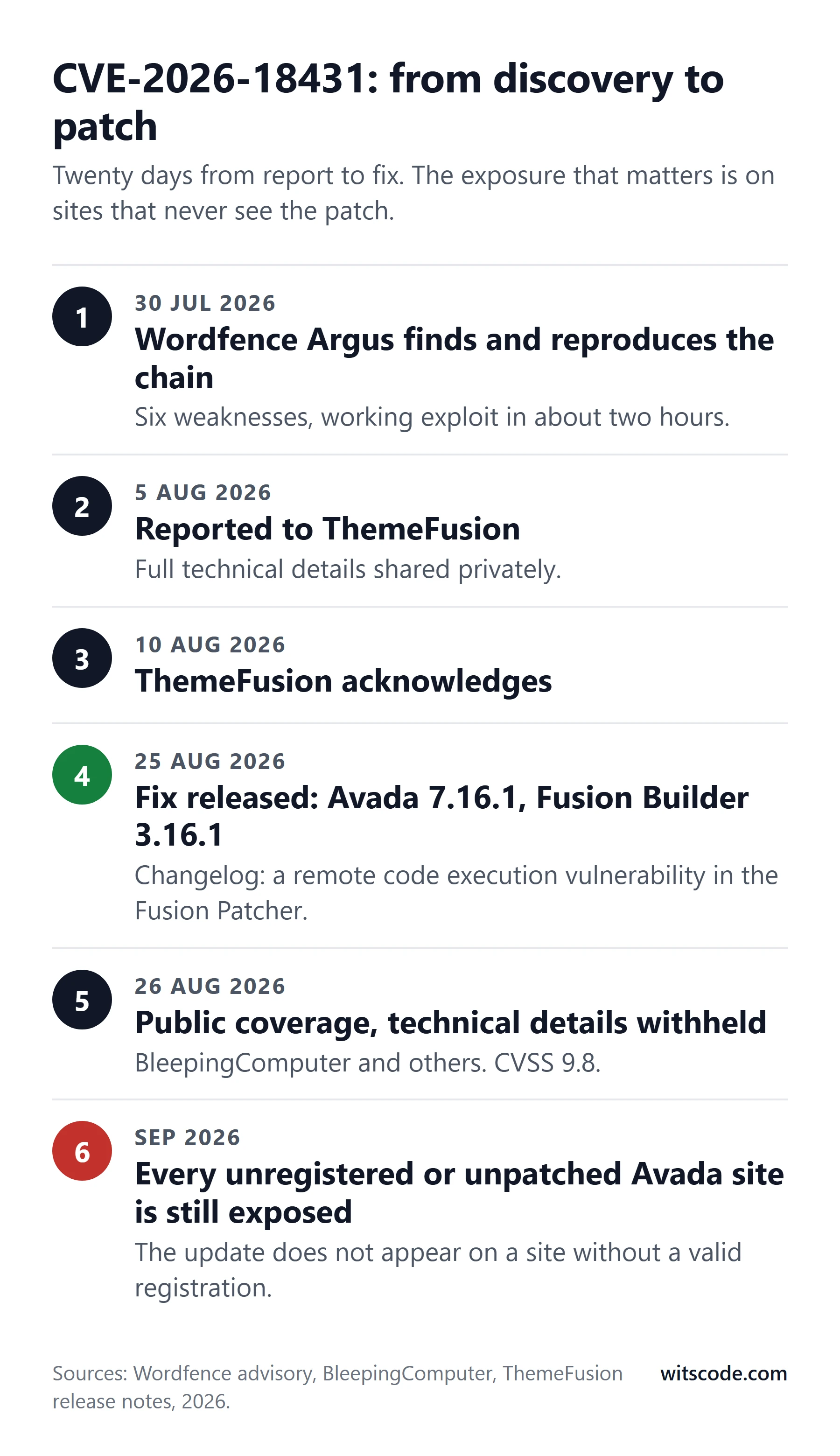
Wordfence's research team found the flaw on 30 July 2026 using Argus, their automated vulnerability research system, which reproduced a working exploit in roughly two hours.1 They reported it to ThemeFusion on 5 August. ThemeFusion acknowledged it on 10 August and released the fix on 25 August.2
The vulnerability is not one bug. It is six, chained in a specific order: exposing attacker-controlled input through a public request, passing that input into functionality that should have been restricted, invoking a privileged component outside the context it was built for, using request data to influence trusted state, reaching an admin-only operation without authorization, and finally bypassing the checks that limit what files can be written.2 The CWE assigned is 862, missing authorization.4
The end of that chain is an arbitrary file write. On a PHP application, arbitrary file write is remote code execution: write a .php file, request it in the browser, and it runs with the web server's permissions.4 ThemeFusion's own changelog names the component: "a remote code execution vulnerability in the Fusion Patcher."3 The Patcher is the part of Avada that fetches hotfixes from outside the site and applies them to files inside it, which is exactly the kind of mechanism you do not want an unauthenticated stranger to steer.7
Two prerequisites matter. Both Avada and Fusion Builder must be installed and active, and "certain administrator-authored content" must exist on the site.4 Wordfence has not said what that content is, deliberately, to give site owners time to patch.2 Do not read that as reassurance. Most real Avada sites are built with Fusion Builder content, which is the whole reason people buy the theme.
The CVSS vector is AV:N/AC:L/PR:N/UI:N/S:U/C:H/I:H/A:H.4 In plain words: reachable from the internet, easy, no privileges, no user interaction, and full loss of confidentiality, integrity and availability. That is what "zero-click" means here. Nobody on your side has to do anything wrong.
What an attacker does with it
Once an attacker can write and run PHP on your server, the theme is no longer the point. They have the site. The usual next moves, all of which we have seen on hacked WordPress sites this year, are:
- Create a hidden administrator account with a system-sounding name.
- Drop a must-use plugin into
wp-content/mu-plugins, which loads automatically and cannot be deactivated from the dashboard. - Inject JavaScript into the theme or the database that serves a fake Cloudflare verification page to your visitors, pushing malware onto their computers. This is the ClickFix campaign, and hacked WordPress sites are its main delivery channel.
- Add a cron job or upload endpoint that rewrites the injection after you delete it.
- Sell access to the site on to whoever pays.
The site owner usually finds out from a customer, or when Chrome starts showing a red "Dangerous site" warning for their domain.
Who is affected, in numbers
- Avada has over 1.07 million sales on ThemeForest.9 Not every sale is a live site, but the installed base is in the high hundreds of thousands.
- Fusion Builder is a required, bundled plugin. There is no Avada site without it.2
- Affected: Avada up to and including 7.16, Fusion Builder up to and including 3.16.4
- Fixed: Avada 7.16.1, Fusion Builder 3.16.1.3
As of the last public reporting we can find, no in-the-wild exploitation had been confirmed.8 Two things about that. First, "not confirmed" is not "not happening"; Wordfence has withheld the technical details precisely because the window between disclosure and mass exploitation for WordPress flaws is usually days, not months. Second, attackers do not need this particular flaw to hit an Avada site that is behind on updates, because 2026 has handed them several.
The 2026 pattern: this is the fourth serious Avada Builder flaw this year
CVE-2026-18431 is the headline, but it is not an isolated event. Avada Builder (the plugin's name in the WordPress dashboard) has had a run of security fixes this year.6
| CVE | Published | Severity | Fixed in | What it allowed |
|---|---|---|---|---|
| CVE-2026-4798 | May 2026 | 7.5 High | 3.15.2, completed in 3.15.3 | Unauthenticated time-based SQL injection on any Avada site that ever had WooCommerce installed |
| CVE-2026-4782 | May 2026 | 6.5 Medium | 3.15.3 | Subscriber-level arbitrary file read, including wp-config.php and its database credentials |
| CVE-2026-8713 | 2026 | 9.1 Critical | 3.15.4 | Unauthenticated arbitrary file deletion, enough to delete wp-config.php and take the site over |
| CVE-2026-16654 | 2026 | Medium | 3.15.7 | Stored XSS in a shortcode attribute, contributor role or higher5 |
| CVE-2026-18431 | 25 Aug 2026 | 9.8 Critical | 3.16.1 with Avada 7.16.1 | Unauthenticated arbitrary file write, remote code execution |
The point of the table is not that Avada is unusually insecure. Large page builders have large attack surfaces, and Wordfence, Patchstack and others are now running automated research against all of them. The point is that an Avada site which missed the August update has almost certainly missed the May and June ones too, and each of those is independently enough for an attacker.
How to check what you are actually running
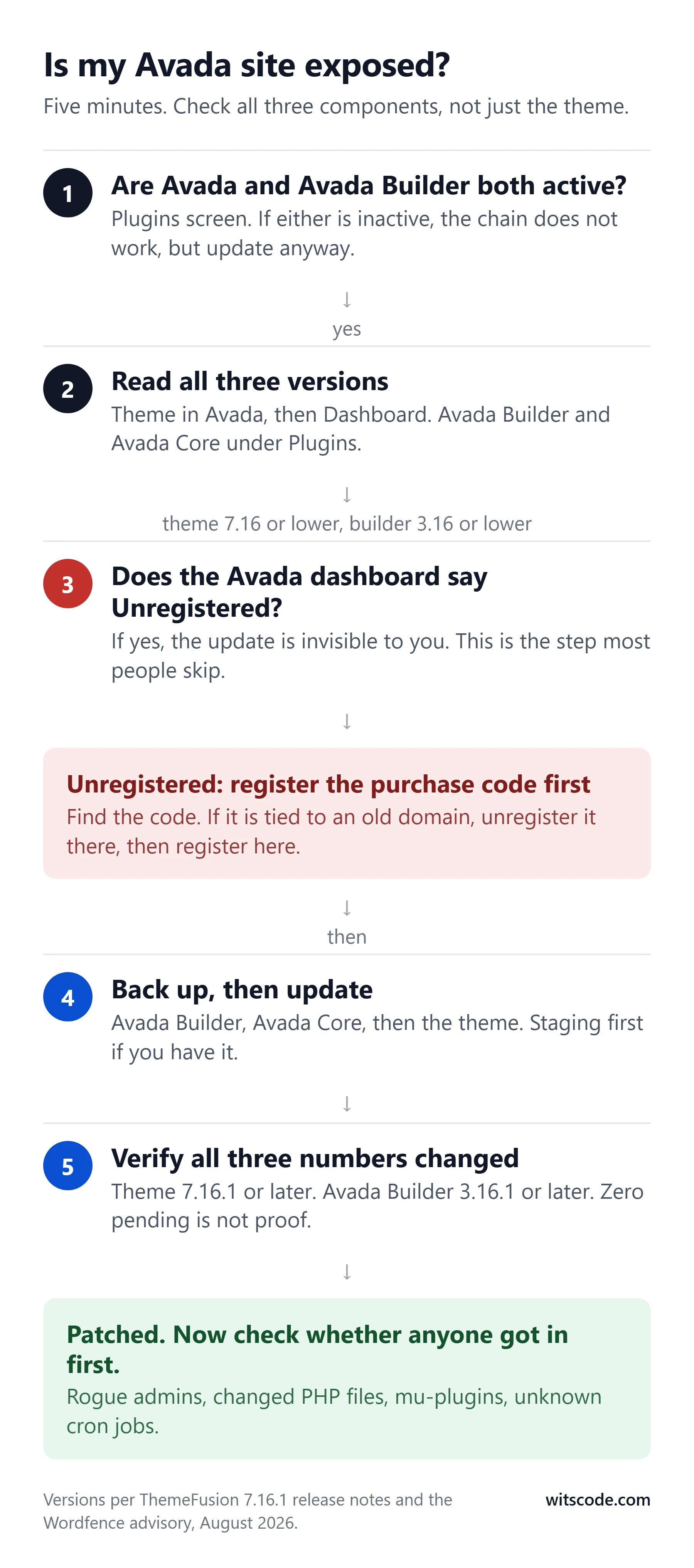
Avada is three components that version independently: the theme, the Avada Builder plugin (Fusion Builder) and the Avada Core plugin. Checking the theme version alone tells you nothing about the plugin that carries the vulnerable code.7
From the dashboard. Open Avada, then Dashboard, and read the theme version. Then open Plugins and read the versions next to Avada Builder and Avada Core. You want Avada 7.16.1 or later and Avada Builder 3.16.1 or later.
With WP-CLI, if you have shell access:
wp theme list --status=active --fields=name,version
wp plugin list --fields=name,version,status
Read the fusion-builder and fusion-core rows.7
What "vulnerable" looks like. Theme 7.15 or 7.16, builder 3.15.x or 3.16, and no update notice anywhere. If you see that combination, keep reading before you assume the update is not available yet.
Why your dashboard may be hiding the update
This is the part that turns a routine patch into a months-long exposure.
Avada, like most premium themes sold through ThemeForest, delivers updates only to sites registered with a valid purchase code. ThemeFusion's documentation is explicit that registration is required to receive updates, and that one purchase code covers one live site plus a staging copy of the same domain.10 On a site with an expired or never-registered license, the update does not show up as "available but blocked." It does not show up at all.7 The WordPress updates screen says everything is current, and it is telling the truth about what it can see.
The sequence we keep meeting on hacked sites goes like this. A developer builds the site on a purchase code they already own. The site launches. Later the developer uses the same code on another client, or the client changes agencies, or nobody renews the support period and the registration quietly lapses. Avada's own settings page shows "Unregistered" in red, but nobody opens the Avada settings page once a site is live. Updates stop. Nothing breaks. A year later the theme is several releases and one critical CVE behind, and the owner believes the site is being maintained.
We wrote this up in more detail, with the evidence on cracked and nulled copies, in the Avada lesson section of the ClickFix article. The short version: a lapsed license means no updates, and a nulled copy means no updates plus whatever the person who cracked it decided to add.
If your site shows Unregistered: find the original purchase code. If it is registered to a domain you no longer control, ThemeFusion provides a way to unregister it so it can be moved. If the code was never yours, the honest fix is a license. It costs less than an hour of cleanup.
How to update without making it worse
- Back up first. Files and database, kept somewhere other than the server. If the site turns out to be compromised, this backup is your forensic copy, so take it before you change anything.
- Register or re-register the purchase code in the Avada dashboard if the site shows Unregistered. The update will not appear until you do.
- Update in this order: Avada Builder, Avada Core, then the Avada theme. The plugins may not update at the same moment as the theme; a "zero updates pending" badge is not proof.7
- Verify all three version numbers changed. Theme 7.16.1 or later, Avada Builder 3.16.1 or later, Avada Core current.
- Purge caches. Page cache, CDN, object cache. An old cached page can keep serving an old injection after you have cleaned the source.
- Do not roll back. Every version before 7.16.1 has the same hole. If the update broke a layout, fix the layout on the patched version.7
Do the update on staging first if you have one. If you do not, do it anyway. A broken layout is a support ticket; an unpatched RCE is an incident.
If you were already behind: assume the door was open
An Avada site that sat on 7.16 or earlier through September was exposed to this flaw for the entire window between disclosure and today, and to the May and June flaws for months longer. Updating closes the door. It does not evict anyone who already walked through it.
After the update, run these checks. They take twenty minutes.
- Administrator accounts. Compare the list in Users against what you expect, and compare the count in the dashboard against the count in the database. Attackers hide accounts from the user list.
wp user list --role=administrator --fields=ID,user_login,user_email,user_registeredshows the real list.7 - Recently changed PHP files.
find /path/to/site -name '*.php' -mtime -30lists everything modified in the last thirty days. Anything inwp-content/uploadsending in.phpis a red flag; uploads should never contain executable code.7 - Must-use plugins. Open
wp-content/mu-plugins. If you did not put a file there, it does not belong. - Scheduled tasks. Install a cron viewer or run
wp cron event list. Look for events you do not recognize, especially ones that fire every few minutes. - The database. Search
wp_optionsandwp_postsfor<script,base64_decodeandeval(. File scanners miss injections stored in the database. - Google's view of you. Open Search Console and check Security Issues. Then load your homepage in an incognito window and in a private window on your phone. Fake verification pages are often served only to certain visitors.
If any of those turn something up, stop treating it as an update and start treating it as a cleanup. The ten-step sequence in the ClickFix article is the order that works: contain first (take it offline, rotate every credential, remove rogue admins), then clean and close. Cleaning first and rotating passwords later leaves the door open while you work.
What a firewall can and cannot do here
A web application firewall in front of the site is worth having, and Wordfence's own users had a rule for this chain before the details were public.1 But there is no published signature for the general case, because the technical details are being withheld, and the vulnerable component cannot be switched off without breaking the theme's update mechanism.7 A firewall is a delay, not a fix. The fix is the version number.
This is also true of Cloudflare in front of the site. Cloudflare's managed WAF blocks a great deal of generic WordPress attack traffic, and we run it in front of every site we look after. It does not know what this specific request chain looks like, and neither does anyone outside Wordfence and ThemeFusion.
The real lesson
CVE-2026-18431 will be patched on most well-run sites within a week of you reading this, if it has not been already. The sites that will get hit are the ones where the update never appeared, because the license lapsed, the developer left, or the theme was never legitimately licensed in the first place. That is a process problem wearing a security problem's clothes.
Three habits close it for good:
- Someone owns updates. A named person or a care plan, with a monthly check that includes premium theme and plugin registration status, not just the WordPress updates count.
- Every premium component is registered. Open the settings page of every paid theme and plugin once, today, and confirm it is activated. Elementor Pro, WP Rocket, Gravity Forms and Avada all behave the same way: unregistered means unpatched.
- Nulled copies are off the table. Not for the license fee. Because the person who cracked it had write access to the code you are about to run on your server.
Frequently asked questions
Is my Avada site vulnerable to CVE-2026-18431?
If the Avada theme is 7.16 or earlier and the Avada Builder plugin is 3.16 or earlier, and both are active, yes. Check all three Avada components in the dashboard or with WP-CLI, not just the theme version.
Which versions fix it?
Avada 7.16.1 and Fusion Builder (Avada Builder) 3.16.1, released by ThemeFusion on 25 August 2026. Anything later is also fine.
Why does my Avada site not show the update?
Avada only delivers updates to sites registered with a valid purchase code. An unregistered or expired site does not see the update at all, and the WordPress updates screen will say everything is current. Open the Avada dashboard and check the registration status.
Does the attacker need a login?
No. The chain is unauthenticated. It requires Avada and Fusion Builder to be active and certain administrator-created content to exist, which most real Avada sites have.
Has it been exploited in the wild?
As of the last public reporting we can find, no exploitation had been confirmed. Wordfence has withheld the technical details to slow that down. Treat an unpatched site as exposed regardless.
Can I just disable the Fusion Patcher?
No. The Patcher is part of Avada's update mechanism and cannot be switched off without breaking updates. The fix is to update to 7.16.1 and 3.16.1.
I updated. Am I safe now?
The update closes the hole. If the site was exposed for weeks before you updated, run the post-update checks above for rogue admin accounts, recently changed PHP files, must-use plugins and unknown cron jobs. If anything turns up, follow the cleanup sequence in our ClickFix article.
Is a WAF enough while I wait to update?
No. A firewall can block some attack traffic but there is no reliable public signature for this chain, and the vulnerable component cannot be disabled. Update now.
- Wordfence Threat Intelligence, vulnerability record for CVE-2026-18431, Avada and Fusion Builder unauthenticated remote code execution via arbitrary file write. wordfence.com
- BleepingComputer, "Critical Avada WordPress theme flaw enables zero-click RCE," August 2026. bleepingcomputer.com
- ThemeFusion, "Version 7.16.1 Security Update," 25 August 2026. avada.com
- WPScan, "Avada <= 7.16 and Fusion Builder <= 3.16, Unauthenticated Remote Code Execution via Arbitrary File Write," CVE-2026-18431. wpscan.com
- ToolsLib, "Avada zero-click RCE chain (CVE-2026-18431) and a separate Fusion Builder XSS," 31 August 2026. blog.toolslib.net
- mySites.guru, "Avada Builder 3.15.3 Security Patches," covering CVE-2026-4782, CVE-2026-4798 and CVE-2026-8713, 2026. mysites.guru
- MagicWP, "Avada 7.16.1 Fixes Fusion Patcher RCE: What to Do Now," 2026. magicwp.io
- SOCRadar, "Critical Avada WordPress Flaw (CVE-2026-18431) Enables RCE," exploitation status as of 27 August 2026. socradar.io
- Envato ThemeForest, Avada item page (sales count), retrieved 15 September 2026. themeforest.net
- ThemeFusion documentation on product registration and update delivery. avada.com/documentation
Version numbers and dates checked on 15 September 2026. If ThemeFusion ships a later release, the advice is the same: be on it.
Who keeps your WordPress site up?
Hacked, outdated, or stuck on hosting you do not trust. Send us the site and get a hardening and hosting plan with a named owner.
- Hack cleanup and security hardening
- Backups, updates, uptime monitoring
- Zero-downtime host migrations
Working on something in Guides & Insights?
Tell us what you are working on. You get a scoped estimate within 48 hours.
Keep reading
More from Guides & Insights.
- Guides & Insights
October 23, 2026
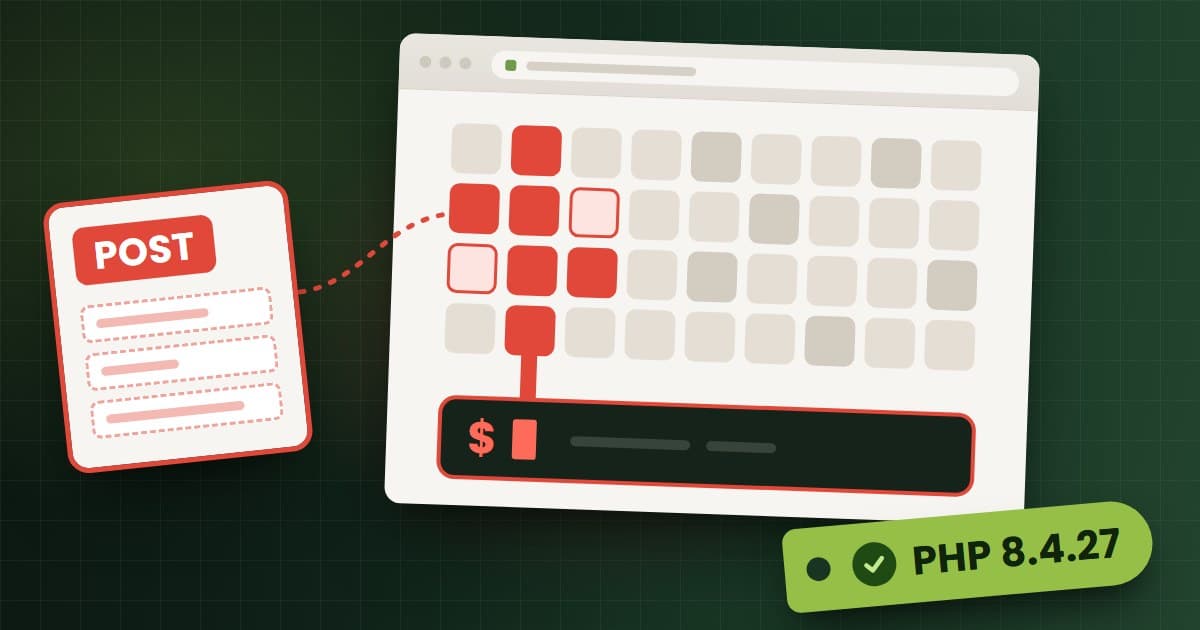
PHP2Shell: How to Patch the PHP Vulnerability on Any Server
PHP2Shell (CVE-2026-109618, CVE-2026-109619) lets attackers run code on unpatched PHP servers. Check your real PHP build, patch any host, and look for a breach.
- Guides & Insights

September 27, 2026
cPanel Vulnerability CVE-2026-87899: Any Hosting Account Can Run Code as Root. What to Do Now
A cPanel CalDAV flaw lets any logged-in hosting account run code as root, and a WP Toolkit bug lets one account change another's WordPress database. Fixed builds, how to check yours, and what...
- Guides & Insights
September 15, 2026
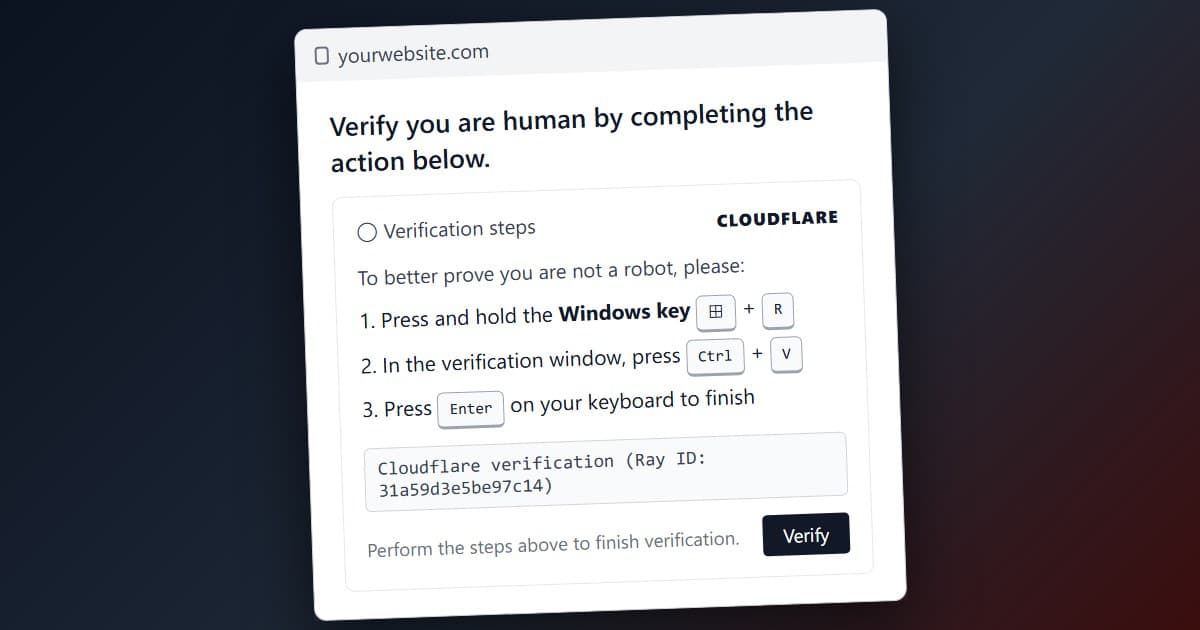
ClickFix: The Fake Cloudflare Page Hijacking Thousands of WordPress Sites, Explained
Thousands of WordPress sites are serving a fake Cloudflare 'Verify you are human' page that installs malware on visitors. How ClickFix works, how the sites get hacked, why cracked themes make it...