

PHP2Shell WordPress Guide: Check Your PHP Build and Your Host


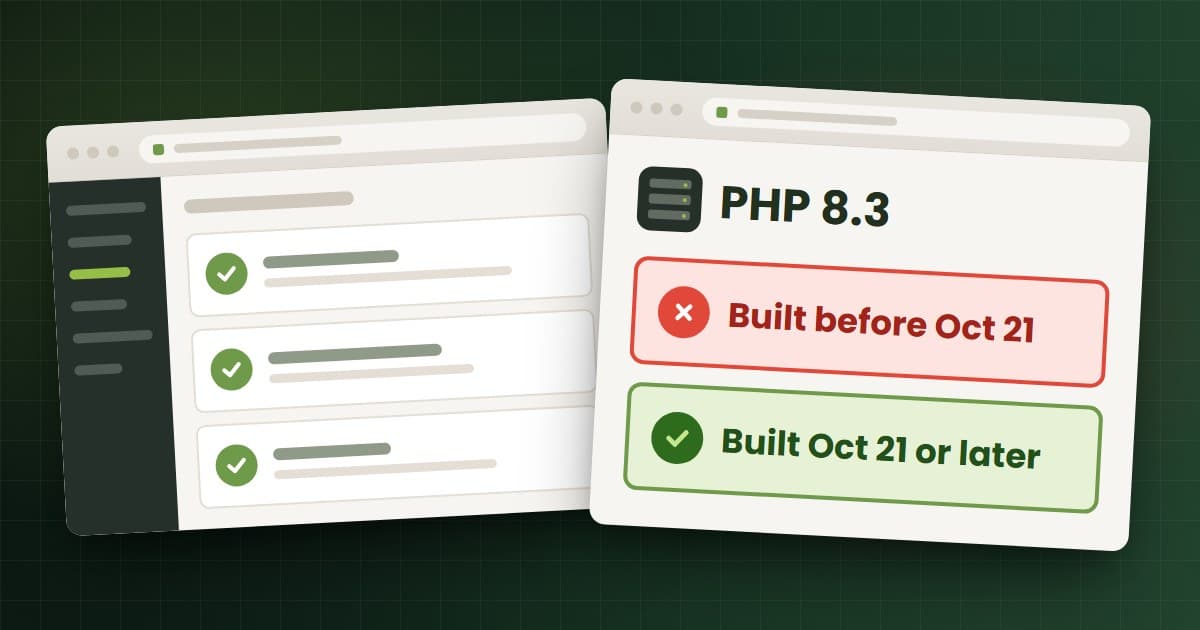
PHP2Shell is the name for two critical flaws in PHP itself, CVE-2026-109618 and CVE-2026-109619, fixed in PHP releases on October 21, 2026.1 For a WordPress site, the PHP2Shell fix happens on the server, not in your dashboard. WordPress.org says "No WordPress update is required or planned for these issues."2 Every WordPress and WooCommerce site runs on PHP, so any site on an unpatched PHP build stays exposed until its host, or whoever runs the server, installs the fix.
Two things make this harder than a plugin update. Site Health will not warn you, and many hosts patched PHP without changing the version number your dashboard shows.345
The short version
- What: Two PHP bugs, rated 9.2 (Critical), that can let an attacker with no login run code on your server.6 Wiz Research showed the attack working on the
wordpress:latestcontainer image.7 - WordPress core: No update needed. Updating WordPress or plugins does not update PHP.28
- Fixed PHP: 8.5.12, 8.4.27, 8.3.36 and 8.2.35. PHP 8.1 and older get no official release.1 About 34.7% of WordPress sites run a branch below 8.2.9
- How to check: Site Health still rates unpatched builds as secure.3 The build date, or a direct answer from your host, is the reliable check.45
- Hosts: Kinsta, SiteGround, Cloudways, Hostinger, GoDaddy and WP Engine say they have installed PHP's fixes on managed hosting. Automattic says its platforms are protected. VPS owners patch PHP themselves.
- Exploitation: Disputed. Reports range from "broad exploitation attempts" to public exploits that fail on a default PHP install.1011 Patch either way.
- Same week: Stolen UpdraftCentral keys were used to install backdoor plugins. Update UpdraftPlus to 1.26.13 or 2.26.13, delete the keys, then hunt for the backdoor, which the update does not remove.1213
Why does PHP2Shell affect WordPress if WordPress has no bug?
WordPress is a PHP application. PHP receives every page view, login and checkout request before WordPress code runs. PHP2Shell sits in that layer, in how PHP handles memory when a request fails and the state it leaves behind between requests.6 PHP lists every web-serving setup as at risk, including PHP-FPM, Apache with mod_php, php-cgi, FrankenPHP and LiteSpeed. Risk is highest on mod_php, where the attack fires before any application code loads.1
A fully updated WordPress site on unpatched PHP is still exposed. Cloudflare says "updating website code or a plugin(s) alone does not fix these vulnerabilities."8 Patchstack warns against "unofficial 'fix' plugins and copy-pasted snippets."14
Code execution gives an attacker the access a malicious plugin would have: read wp-config.php with your database password and salts, write PHP files, and create admin users. Wiz also describes a leak path where memory from other requests, which can hold passwords, tokens and API keys, comes back to the attacker in a session cookie.7 On a WooCommerce store, that can include customer logins and payment gateway keys.
How do I check my WordPress PHP version in 2 minutes?
Step 1: Read the version in Site Health
Go to Tools > Site Health > Info, open the Server section, and note the full PHP version, for example 8.3.36 or 8.2.30.215
Step 2: Ignore the Site Health verdict for PHP2Shell
Site Health takes its PHP verdict from a WordPress.org service. On October 23, that service rated PHP 8.1.2 and the unpatched 8.2.30 and 8.3.30 as secure, and 7.4.33 as not secure.3 So Site Health will not warn you about PHP2Shell on 8.1 or on an unpatched 8.2 or newer build.
Step 3: Check the build date
Many hosts install the fix as a patched build of the version you already run. Hostinger says the version may not change, and that "A Build Date of October 21, 2026 or later" means you have the fix. Find it under Websites > Dashboard > PHP Info.4 GoDaddy says "Your PHP version number may not change" and gives the same build date cutoff. It reads the date from the "built:" line of php -v over SSH, or from a temporary phpinfo file.5 Delete that file as soon as you have read it, because it shows your server details to anyone.
On other hosts, a build date before October 21, 2026 means ask today. A later date is a good sign that only your host can confirm.
What the PHP version numbers mean
| Version Site Health shows | What it means for PHP2Shell |
|---|---|
| 8.5.12+, 8.4.27+, 8.3.36+ or 8.2.35+ | Fixed upstream release.1 Confirm PHP was restarted. |
| A lower 8.2, 8.3, 8.4 or 8.5 release | Vulnerable, or backported with the old number. Check the build date or ask.45 |
| 8.1, 8.0 or 7.4 | No official release, only minimal source backports, so you depend on your host or OS vendor.1 Plan a move to 8.3 or newer. |
| 7.3 or older | Below what current WordPress supports. The vulnerable code goes back to PHP 5.4.167 Move now. |
WordPress recommends "PHP version 8.3 or greater."16 PHP 8.1 reached end of life on December 31, 2025, and security support for 8.2 ends on December 31, 2026.17 By our count from WordPress.org's October 23 usage data, 34.7% of WordPress sites run a branch with no official PHP release for these bugs, led by 7.4 at 15.50% and 8.1 at 10.00%.9
What have WordPress hosts said about PHP2Shell?
Each row gives only what the host's own page states (times UTC unless the host used another zone). "Protected" and "patched" are different claims.
| Host | What its own page says |
|---|---|
| WordPress.com, WordPress VIP, WP Cloud, Pressable | Automattic, October 21: "your site is already protected" and "There is nothing you need to do." The post does not say a patched PHP build was installed.18 |
| Kinsta | Rollout from 19:04 on October 21. Resolved 08:26 on October 22: "the PHP security updates have been rolled out across the platform," with 7.4 to 8.5 listed. Mitigations stay. "No evidence of any breaches."19 |
| SiteGround | Server mitigations after the October 20 notice. "Once PHP released the fixes on 21 October, we applied them across all SiteGround servers." "There's nothing you need to do." Last updated 12:00 on October 22.20 |
| Cloudways | Mitigations started 09:16 on October 21 and were fleet-wide by 22:19. Patches listed for PHP 5.6 to 8.4. All active servers updated by 10:11 on October 22.21 |
| Hostinger | PHP's fix installed on all servers except VPS, rollout complete 06:44 on October 22, plus ModSecurity rules. VPS customers patch themselves.4 |
| GoDaddy | Managed WordPress patched 19:30 on October 21, Windows Hosting 01:20 and Web Hosting 13:30 on October 22. VPS customers update PHP themselves.5 |
| Bluehost | 18:15 ET on October 22: "The majority of these platforms are now up-to-date." On a patched PHP version, "no action is needed; we are applying patches for you." Uploads may be size-limited during mitigation. VPS and dedicated customers run a package update.22 |
| WP Engine | Resolved 01:19 on October 22 (20:19 CDT October 21): "finished the deployment of security patches," with 7.4, 8.2, 8.4 and 8.5 builds listed, and "no action is needed from you."23 |
WordPress.com adds: "If you run your own servers, update now."24 Hostinger and GoDaddy leave VPS patching to the customer, and Bluehost does the same for VPS and dedicated servers.4522 If your host is missing from the table, ask it directly.
What should I ask my web host about PHP2Shell?
Codeable suggests asking whether the host has "applied the 21 October PHP security release."25 Copy this message, fill in the brackets, and send it through support ticket or chat:
Subject: PHP2Shell (CVE-2026-109618, CVE-2026-109619) status for [your domain]

Hi,

My WordPress site [your domain] runs PHP [version from Tools > Site Health > Info > Server].

Please confirm:

1. Is the October 21, 2026 PHP security release, or a backported fix for
   both CVEs, installed for the PHP version my site uses?
2. What build date or package version shows the fix is in place?
3. Were my site's PHP workers restarted after the update?
4. If I am on PHP 8.1 or older, can you move me to 8.3 or newer?
5. Have you seen suspicious requests or file changes on my account
   since October 17, 2026?

Thank you.
If the reply says "protected" but not "patched," ask question 1 again. If your host cannot answer, treat the site as unpatched.
How do I update PHP on WordPress without breaking the site?
These are WordPress.org's steps, with our additions for staging and stores.15
- Back up files and database, and keep one copy outside the hosting account.
- Update WordPress, themes and plugins first, so you test the code you will run.
- Run the PHP Compatibility Checker plugin. Treat its output as a test list, not a guarantee.
- Switch on staging first. Test forms, login, cart, checkout and order emails. From 8.1 or older, go straight to 8.3 or newer.16
- Switch production in a quiet hour, with a fresh backup taken that day.
- Know your rollback. If something breaks, WordPress.org says to ask your host to restore the previous PHP version, then restore your backup. Treat an unpatched build as a stopgap for a day, not a place to stay.
On shared or managed hosting, ask your host rather than editing server settings yourself, as Codeable also advises.25 On a WooCommerce store, test custom checkout code and older payment plugins hardest. If your store has either, a test pass by an experienced WooCommerce development partner costs less than a broken checkout.
What if I manage my own server?
On a VPS, cloud server or containers, take a snapshot, install the patched PHP packages from your OS vendor or the official image, and restart PHP-FPM or Apache. The official Docker php image gets no fix for 8.1 or older, Patchstack notes.14 WordPress.org says self-managed servers on old PHP should consider going offline while they upgrade.2 The command-line PHP can differ from the PHP your web server runs, so confirm the web server's build date too, then delete any phpinfo file you used. Our PHP2Shell guide for every PHP site covers distro packages, container images and server checks.
Do interim mitigations work on WordPress?
They buy time and nothing more. PHP says the mitigations "do not make an installation safe."1 Cloudflare's rules have run on all WAF plans, Free included, since 03:02 on October 21, and Cloudflare saw attackers change payloads to try to get past them.8 Patchstack adds that the rules "only help if your server accepts traffic exclusively from Cloudflare."14 So on your own server, set it to accept web traffic only from the proxy.
Is PHP2Shell being exploited against WordPress sites?
The evidence is disputed.
- Attempts are real. Amazon saw an attempt on October 17, four days before the patch, then "broad exploitation attempts in the wild," though it is unclear whether they would succeed.10 watchTowr says its honeypots caught exploitation of both CVEs on October 21.36
- Early alarm. Patchstack's hosting partners reported exploitation incidents at 07:34 on October 21. A later Patchstack entry, at 13:57, describes only probing.14
- Weak public exploits. Sansec said on October 22 that "The public exploits do not work against a default PHP installation."11 Hostinger says the circulating exploit failed against its servers.4
- No breaches reported. Kinsta has "no evidence of any breaches," and Hostinger has seen no rise in infections.194
- No government listing. On October 23, neither CVE was in CISA's Known Exploited Vulnerabilities catalog.26 CISA's October 21 alert said it had not observed exploitation.27
Patch anyway. The attack has been shown working on WordPress, and the details are public.
What is the UpdraftCentral backdoor, and how do I clean it up?
The UpdraftCentral backdoor is a separate attack from the same week. TeamUpdraft, maker of UpdraftPlus, says an attacker got into teamupdraft.com "over the weekend of 17-18 October" and "used a compromised key to access our site." The database held customer details and the keys for UpdraftCentral, UpdraftVault and UpdraftClone, but no card data. Plugin downloads and self-hosted UpdraftCentral were not affected.12
How the UpdraftCentral attack works
UpdraftCentral manages many WordPress sites from one dashboard, and each connected site trusts a key. With stolen keys, the attacker sent signed "upload plugin" commands, and WordPress installed and activated the attacker's plugin. Patchstack says this is not a plugin bug and has no CVE. The keys never expire, and the checkbox that connects a site was ticked by default.28
According to Patchstack, the backdoor creates an Editor account with the manage_options and install_plugins powers, plus a login cookie that skips the login form and 2FA. The account survives removal of the plugin.28 TeamUpdraft calls them admin accounts, so check both roles.12 Patchstack counted 99 distinct plugin names and saw installs from 15:32 on October 18 to 09:23 on October 19 (it gives no time zone).28 Nethemba, which first analyzed the samples, saw the attacker active again on October 20 and 21.13 Some samples crash with an HTTP 500 error, and Patchstack's advice is "Do not repair such a plugin."28
Which UpdraftPlus version fixes it?
Use UpdraftPlus 1.26.13 (free) or 2.26.13 (Premium). TeamUpdraft says it shipped just after 22:00 BST (21:00 UTC) on October 19 and that WordPress.org pushed it to all users.12 Skip 1.26.12 and 2.26.12. Nethemba found that release has a bug and deletes no keys, though some reports still cite it.1329 Even 1.26.13 leaves a gap. Keys created between 12:07 and 21:00 UTC on October 18 survive it, and no version removes a backdoor already installed.13
Indicators of the UpdraftCentral backdoor
Every indicator below comes from Nethemba's analysis.13 IP addresses are defanged on purpose. Patchstack says IP blocking "is not a control here."28
| Type | Indicator |
|---|---|
| Plugin names | Site Health Cache, site-health-364f, load-stack-35c, boost-kit (some hide from the plugin list) |
| Fake plugin authors | PixelBinder, Harbor Stack Labs, CommonGantry, WPBridge, MetaLayer |
| Accounts | data-ops43, media-staff96, system_team850, web.tech988, with emails at example.org or example.com and display names "Site Tools" or "System Team" |
| Database options | <slug>_sync_token, <slug>_uid, <slug>_installed, sh_cache_ver |
| Log entries | probe.central.updraftplus.com and "Command received: plugin.upload_plugin" |
| User agent | WordPress/6.4; class-udrpc.php with no library version |
| IP addresses | 43.250.53[.]42 and 2a09:bac5:4e21:2e3c[::]49b:9 |
Clean up in this order
Deleting a backdoor plugin through wp-admin runs its uninstall routine, which can wipe the database entries that prove what happened.1328 Collect evidence first, then remove.
- Snapshot the site. Copy all files and the database off the server before you change anything (our addition).
- Log in directly to each site's own wp-admin, not through the UpdraftCentral dashboard.12
- Update UpdraftPlus to 1.26.13 or 2.26.13.12
- Delete every UpdraftCentral key, even if you never used UpdraftCentral. Go to Settings > UpdraftPlus > Advanced Tools > UpdraftCentral, or run
wp option delete updraft_central_localkeys. If you are not mid-migration, also deleteupdraft_migrator_localkeys. Removing the site from the UpdraftCentral dashboard is "not enough."2813 - Look for the backdoor. Check Users for unknown Administrators and Editors, and Plugins, including Must-Use, against the indicator table.1228 Agencies can also log in to UpdraftCentral through My Account and check any listed site they did not knowingly connect since October 19.12
- Move, do not uninstall. Move any backdoor plugin folder out of the web root over SFTP or your host's file manager, then remove its options and accounts.1328
- Reset access. Change admin passwords, end all sessions, turn 2FA back on, and change your teamupdraft.com password by typing the address yourself.1228
- Restore if compromised from a backup made before October 17, and compare files against a clean install.1228 A restored database can bring old keys back, so repeat step 4.
- Reconnect storage with fresh keys. UpdraftVault users reconnect, and UpdraftClone users reissue client keys.12
- Reconnect UpdraftCentral last, if at all, under an account that cannot install plugins.28
What other WordPress attacks should I check for in October 2026?
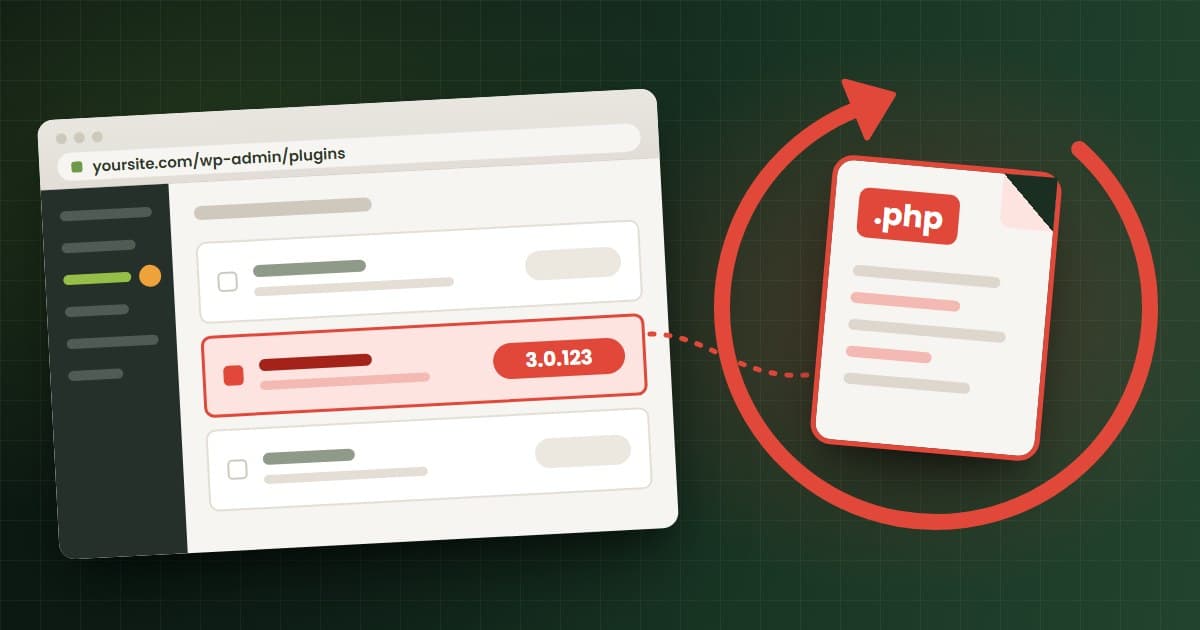
Rank Math PRO 3.0.123. Copies of Rank Math SEO PRO served between 20:02 UTC on October 15 and 07:12 UTC on October 16 carried a backdoor, tracked as CVE-2026-111862. Version 3.0.124 is clean, and Rank Math says "Deactivating the plugin alone is not sufficient."30 Follow our Rank Math PRO backdoor cleanup guide if any of your sites took that version.
Bricksforge. CVE-2026-85097, rated 10.0, lets an attacker with no login upload files and run code through the Bricksforge add-on. Patchstack first saw exploitation at 21:47 UTC on October 7. Version 3.1.8.10 fixes it. Look for PHP files in wp-content/uploads/bricksforge/tmp/ and files named login_admin_*.php in uploads.31
How can I tell if my WordPress site was hacked?
Look for a foothold that survives your next update. The first four checks work from the dashboard or a file manager. The rest need SSH with WP-CLI, or your host.
- Unknown administrators and editors. Filter Users > All Users by Administrator, then Editor. With WP-CLI, run
wp user list --role=administratorandwp user list --role=editor. - Must-use plugins. Look for a Must-Use tab under Plugins. These load on every page and cannot be turned off from the dashboard, which makes
wp-content/mu-plugins/a common hiding place. - PHP files in uploads.
wp-content/uploads/should hold media. An emptyindex.phpis normal. Any other.phpfile needs a close look;find wp-content/uploads -name "*.php"lists them. - Plugins you did not install, including the names and authors in the UpdraftCentral indicator table.
- Core files that do not match.
wp core verify-checksumscompares core files with the official release, and--include-rootalso flags non-WordPress files in the root folder.32wp plugin verify-checksums --alldoes the same for WordPress.org plugins, but cannot verify premium ones.33 - Scheduled tasks. Run
wp cron event list, and ask your host to check the server crontab. - Server logs. Ask your host to look back to October 17 for requests containing
PHP_SESSION_UPLOAD_PROGRESS, unexpected processes and file changes.10 Wiz adds multipart requests followed by memory limit errors or repeated 500 errors, oversized session cookies, and unexplained PHP worker restarts.7
Wiz warns that application logs may show little, because the attack runs below the application layer.7 A clean result is reassuring, not proof. If you find something, snapshot the site before you change anything and follow our hacked WordPress site playbook.
Which hardening steps limit PHP2Shell damage on WordPress?
In our view, none of these steps stops PHP2Shell itself, because the bug fires before WordPress code runs. They make it harder for an attacker to stay, spread, or go unnoticed. Several are server changes, so on shared or managed hosting, ask your host to make them, and back up before any change.
- Block PHP execution in uploads. WordPress's Nginx documentation gives this rule:
location ~* /(?:uploads|files)/.*\.php$ { deny all; }. To test it, put a PHP file in uploads and try to run it from your browser,34 then delete the test file. Apache servers use a.htaccessrule in uploads for the same job. Test either rule on staging, since a badly built plugin may run PHP from uploads. - Set file permissions. WordPress's hardening guide recommends 755 for folders, 644 for files and 400 or 440 for
wp-config.php.35 - Turn off the file editor with
define( 'DISALLOW_FILE_EDIT', true );inwp-config.php, after saving a copy of the original file. The guide notes that "This will not prevent an attacker from uploading malicious files."35 - Separate your sites. Give each site its own database user, since one compromised site on a shared server can reach others.35
- Watch your files. The guide recommends monitoring that alerts you when
.phpfiles are added or changed.35 - Rotate secrets if you were exposed. Wiz says the leak can expose passwords, tokens and API keys from other requests.7 On a site that ran unpatched PHP and shows signs of attack, we would rotate database passwords, salts, payment gateway keys and SMTP passwords.
What should WordPress site owners and agencies do now?
Today
- Read the PHP version in Site Health on every site you own or manage.
- Check the build date, or send your host the message above.
- On your own servers, take a snapshot, install patched PHP and restart it. If you cannot patch today, lock the origin behind a firewall or take the site offline.
- Update UpdraftPlus to 1.26.13 or 2.26.13 and delete the UpdraftCentral keys.
- Check for unknown Administrators, Editors and must-use plugins.
This week
- Back up, then move sites on PHP 8.1 or older to 8.3 or newer, on staging first.
- Run the compromise checks above, and check for Rank Math PRO 3.0.123 and Bricksforge below 3.1.8.10.
- Rotate secrets and restore from a clean backup on any site that shows signs of compromise.
Ongoing
- Keep a list of every site with its host, PHP version and who patches the server.
- Review PHP versions quarterly, and leave PHP 8.2 before its security support ends on December 31, 2026.17
- Apply the hardening steps above, and connect remote-management tools under accounts that cannot install plugins.
Frequently asked questions
Do I need to update WordPress for PHP2Shell?
No. WordPress.org says no WordPress update is required or planned. The fix is a PHP update on the server, which updating WordPress does not touch.
Site Health says my PHP version is fine. Am I safe from PHP2Shell?
Not necessarily. On October 23, the service behind Site Health still rated PHP 8.1 and unpatched 8.2 and 8.3 builds as secure. Check the build date, or ask your host whether the October 21 fix is installed.
My host says my site is "protected." Is that the same as patched?
Not always. "Protected" can mean a firewall rule or mitigation in front of PHP, while "patched" means the fixed PHP build is installed. Outside Automattic's platforms, ask your host which one you have.
Can a WordPress security plugin protect my site from PHP2Shell?
No plugin can fix PHP2Shell, because the bug sits in PHP and, on mod_php setups, fires before any plugin loads. A security plugin can still help you spot new admin accounts or changed files afterwards.
Does updating UpdraftPlus remove the UpdraftCentral backdoor?
No. Version 1.26.13 or 2.26.13 deletes keys created before 12:07 UTC on October 18, but keys from 12:07 to 21:00 UTC that day survive, and so does any backdoor already installed. Delete the keys by hand, then check users and plugins.
Is PHP2Shell being used to hack WordPress sites right now?
The evidence is disputed. Amazon and watchTowr report exploitation attempts, while Sansec says the public exploits fail on a default PHP install and Kinsta reports no evidence of breaches. Patch PHP regardless.
If you want help
If you manage several WordPress or WooCommerce sites and can't tell which hosts have patched, or you need a site moved to PHP 8.3 without breaking checkout, send us the list through /start. You'll get a scoped estimate within 48 hours.
Sources
- PHP, 2026 news archive: advance notice (October 20, 2026) and security release of PHP 8.5.12, 8.4.27, 8.3.36 and 8.2.35 (October 21, 2026). php.net
- WordPress.org News, John Blackbourn, "Critical PHP Security Release," October 21, 2026. wordpress.org
- WordPress.org serve-happy API, the data source for the Site Health PHP check (see wp_check_php_version()), queried for PHP 8.1.2, 8.2.30, 8.3.30 and 7.4.33 on October 23, 2026.
- Hostinger Blog, protecting customers from PHP2Shell, checked October 23, 2026. hostinger.com
- GoDaddy, "Important PHP security update: What website owners need to do," checked October 23, 2026. godaddy.com
- PHP security advisories GHSA-w8hw-w9fx-j79w (CVE-2026-109618) and GHSA-6wmf-4rv5-p3rp (CVE-2026-109619), and the CVE record, published October 21, 2026.
- Wiz Research, PHP2Shell remote code execution in PHP, October 21, 2026. wiz.io
- Cloudflare, PHP vulnerabilities and WAF protection, published October 21, 2026, modified October 22, 2026. blog.cloudflare.com
- WordPress.org PHP version statistics API, fetched October 23, 2026. The share below 8.2 is WitsCode's sum of this data. api.wordpress.org
- Amazon Threat Intelligence, PHP2Shell exploitation identified prior to public disclosure in MadPot, October 21, 2026. aws.amazon.com
- Sansec, PHP2Shell research, updated October 22, 2026. sansec.io
- TeamUpdraft, security incident notice, October 19, 2026, updated October 23, 2026. teamupdraft.com
- Nethemba, UpdraftCentral backdoor analysis, October 19, 2026, changelog updated to October 23, 2026. nethemba.com
- Patchstack, Mart Virkus, PHP major vulnerability alert, October 21, 2026, with timeline updates. patchstack.com
- WordPress.org Support, "Update PHP," last modified July 29, 2026. wordpress.org
- WordPress.org, Requirements, last modified May 7, 2026. wordpress.org
- PHP, Supported Versions and Unsupported Branches, checked October 23, 2026.
- Automattic, "Your sites are protected against the PHP2Shell vulnerabilities," October 21, 2026. automattic.com
- Kinsta status page, PHP security incident, October 21 to 22, 2026. status.kinsta.com
- SiteGround Blog, critical PHP vulnerabilities, October 2026, last updated October 22, 2026. siteground.com
- Cloudways status page, PHP security incident, October 21 to 22, 2026. status.cloudways.com
- Bluehost status, announcement 271, October 22, 2026. bluehost.com
- WP Engine status page, "PHP Security Update," October 21, 2026, resolved 08:19 PM CDT, checked October 23, 2026. wpenginestatus.com
- WordPress.com Blog, Ian Stewart, PHP2Shell vulnerabilities, October 21, 2026. wordpress.com
- Codeable, PHP vulnerability CVE-2026-109618, October 22, 2026. codeable.io
- CISA, Known Exploited Vulnerabilities catalog feed, checked October 23, 2026. cisa.gov
- CISA, "Critical Vulnerabilities in PHP Require Immediate Patching," October 21, 2026. cisa.gov
- Patchstack, Dave Jong, UpdraftCentral key compromise and WordPress backdoors, October 19, 2026. patchstack.com
- The Hacker News, attackers abuse UpdraftCentral keys, October 21, 2026. thehackernews.com
- Rank Math, "Rank Math PRO 3.0.123 Security Incident: How to Secure Your Website," October 16, 2026, rankmath.com, and the CVE record for CVE-2026-111862, published October 19, 2026.
- Patchstack, critical unauthenticated arbitrary file upload vulnerability exploited in Bricksforge plugin. patchstack.com
- WP-CLI, wp core verify-checksums. developer.wordpress.org
- WP-CLI, wp plugin verify-checksums. developer.wordpress.org
- WordPress Developer Resources, Nginx configuration. developer.wordpress.org
- WordPress Developer Resources, "Hardening WordPress," last modified October 14, 2026. developer.wordpress.org
- watchTowr, PHP2Shell remote code execution intelligence, October 21, 2026, last updated October 22, 2026. watchtowr.com
Facts checked on October 23, 2026.
Comparing web agencies?
Send the brief. You get a scoped plan, a real timeline, and we tell you when another shop is the better fit.
- Rebuilds, redesigns, and migrations
- You own the code and the domain
- Scoped estimate within 48 hours
Working on something in WordPress?
Tell us what you are working on. You get a scoped estimate within 48 hours.
Keep reading
More from WordPress.
- WordPress
October 19, 2026
Rank Math PRO Backdoor: How to Check and Clean Your Site
The Rank Math PRO backdoor hit copies of 3.0.123 downloaded Oct 15 to 16, 2026. Check if your site is affected, spot the signs, and clean it in the right order.
- WordPress
October 6, 2026
WordPress 7.1.3 Security Release: SQL Injection and XSS Fixes
WordPress 7.1.3 fixes seven core flaws, including SQL injection and stored XSS. See who is at risk, how to check your version and update, and what to do today.
- WordPress
October 1, 2026
CVE-2026-87902: Update to WordPress 7.1.2 and Check for a Breach
CVE-2026-87902 can let attackers run code on unpatched WordPress sites and is under attack. Check your version, update to WordPress 7.1.2 and look for a breach.