

ChatGPT Ads: How It Works, How to Set It Up, and What OpenAI Does Not Document
OpenAI's ad platform is live, most categories still cannot use it, and the published API is twice the size of the published docs. This is the operational guide: policy gates, the pixel, the Conversions API, deduplication, oCPC, and the lead forms and Business Agents that existed only in the spec until OpenAI announced Sponsored Agents in September 2026.
For: Paid media leads, Growth and performance teams, Marketing engineers, Agency account managers, Founders evaluating a new channel.
What is in this guide28 sections
What ChatGPT Ads actually is
ChatGPT Ads is OpenAI's advertising platform. It places sponsored units inside ChatGPT conversations, sells them through an auction, and measures the results with a first-party pixel and a server-side Conversions API. There are two ways in. A self-serve Ads Manager at ads.openai.com, and a REST API at https://api.ads.openai.com/v1 for partners and in-house teams that want to script the whole thing.
That is the short version. The rest of this guide is the long version, because almost every operational detail of this platform is either buried in a reference page or absent from the written docs entirely.
Three things make it different from every ad platform you have run before.
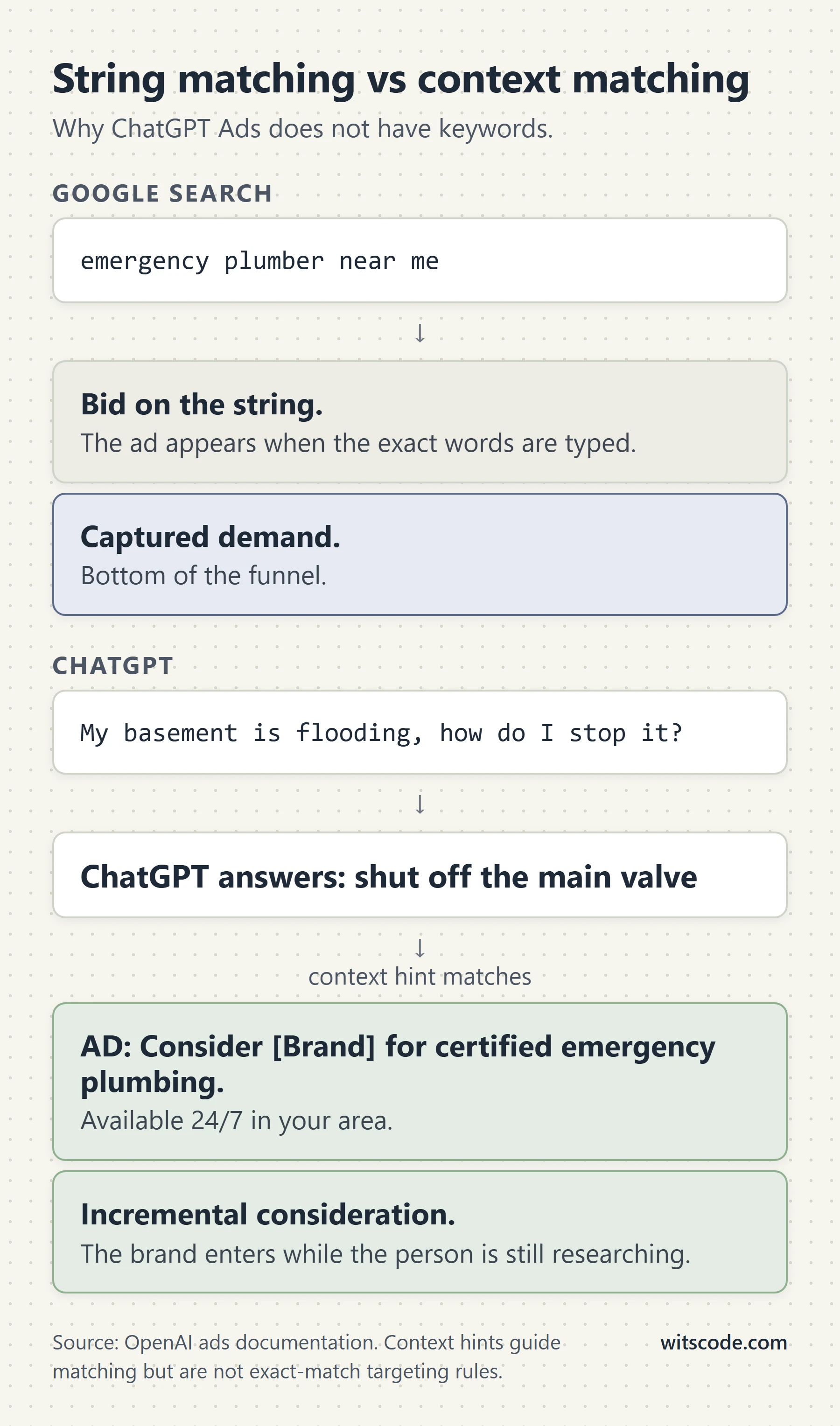
You do not buy keywords. You write context hints, which are plain-language descriptions of the conversations where your product is relevant. The matching is semantic and probabilistic. OpenAI states plainly that hints "guide matching but aren't exact-match targeting rules." There is no exact match, no phrase match, and no search terms report in the sense you know it.
Most categories cannot advertise yet. The ad policy limits the initial test period to a short list of consumer verticals. If you sell B2B software, you are almost certainly not in it. Read the policy section before you plan a budget.
The API is much bigger than the documentation. OpenAI publishes an OpenAPI spec at https://developers.openai.com/ads/openapi.json. Version 2.3.0 of that spec exposes 70 paths and 88 operations. The written guides cover roughly half. Native lead forms, webhook lead delivery, and conversational Business Agents are all in the spec, fully typed, and were mentioned nowhere in the prose docs until September 2026, when OpenAI announced the agent product as Sponsored Agents. That gap is the single most useful thing in this guide, and it is covered in detail below.
What ChatGPT Ads is not
It is not a search engine ad product with a different skin. There is no query, there is a conversation. The unit of targeting is a thread, not a string.
It is not pay-per-conversion, even when you pick the conversion objective. More on that in the oCPC section, because it is the most commonly misread part of the platform.
It is not a way to influence what ChatGPT says. OpenAI runs ads on separate systems from the model and states that ads do not change the answer. Whatever you think of ads in an assistant, buying them does not buy you a mention in the response.
Where the ads appear, and who sees them
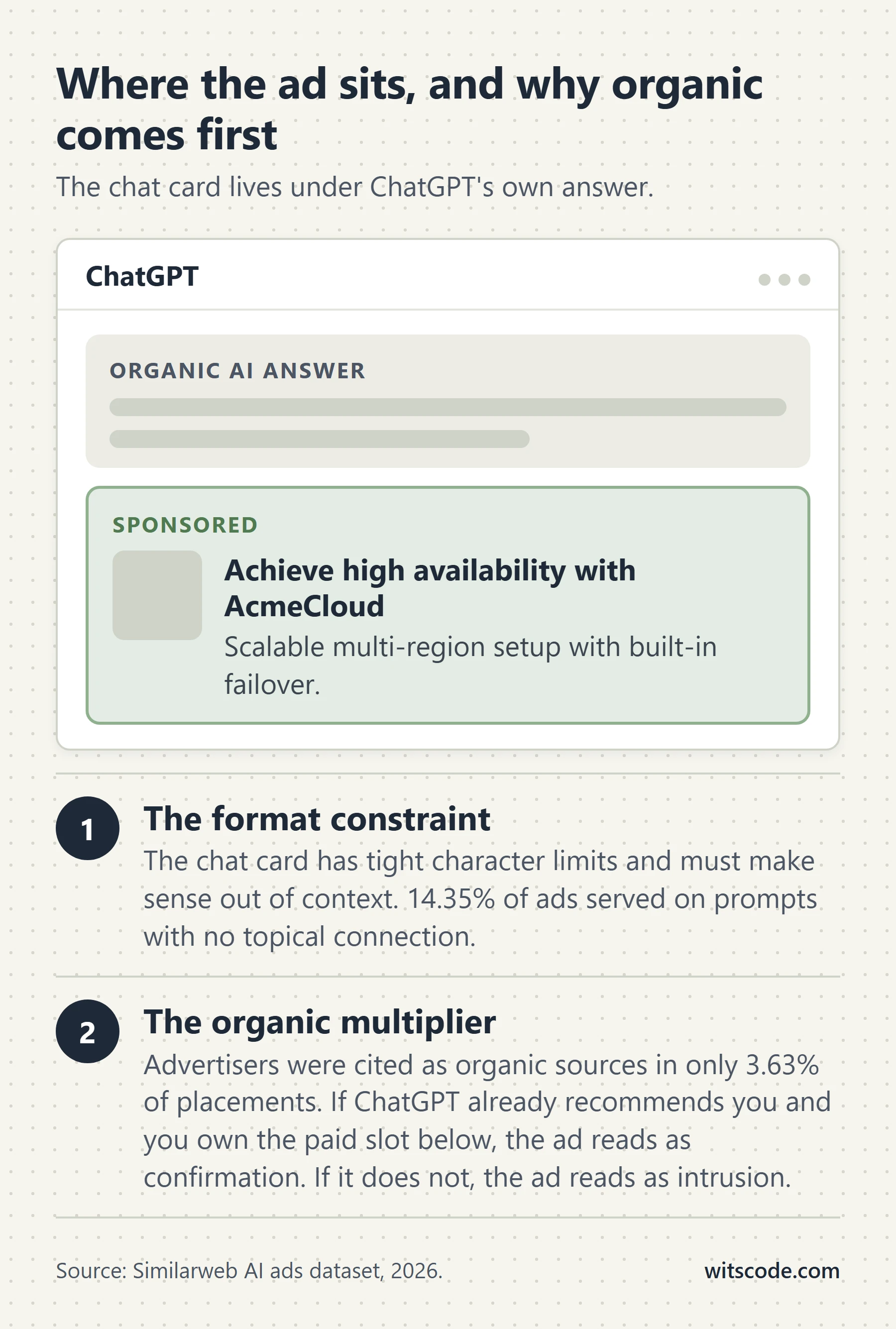
Ads render below the end of a ChatGPT response, labeled as sponsored and visually separated from the answer, according to OpenAI's user-facing help article on ads in ChatGPT.
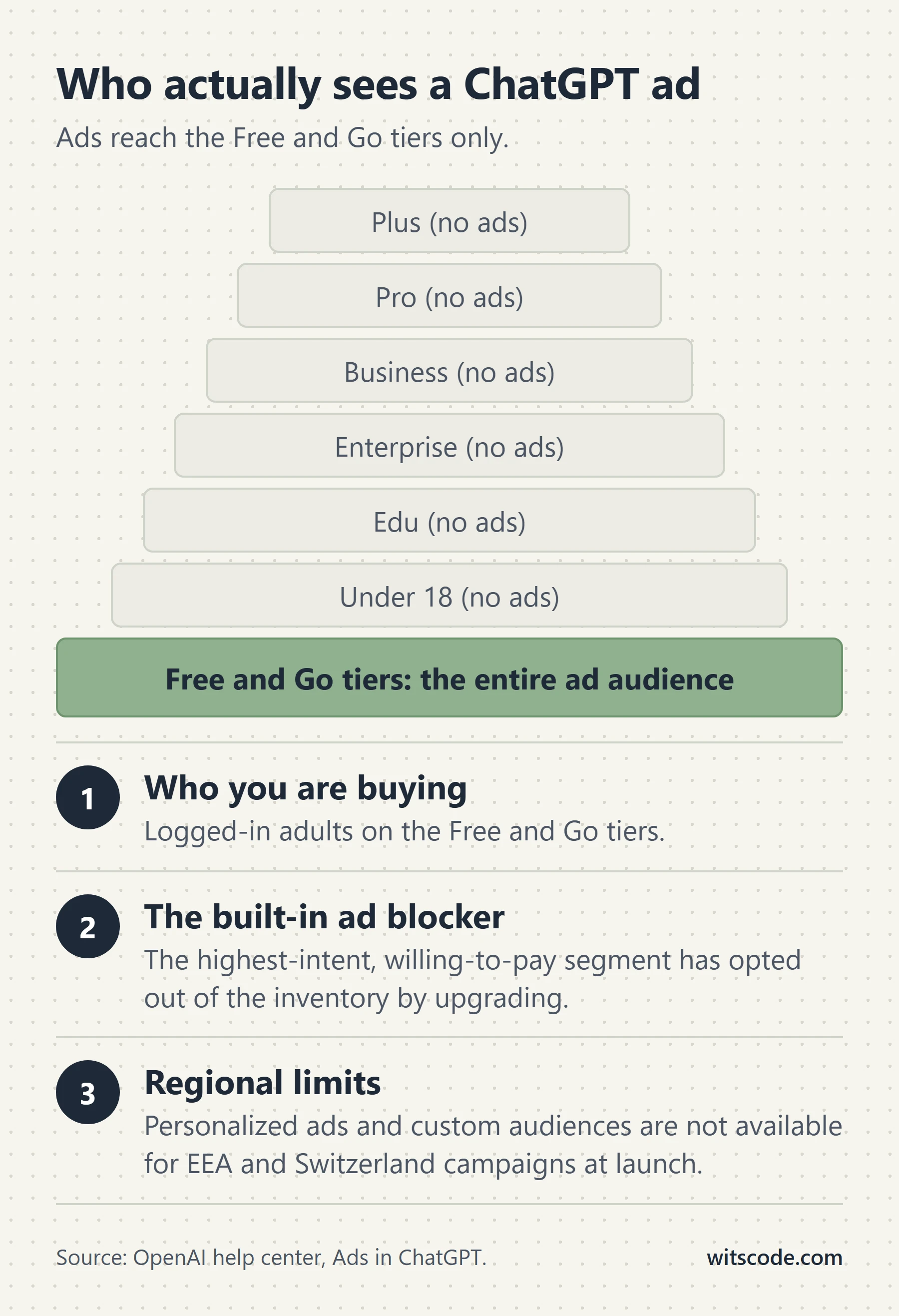
The audience is narrower than "ChatGPT users." Per that same article:
- Ads appear only on the Free and Go tiers.
- Plus, Pro, Business, Enterprise, and Edu do not show ads.
- Accounts identified as belonging to users under 18 do not get ads, using account-level age information and age prediction.
- Temporary Chats never show ads.
- Ads did not appear in the ChatGPT Atlas browser during the test.
This matters for your media plan in a way that is easy to skip past. The paying, high-intent, professionally-motivated segment of ChatGPT's user base is the segment you cannot reach. You are buying the free tier. If your buyer is a senior engineer or a VP who expenses a Plus subscription, they are not in this inventory.
The rollout timeline
Dates, from OpenAI's own announcements:
| Date | What happened | Source |
|---|---|---|
| January 16, 2026 | OpenAI announces the intent to test ads on the US Free and Go tiers, and brings ChatGPT Go to the US | Our approach to advertising |
| February 9, 2026 | The US test begins | Ads in ChatGPT help article |
| May 5, 2026 | Beta self-serve Ads Manager opens, with CPC bidding | New ways to buy ChatGPT ads |
| August 11, 2026 | Expansion to the UK, Mexico, Brazil, Japan, and South Korea confirmed | Testing ads in ChatGPT |
| August 18, 2026 | Announced expansion across 31 European markets | ChatGPT Ads expands across Europe |
| August 31, 2026 | Self-service Ads Manager live across those European markets; ad policy v1.5 published | Expanding access to AI with ChatGPT Ads |
In the August 31 post, OpenAI states the ads business reached a $1B annualized revenue run rate in under 200 days, with tens of thousands of advertisers. Read that as a signal about OpenAI's commitment, not about your likely CPA.
What data selects the ad
This is the part your legal and privacy people will ask about, and it is worth getting right because there is a lot of confident nonsense written about it.
Always used for ad selection: the content of the current chat thread, plus basic context such as general location and language.
Additionally used when Personalized Ads is on: the current thread including personalized model responses, ad interaction history, and past chats and memory. If memory is enabled, ChatGPT may reference saved memories and recent chats when picking an ad.
What advertisers receive: aggregated, non-identifying reporting. Views and clicks. Not chats, not chat history, not memories, not name, email, precise location, or IP address. If a user messages an advertiser through an ad, the advertiser sees only the messages the user sent.
Users get an Ad Controls settings panel: turn off personalization, view ads history and topics, delete ads data, and a per-ad menu with Hide ad, Report ad, About this ad, and Ask ChatGPT. There is also an Ads-Free option on the Free plan that removes ads in exchange for lower message limits and reduced features.
One regional rule that lives only in the help center and not in the ad policy: personalized ads are not initially available in the European Economic Area or Switzerland. Custom audiences are likewise unavailable for EEA and Switzerland campaigns. If your campaign is European, plan for contextual matching only.
Can you even advertise? Read the policy before you plan a budget
This is the first gate, and most guides bury it at the bottom. Do it first, because the answer for a large share of businesses is no.
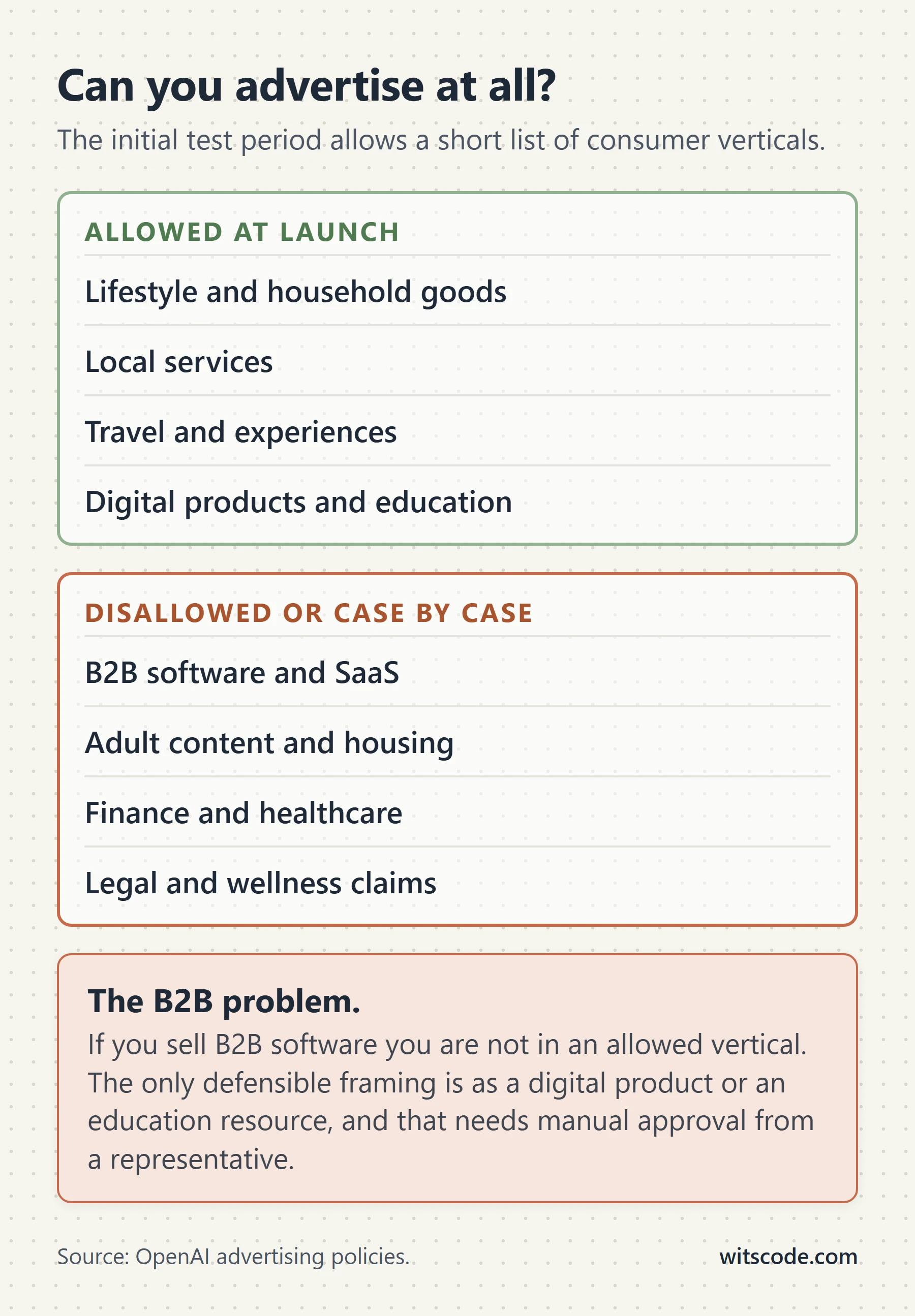
The OpenAI ad policies page, version 1.5 as of August 31, 2026, states that during the initial test period ads are primarily limited to consumer verticals: lifestyle and household goods, local services, travel and experiences, and digital products or education. A later section on the same page restates the same four slightly differently as household and consumer goods, local services, travel and entertainment, and digital products and education. Both phrasings are hedged with "primarily" and "such as." Neither is a formal enumerated list, which means eligibility is a judgment call made by OpenAI's reviewers, not a lookup table you can check yourself.
Then the line that decides it for everyone else: all other categories are disallowed at launch.
The eligibility table
| Category | Status | Notes |
|---|---|---|
| Lifestyle and household goods | Allowed | Core launch vertical |
| Local services | Allowed | Core launch vertical |
| Travel and experiences | Allowed | Core launch vertical |
| Digital products and education | Allowed | Core launch vertical |
| Financial services | Case by case, US only, approved advertisers | Auto loans, credit cards, credit monitoring, deposit accounts, financial planning, insurance, investment services, mortgages, personal loans, payment services. Never: credit repair, debt settlement, bullion and alternative investments. Outside the US, generally prohibited |
| Healthcare and medicine | Case by case, US only, approved advertisers | Consumer medical devices and wearables, dental, supplements, non-advocacy disease awareness, health insurance, hospitals and urgent care, diagnostics, minimally invasive cosmetic procedures, vision. Outside the US, generally prohibited |
| Legal services | Case by case, US only | Advertiser must be licensed in the jurisdiction where the ad shows. Outside the US, prohibited |
| Adult and dating | Disallowed | Includes companion apps |
| Alcohol and tobacco | Disallowed | Over 0.5% ABV, cigarettes, vaping, nicotine |
| Gambling | Disallowed | Casino travel and non-cash games may qualify |
| Political content | Disallowed | Includes public-policy advocacy and contested social issues |
| Recreational drugs | Disallowed | Non-intoxicating hemp-derived products may qualify |
| Counterfeit goods | Disallowed | |
| Housing and job listings | Disallowed at listing level | Linking to a listings platform is allowed if neither creative nor landing page names a specific listing |
| Wellness claims | Disallowed | Diet pills, detox, health coaching, unsupported supplements |
| Everything else | Disallowed at launch |
The B2B problem nobody wants to say out loud
Read that list again. There is no B2B category. No professional services, no agencies, no software, no consulting, no manufacturing, no wholesale.
If you sell B2B, you are not in a named allowed vertical, and the policy says all other categories are disallowed at launch. The closest defensible fits are local services if you genuinely serve a local market, and digital products or education if what you are advertising is a course, a tool, or a downloadable resource rather than a retainer.
That is a real constraint and you should treat it as one. Do not build a pixel, a Conversions API pipeline, and a campaign structure and then discover at review that your category is not eligible. Confirm your eligibility with OpenAI before you build anything. The advertiser policies section adds another trap: advertisers whose primary business model sits in a restricted category may be ineligible entirely, even for an otherwise-compliant product.
Placement exclusions
Separately from what you sell, there is where your ad can appear. OpenAI blocks ads next to two classes of conversation.
Sensitive user contexts. Emotionally reliant contexts, mental and personal health conversations, and sensitive user journeys.
Brand-unsafe contexts. Child safety, circumventing safeguards, cyber abuse, dangerous activities, debated social content, fraud and deception, graphic or exploitative sexual content, graphic violence, hate and harassment, illicit content, IP infringement, misinformation, obscenity and profanity, political content, privacy, regulated goods, suicide and self-harm, terrorism, weapons.
One policy change is easy to miss. Version 1.1 of the policy, in April 2026, stopped categorically blocking ads in medical, legal, and financial advice contexts. Sensitive and personal conversations remain ineligible. So an ad can now run adjacent to a general question about how mortgages work, but not adjacent to someone describing their own financial distress.
The rule that will get your creative rejected
Ads must be clearly distinguishable from the ChatGPT product experience. OpenAI can remove or require changes to any ad that imitates the appearance, functionality, or voice of ChatGPT or another OpenAI interface in a way that could make a user think the ad is part of the product.
In practice: do not style your creative as a chat bubble. Do not write your ad body in the second-person assistant voice. Do not use an interface screenshot that reads as a ChatGPT response. This is the most common self-inflicted rejection on a platform where the temptation to blend in is enormous.
One more operational rule worth pinning to the wall, from the ad integrity section: ads or landing pages that cannot be reviewed or evaluated by OpenAI's systems are not eligible to run. If your landing page sits behind a bot wall, a country block, an aggressive WAF, or a JavaScript-only render that a crawler cannot resolve, your ad does not serve. Fix the reviewability before you debug the campaign.
How matching works: context hints, not keywords
There is no keyword. There is a context hint, and it sits on the ad group.
curl -X POST "https://api.ads.openai.com/v1/ad_groups" \
  -H "Authorization: Bearer $OPENAI_ADS_API_KEY" \
  -H "Content-Type: application/json" \
  -d '{
    "campaign_id": "cmpn_101",
    "name": "US English",
    "description": "Primary English-speaking audience.",
    "context_hints": ["productivity", "team collaboration"],
    "status": "active",
    "bidding_config": {
      "billing_event_type": "impression",
      "max_bid_micros": 60000
    }
  }'
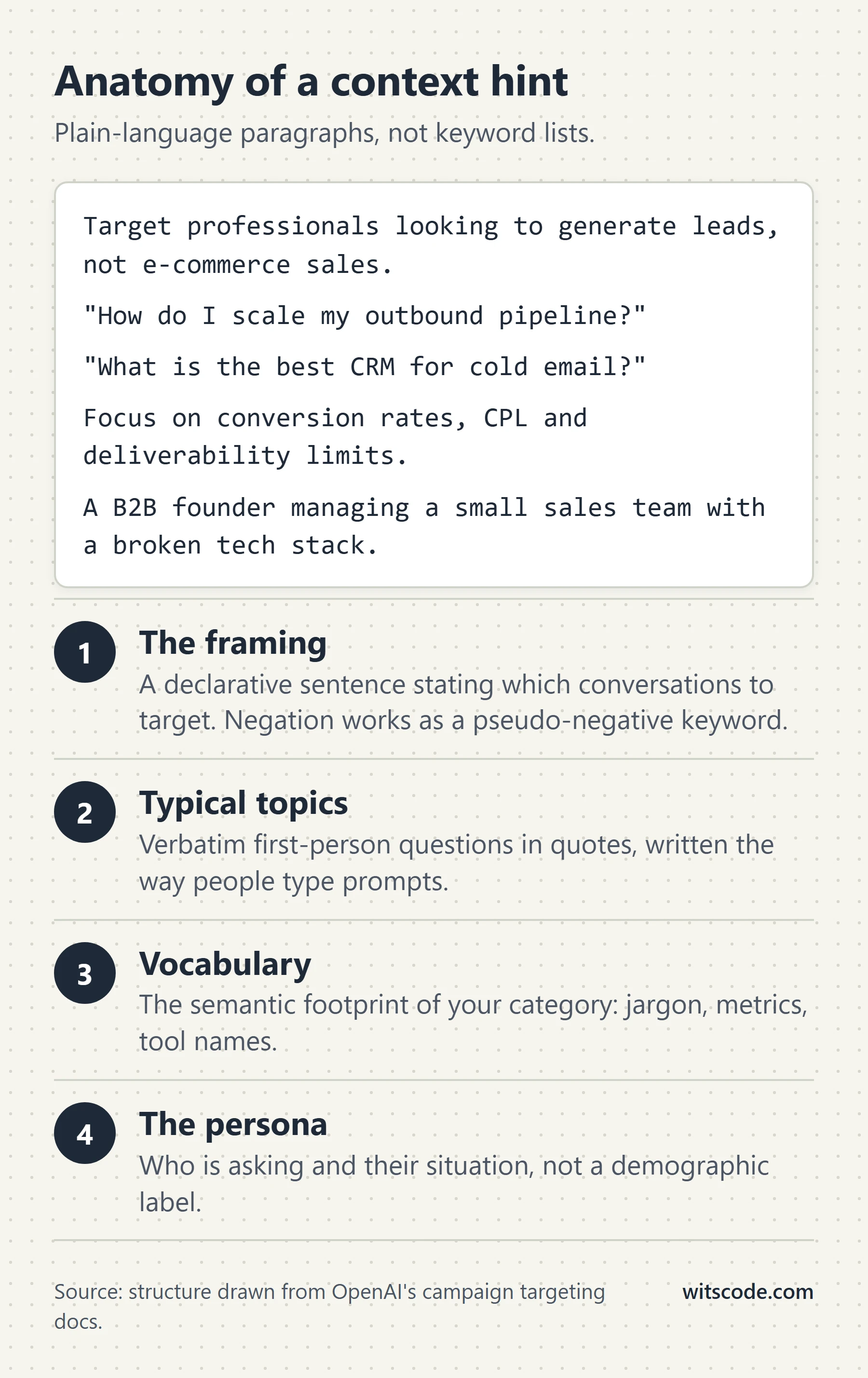
OpenAI's framing is that hints describe the conversations, topics, or keywords where your product may be relevant, and that they guide matching without being exact-match targeting rules. There is no guarantee your ad appears in any specific conversation.
Practically, that changes how you write them.
Write hints as topics and situations, not as bid terms. "team collaboration" and "productivity" in OpenAI's own example are topics. A hint like "buy project management software cheap" is a search query, and search queries are the wrong shape for this system.
One theme per ad group. You cannot see a search terms report and you cannot negate at the ad group level, so the ad group is your only unit of thematic control. Mix three themes into one ad group and you have permanently lost the ability to tell them apart in reporting.
Negatives are account-level only. The OpenAPI spec exposes POST /ad_account/negative_keywords, and it takes a single array of up to 100 strings, each up to 100 characters, for the entire ad account. That is it. There is no campaign-level or ad-group-level negative list in the spec. Plan your account structure knowing that a negative you add for one product line applies to every campaign you run.
A note on what nobody can tell you
Several agency guides describe the ChatGPT Ads auction as a "relevance-weighted, second-price auction." That description does not appear in any OpenAI primary source. PPC Land reported in April 2026 that at that point there was no live auction at all, and that pricing reflected negotiated minimums and pilot budgets. An auction has clearly arrived since self-serve launched, but its exact mechanics have not been published. Treat auction-mechanics claims you read elsewhere, including any inference in this guide, as unconfirmed.
What ChatGPT Ads actually costs
Start with what is verifiable, because most of the cost tables circulating online are agency lead magnets with no disclosed methodology.
| Figure | Value | Source | Date |
|---|---|---|---|
| Launch CPM | $60 | Digiday | April 2026 |
| CPM by April 2026 | $25 to $45, with one agency averaging around $45 | Digiday | April 2026 |
| Recommended max CPC bid | $3 to $5 | Search Engine Journal, sourcing Digiday | April 2026 |
| Pilot minimum spend | $200,000 to $250,000 | Digiday, PPC Land | Early 2026 |
| Minimum cut | $50,000 | PPC Land | April 13, 2026 |
| Minimum removed | None | PPC Land | May 5, 2026 |
| Minimum daily budget, self-serve | $25 USD, with local equivalents | Reported from OpenAI's published guidance | Mid 2026 |
| Default max bid on the reach objective | $60 CPM | OpenAI Ads Manager guidance | 2026 |
Comparative CPMs quoted alongside the $60 figure in Digiday's reporting: Facebook $4.82, Instagram $7.63, Google Display $10.33, TikTok $3.02, LinkedIn $39.19. Even at the reduced $25 to $45 range, ChatGPT is priced above LinkedIn on a CPM basis. That is the most expensive mainstream inventory most performance teams buy.
On a CPC basis, $3 to $5 is unremarkable. It sits below median Google Search CPCs in many competitive categories and above a typical Meta click. If your unit economics work on Google Search, they can plausibly work here.
What does not exist, and you should not pretend otherwise
There is no independent, methodology-disclosed benchmark set for ChatGPT Ads. No research firm, no measurement vendor, no platform has published cross-advertiser CPM, CTR, CPA, or conversion-rate benchmarks by industry. Every tidy table you have seen with per-vertical CTRs comes from an agency blog with no stated sample size, no spend base, and no method. Do not put those numbers in a client deck.
There is no named, published case study with attributable results. OpenAI has cited an e-commerce advertiser hitting roughly 3x return on ad spend across campaigns in 28 days, and a partner reporting that more than 80% of its ChatGPT ad traffic came from new customers. Both are anonymized, both come from OpenAI's own marketing, and neither has a disclosed methodology. Treat them as directional at best.
The auction mechanics are not published. See the earlier note. PPC Land reported that in April 2026 there was no live auction at all.
The default click attribution window is not published. OpenAI's example uses attribution_window_days: 30. The permitted range and the default are not stated anywhere in the developer documentation.
Saying "we do not know" here is not a weakness. It is the difference between a media plan and a guess.
The performance reality check
There is one genuinely useful third-party dataset, and it is not flattering.
SE Ranking studied 50,006 commercial prompts across 20 US niches, reported by Search Engine Land in August 2026 and MediaPost. The findings:
- Ads appeared on 25.94% of commercial prompts.
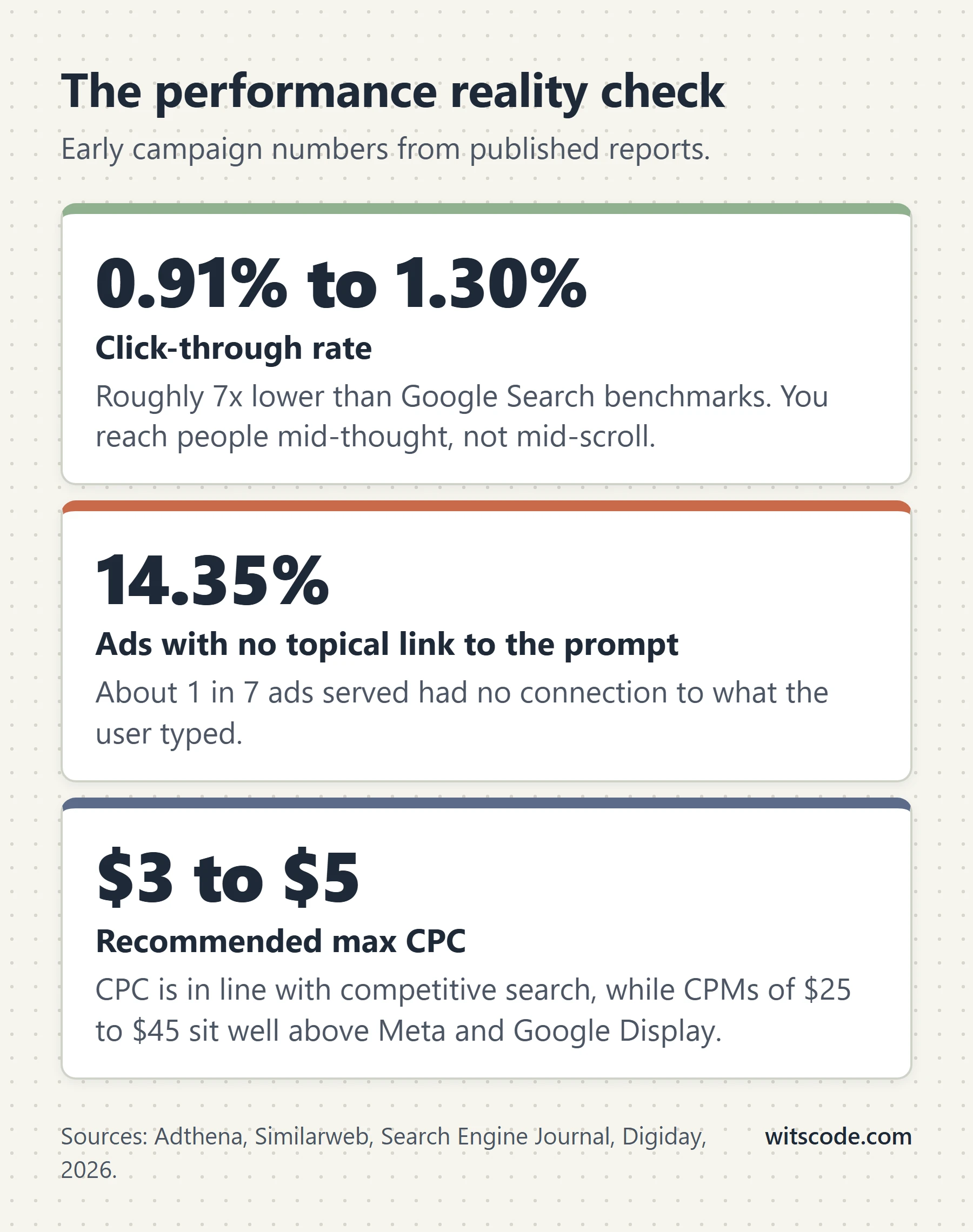
- 14.35% of ads had no topical connection to the prompt. Roughly one in seven.
- In Relationships and in News and Politics, irrelevance exceeded 50%.
- Advertisers were cited as sources in only 3.63% of placements, against 11.53% in Google AI Mode. Buying a ChatGPT ad does not appear to make a brand meaningfully more likely to feature in the answer itself.
- SE Ranking's own test campaigns: over 97,000 impressions, 1,263 clicks, a 1.30% CTR, and minimal sign-ups.
- 1,159 unique advertisers, with a single advertiser taking 13.56% of all ad units.
Separately, an Adthena client campaign produced a 0.91% CTR against a 6.4% Google Search benchmark in the same sector, roughly seven times less engagement. That figure has been reported widely by Search Engine Journal and eMarketer. Adthena also measured ads appearing on about 0.8% of responses in early testing, which is a very different denominator from SE Ranking's commercial-prompt subset. Both can be true.
The structural problem with the audience
SE Ranking's paid search specialist named the flaw that no optimization fixes. Ads reach only Free and Go users. The more someone looks like a high-value customer, the more likely they have paid for an ad-free plan.
Sit with that for a second. On Google, buying the top slot on a commercial query reaches everyone who searched it. On ChatGPT, the segment most able and willing to spend money is systematically excluded from the inventory, because they upgraded. Every other targeting decision you make sits on top of that constraint.
What advertisers said in the early months
Search Engine Land, March 2026: the pilot left advertisers without proof of ROI. No performance data beyond clicks and views, no automated buying, deals run through calls, emails, and spreadsheets. Two agency executives said they could not prove the ads drove measurable business results.
Campaign US, March 19, 2026: multiple brands reported less than ideal results in their first weeks, citing poor click-through rates and opaque measurement.
eMarketer, March 2026: DEPT's SVP of media said the ad-serving process lacks transparency. An executive noted the ads were not yet shown often enough to assess impact.
Search Engine Journal's Brooke Osmundson gave the most useful piece of advice in the whole discourse: most mid-market advertisers do not need to rush in the moment self-serve opens. Her framing was curiosity, not urgency.
Counterweight, and it is real: Digiday reported in May 2026 that at a room of UK marketing executives, every hand went up when asked who wanted to be ready for ChatGPT ads. Adthena's CMO called it a pivotal moment for search marketers. Entropy Consulting's Alex Tait supplied the sober version: in a conversational environment, budgets will not follow unless advertisers can demonstrate results.
And the fact that settles the argument commercially, whatever anyone feels about it: OpenAI reported a $1B annualized revenue run rate in under 200 days, with tens of thousands of advertisers.
The trust problem, stated honestly
This deserves a section because it is a real business risk, not a talking point, and because sanitizing it makes a guide useless.
What happened in December 2025
Before paid ads existed, ChatGPT began surfacing app suggestions mid-conversation. A Pro subscriber got a Peloton pitch while discussing something unrelated. Another got Target shopping prompts while asking about disk encryption. Users paying $200 a month were seeing what looked like advertising.
The reaction, as reported by Tom's Guide, included lines like "I might just cancel my subscription. I didn't pay for in-chat ads."
OpenAI's own people conceded the point. A data lead said the implementation was bad and confusing. Chief Research Officer Mark Chen said anything that feels like an ad needs care, and that they fell short. OpenAI disabled the promotional app messages on December 8, 2025.
Two separate controversies get conflated constantly, and the conflation is the most common error in coverage of this platform. The December 2025 incident was unpaid app suggestions shown to paying subscribers. The February 2026 launch was a deliberately conservative paid product: labeled, visually separated from the answer, free tiers only, opt-out available, sensitive topics excluded. The launch produced far less user anger than the December event did.
What the survey data actually says
Two studies point in opposite directions, and you need both.
Stated distrust is high. An Ipsos Consumer Tracker survey of 1,085 US adults in February 2026 found 63% agreed ads would reduce their trust in AI search results. Only 24% disagreed. Reported by Search Engine Journal.
Revealed behavior is tolerant. Forrester's ConsumerVoices survey of 409 answer-engine users across the US, UK, and Canada, fielded February 6 to 9, 2026, found 83% would stay on the free tier despite ads. Only 6% said they would pay to avoid them.
Both are true. People say ads erode their trust, and they keep using the free product anyway. Anyone quoting only one of those numbers is selling you something.
The lived experience appears milder than the rhetoric. TechRadar's reviewer actually used the ad-free toggle and reported the ads barely interfered with the conversation, closer to a sponsored Google result than an unskippable video. He kept the ads on rather than accept the reduced rate limits. He also named the structural risk precisely: even the suggestion that money could influence an answer would undermine the whole experience.
The publisher side
Publishers see it differently again. Digiday's January 2026 media briefing quoted one publishing executive on OpenAI monetizing answers built partly from publisher content: "That's a bitter pill." Bauer Media's chief product officer framed the shift as moving from how answers work to who gets represented, surfaced, and paid. Three named threats: no revenue share, traffic displacement as users transact inside the chat, and direct competition for ad budgets.
Why this matters for your media plan
Three concrete implications, not sentiment.
Creative that feels like the assistant will get rejected and will earn resentment. The policy already forbids imitating ChatGPT's appearance, functionality, or voice. The user backlash is specifically about ads that blur into the product. Both point the same way: make your ad look like an ad.
Ad load is going to rise, and tolerance is measured at today's load. The Forrester 83% figure was collected when ads were new and sparse. Whether it holds at higher frequency is unknown.
Competitors are using this against you. Anthropic ran Super Bowl advertising in February 2026 with the line "Ads are coming to AI. But not to Claude." Sam Altman called the campaign dishonest. Whatever you make of that exchange, ad-free positioning is now a live competitive claim in the category, and your brand appearing in an assistant's ad slot is a thing some of your buyers will notice.
Step 1: get the account and the API key
Two paths, and you can use both at once.
Self-serve. Sign up at ads.openai.com, complete business verification, add a billing method, and you are in the Ads Manager. Reported minimum daily budgets are $25 USD, with local equivalents in other currencies. The $200,000 to $250,000 pilot minimum that applied in early 2026 was cut to $50,000 in April and removed entirely when self-serve opened on May 5, 2026, per PPC Land's reporting.
API. The base URL is https://api.ads.openai.com/v1. Authentication is a bearer token, one key per ad account, issued from the Settings tab in the Ads Manager. Rate limits are 600 requests per minute per endpoint and 1,200 per minute overall, enforced per ad account and per IP. If you run several client accounts from one server, you will hit the IP limit before you hit any account limit. Plan your egress accordingly.
Confirm which account a key belongs to before you do anything else:
curl -sS "https://api.ads.openai.com/v1/ad_account" \
  -H "Authorization: Bearer $OPENAI_ADS_API_KEY"
Micros: the unit that causes the most expensive mistakes
Every monetary value in the API is in micros, meaning millionths of the currency unit.
| You mean | You send | Field |
|---|---|---|
| $60.00 CPM | 60000 |
max_bid_micros with billing_event_type: "impression" |
| $4.00 CPC | 4000000 |
max_bid_micros with billing_event_type: "click" |
| $100.00 CPA target | 100000000 |
max_bid_micros on an oCPC ad group |
| $1.00 minimum campaign budget | 1000000 |
budget.lifetime_spend_limit_micros |
| 1.5x bid multiplier | 1500000 |
bid_multiplier_micros |
Note the trap in row one. A CPM bid is priced per thousand impressions, so a $60 CPM is 60000 micros, not 60000000. Get that wrong in the wrong direction and you have bid $60,000 CPM. Write a helper function and never type a micros literal by hand.
// One function. Use it everywhere. Never inline a micros literal.
const micros = (amount) => Math.round(amount * 1_000_000);

micros(4);    // 4000000  -> $4.00 CPC
micros(0.06); // 60000    -> $60.00 CPM (priced per 1,000 impressions)
micros(100);  // 100000000 -> $100.00 CPA target
Brand review and the favicon trap
Before conversions setup will work, your brand review must be approved. The most common blocker is missing_favicon. The fix is to upload an image of at least 128 by 128 pixels with purpose: "account_favicon", then POST /ad_account/brand. This is a real gate, not a warning, and it stalls plenty of first-day integrations.
Step 2: the three-layer model
Campaign, then ad group, then ad. All three must be enabled, and the ad must pass review, before anything serves at all.
CAMPAIGN                     cmpn_101
  budget (lifetime, micros)
  schedule (start_time, end_time)
  location targeting
  custom audience targeting
  bidding_type   <-- PERMANENT, set at creation
  conversion_event_setting_ids
        |
        +-- AD GROUP          adgrp_301
        |     context_hints[]
        |     billing_event_type  (impression | click)
        |     max_bid_micros
        |     product_set
        |     custom_audience_bid_multipliers
        |           |
        |           +-- AD     ad_501   creative: chat_card
        |           |            title, body, target_url, file_id
        |           |            review_status: in_review | approved | rejected
        |           |
        |           +-- AD     ad_502   creative: product_ad_template
        |                        image and destination pulled from the feed
        |
        +-- AD GROUP          adgrp_302  (second theme, second set of hints)
Reviews usually clear in minutes. Watch review_status on each ad: in_review, then approved or rejected.
Creating a campaign
curl -X POST "https://api.ads.openai.com/v1/campaigns" \
  -H "Authorization: Bearer $OPENAI_ADS_API_KEY" \
  -H "Content-Type: application/json" \
  -d '{
    "name": "Spring launch",
    "description": "Promote the new productivity bundle.",
    "start_time": 1735689600,
    "end_time": 1738368000,
    "status": "active",
    "budget": {
      "lifetime_spend_limit_micros": 25000000
    },
    "targeting": {
      "locations": {
        "include": [{ "id": "2000043" }, { "id": "3000194" }]
      }
    }
  }'
Two details the documentation does not flag for you.
The API campaign object takes a lifetime budget, not a daily one. budget.lifetime_spend_limit_micros is the required field, minimum 1000000. The self-serve Ads Manager exposes daily budgets with a reported $25 per day minimum. If you script campaigns through the API and manage them in the UI, you are working with two different budget models on the same object. Decide which one owns pacing and stick to it.
Omitting location targeting means everywhere. If you do not provide targeting.locations.include, the campaign can target all available locations. That is the opposite of most platforms' default-to-nothing behavior, and it is how test campaigns quietly serve in markets you do not sell to.
Creating an ad
curl -X POST "https://api.ads.openai.com/v1/ads" \
  -H "Authorization: Bearer $OPENAI_ADS_API_KEY" \
  -H "Content-Type: application/json" \
  -d '{
    "ad_group_id": "adgrp_301",
    "name": "Planner launch card",
    "status": "active",
    "creative": {
      "type": "chat_card",
      "title": "Try the new workspace planner",
      "body": "Coordinate tasks, docs, and meetings in one place.",
      "target_url": "https://example.com/workspace-planner",
      "file_id": "file_901"
    }
  }'
Creative limits: title 3 to 50 characters, body up to 100 characters, target_url up to 2,048. Names across all objects are 3 to 1,000 characters. Chat cards require both a target_url and a file_id from the upload endpoint. Product ad templates pull image and destination from the feed item, so they need neither.
One hundred characters of body copy is not a lot. Write the offer, not the brand story.
Account limits worth knowing before you design a structure
- 5,000 campaigns, 5,000 ad groups, and 5,000 active-or-paused ads per self-serve account.
- Campaigns hold up to 2,500 location ids.
- Bulk API: up to 1,000 operations per job, 16 MiB body, 10 create-requests per 10 seconds. Limited preview, per account.
- Archiving is irreversible everywhere. Archive a campaign, ad group, ad, audience, or feed and it does not come back. Pause instead, unless you are certain.
Step 3: choose a bidding type, permanently
This is the decision you cannot undo, and it is the single most consequential line in the entire API.
bidding_type is set at campaign creation and cannot be changed afterward. You cannot convert a CPM campaign to CPC. You cannot convert either to conversions. If you want a different bidding type, you build a new campaign.
bidding_type |
You pay per | The system optimizes for | billing_event_type on the ad group |
What max_bid_micros means |
|---|---|---|---|---|
impressions (default) |
1,000 impressions | Broad reach | impression |
Your max CPM |
clicks |
Valid click | People likely to click | click |
Your max CPC |
conversions (oCPC) |
Valid click, not conversion | Clicks likely to convert | click (required) |
Your target CPA |
If you omit bidding_type, you get impressions. That is a reach product being used as a default, and it is the wrong default for almost every performance advertiser.
A decision tree you can actually follow
Do you have working conversion tracking, verified with real events?
  |
  NO ---> Do you need reach and brand presence, or clicks?
  |          reach   -> bidding_type: "impressions", billing: impression
  |          clicks  -> bidding_type: "clicks",      billing: click
  |          (Then go build tracking. Come back.)
  |
  YES --> Is your goal event one of the STANDARD events?
             |
             NO (it is a custom event)
             |    -> Custom events cannot be an oCPC goal. Either map your
             |       goal onto a standard event, or run "clicks".
             |
             YES
                  |
                  Is conversion bidding enabled on your ad account?
                     NO  -> you get 403 "Conversion bidding is not enabled".
                     |       Ask your OpenAI rep to turn it on.
                     YES -> bidding_type: "conversions"
                            billing_event_type: "click"
                            max_bid_micros = your CPA target
                            exactly ONE active standard event setting
Step 4: understand oCPC before you use it
Conversion-optimized campaigns are the reason to build the measurement stack at all, and they are also the most misunderstood feature on the platform.
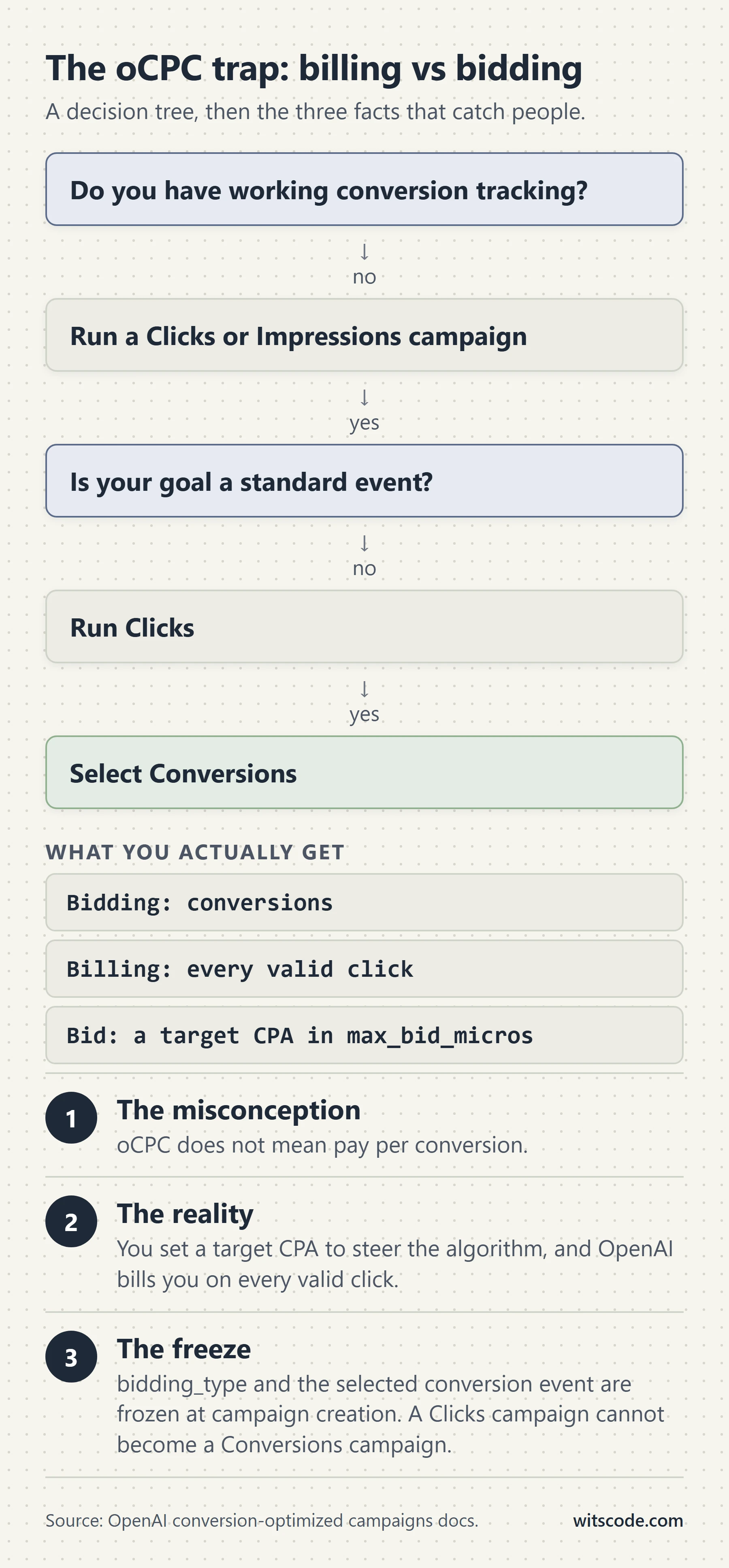
You set a CPA bid. OpenAI bills you per click.
That is not a quirk of wording. From OpenAI's own conversion-optimized campaigns documentation: OpenAI charges you only when a valid click occurs, and the auction determines the actual CPC. max_bid_micros is described as an optimization input, not a conversion charge. The system uses your selected conversion event together with ad quality, relevance, click likelihood, and conversion likelihood to favor clicks that are more likely to lead to that event.
WHAT YOU SET                 WHAT THE SYSTEM DOES              WHAT YOU PAY
------------                 --------------------              ------------
max_bid_micros               predicts P(conversion | click)    a CPC set by
= 100000000                  and bids harder into auctions     the auction,
= $100.00 CPA target   --->  where that probability is    ---> on every valid
                             high                              click

                                                               NOT per
                                                               conversion
The practical consequence: a $100 CPA target does not cap your cost per conversion at $100. It tells the system how much a conversion is worth to you so it can decide how aggressively to buy clicks. If your landing page converts at half the rate the model expects, you pay for every one of those clicks and your actual CPA lands well above your bid. Watch realized CPA against bid from day one, not week three.
The five oCPC preconditions
bidding_type: "conversions"set at campaign creation. It cannot be added to an existing campaign.- Exactly one active standard conversion event setting on the campaign, referenced by
conversion_event_setting_ids. Custom events are never valid optimization goals. - The ad group must use
billing_event_type: "click". - Live conversion tracking through the pixel, the Conversions API, or both, with the event setting bound to at least one active source.
- Conversion bidding enabled on the ad account. If it is not, you get
403 Conversion bidding is not enabled, and no amount of retrying fixes it. Contact your rep.
What is frozen after creation
- The campaign's bidding type.
- The selected conversion event.
You can adjust the bid. You cannot change what you are optimizing toward. If you launch an oCPC campaign against registration_completed and later decide order_created is the real goal, that is a new campaign and a new learning period.
curl -X POST "https://api.ads.openai.com/v1/campaigns" \
  -H "Authorization: Bearer $OPENAI_ADS_API_KEY" \
  -H "Content-Type: application/json" \
  -d '{
    "name": "Acme purchases",
    "status": "paused",
    "budget": {
      "lifetime_spend_limit_micros": 250000000
    },
    "bidding_type": "conversions",
    "conversion_event_setting_ids": ["ces_123"]
  }'
Note the "status": "paused" in OpenAI's own example. Create paused, verify the ad group billing event and the ad review status, then activate. There is no undo on spend.
Step 5: build the conversion plumbing
There are three ways to get conversion data into ChatGPT Ads. You will use two of them.
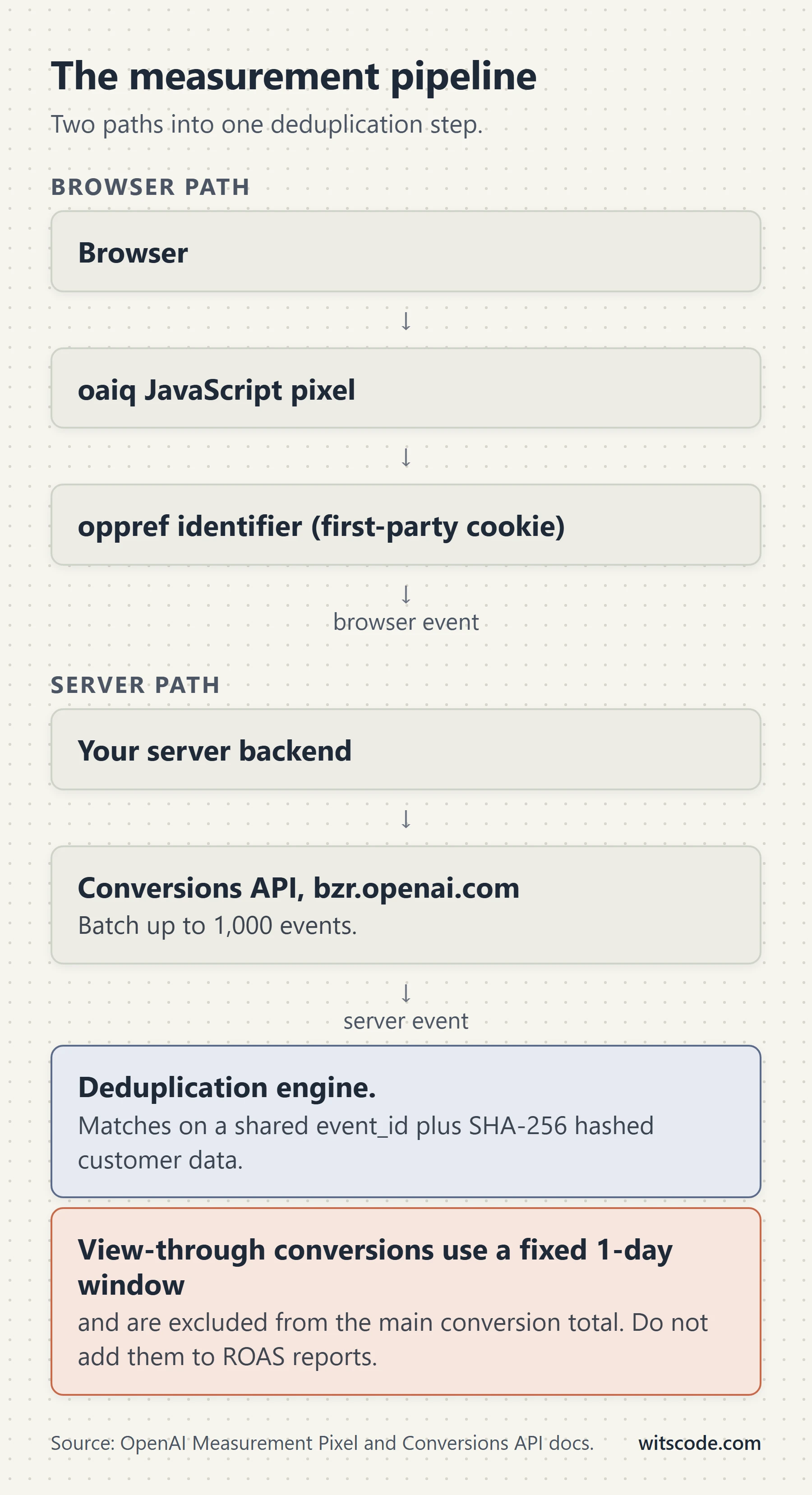
| Path | Runs in | Batching | Captures oppref for you |
Supports a user object |
Use it for |
|---|---|---|---|---|---|
| JavaScript Measurement Pixel | Browser | Yes | Yes | Yes (via init) |
Everything the browser can see, and click matching |
| Conversions API | Your server | Up to 1,000 events per request | No | Yes (per event) | Anything financially meaningful, plus offline, phone, and app events |
| Image tag | Browser, no JS | No, one event per request | No | No | Last-resort fallback where JavaScript cannot run |
OpenAI's own documentation states that the Conversions API "is a more reliable tracking source than the pixel alone." The correct architecture is both, deduplicated. The image tag exists for environments where you cannot run JavaScript at all. Treat it as a fallback, never as a plan.
The provisioning order
Do this in order. Skipping step two is the most common reason a first integration stalls.
GET /ad_accountto confirm which account your key belongs to.- Get brand review to
approved. If the reason ismissing_favicon, upload an image of at least 128 by 128 withpurpose: "account_favicon", thenPOST /ad_account/brand. POST /conversions/pixelsand save both returned ids.POST /conversions/api_keysfor the server-side secret.POST /conversions/event_settingsto define what counts as a conversion.GET /conversions/events?pid=to verify events are landing.
curl -X POST "https://api.ads.openai.com/v1/conversions/pixels" \
  -H "Authorization: Bearer $OPENAI_ADS_API_KEY" \
  -H "Content-Type: application/json" \
  -d '{
    "name": "Acme website",
    "client_type": "web"
  }'
{
  "id": "clidsrc_123",
  "client_type": "web",
  "name": "Acme website",
  "pixel_id": "134534..."
}
Save both. They are different things and they are not interchangeable.
id(clidsrc_123) is the source id. It goes intosource_idson an event setting.pixel_id(the numeric string) is what you put in the pixel snippet and in the?pid=query parameter on Conversions API calls.
Mixing these up produces silent failures: your events go nowhere and your event setting never fires. This single distinction accounts for a large share of "my ChatGPT pixel is not working" threads.
Then the server key. Generate it, store it in your secrets manager, and never let it touch browser code.
curl -X POST "https://api.ads.openai.com/v1/conversions/api_keys" \
  -H "Authorization: Bearer $OPENAI_ADS_API_KEY" \
  -H "Content-Type: application/json" \
  -d '{
    "name": "Acme production conversions"
  }'
Step 6: install the pixel
Put this as high in <head> as you can, on every page you want to measure. Early conversions are lost while the rest of the page loads if you bury it.
<script>
  (function (w, d, s, u) {
    if (w.oaiq) return;
    var q = function () {
      q.q.push(arguments);
    };
    q.q = [];
    w.oaiq = q;
    var js = d.createElement(s);
    js.async = true;
    js.src = u;
    var f = d.getElementsByTagName(s)[0];
    f.parentNode.insertBefore(js, f);
  })(window, document, "script", "https://bzrcdn.openai.com/sdk/oaiq.min.js");

  oaiq("init", {
    pixelId: "<YOUR-PIXEL-ID>",
  });
</script>
Add debug: true to init while you are testing. It logs SDK activity to the browser console. Take it out before you ship.
Content Security Policy
If you run a CSP, and you should, merge in these sources or the pixel silently does nothing.
| Directive | Source | Why |
|---|---|---|
script-src |
https://bzrcdn.openai.com |
Load the SDK |
connect-src |
https://bzr.openai.com |
Send events via fetch or sendBeacon |
connect-src |
https://bzrcdn.openai.com |
Fetch per-pixel configuration |
img-src |
https://bzr.openai.com |
The image request fallback |
Content-Security-Policy: default-src 'self'; script-src 'self' 'nonce-<NONCE>' https://bzrcdn.openai.com; connect-src 'self' https://bzr.openai.com https://bzrcdn.openai.com; img-src 'self' https://bzr.openai.com;
Use a fresh nonce per response and put the same value on the snippet's opening tag. Do not add 'unsafe-inline' just for this pixel. If your policy defines script-src-elem, add the CDN source and your nonce there too.
Note that bzr.openai.com and bzrcdn.openai.com are separate hosts, and neither is openai.com. Allowlisting *.openai.com covers both, but most locked-down policies enumerate hosts explicitly, and teams routinely add one and forget the other. The symptom is an SDK that loads and never sends.
Gate the pixel behind consent
This is the part every GDPR-adjacent site gets wrong, and the ordering is unforgiving.
// 1. Deny FIRST, before init. Not after.
oaiq("consent", false);

oaiq("init", {
  pixelId: "<YOUR-PIXEL-ID>",
});

// 2. Only after the user actually grants measurement consent:
oaiq("consent", true);
Three rules that matter:
The pixel defaults to consent true. Unless you explicitly set false, or the SDK finds a stored denial, it assumes it may measure. If your cookie banner loads asynchronously and the pixel initializes first, you have already measured before the user chose.
Set consent before init, not after. The call order above is the order in OpenAI's own documentation for a reason.
Blocked events are never replayed. When consent is false, the pixel does not send measurement pings, and turning consent on later does not backfill them. Anything that happened while consent was denied is gone permanently. This is different from platforms that queue and flush.
If you use a consent management platform, wire oaiq("consent", ...) to the CMP's measurement or analytics category, fire false synchronously in <head> before the CMP resolves, and flip to true in the CMP's grant callback. If you are running Consent Mode style logic for other tags, the ChatGPT pixel needs its own explicit call. It does not read anyone else's consent signal.
Advanced matching
Two flavors, and they stack.
Automatic advanced matching detects supported customer information already present on your page, normalizes it, and hashes it with SHA-256 in the browser before including it with events. Raw customer information is not sent to OpenAI. You do not change your implementation to get it.
Manual matching is a user object on init. It is request-scoped, so it goes on init, never on individual measure calls.
oaiq("init", {
  user: {
    email_sha256:
      "b4c9a289323b21a01c3e940f150eb9b8c542587f1abfd8f0e1cc1ffc5e475514",
    phone_number_sha256:
      "758fbf68945f21c416814c539ab578876c8d98fb69e6da692def92cd52417fe0",
    external_id_sha256:
      "73d83a078369bb4f0971b317aa7797a91cf5c0df1b62161c2e47d75c33ab5b6e",
    country: "US",
    city: "San Francisco",
    region: "California",
    postal_code: "94107",
  },
});
If user data only becomes available after login, call init again with the complete user object. When the page has exactly one pixel you can omit pixelId on that second call. If the page runs more than one pixel, always include the intended pixelId.
Note the asymmetry between the two integrations, because it breaks people who copy fields between them:
| Pixel | Conversions API | |
|---|---|---|
| Field names | Singular: email_sha256 |
Plural lists: emails_sha256 |
| Placement | On init |
On each events[].user |
| Multiple values | No | Yes, first three valid unique values are used |
| Geo fields | country, city, region, postal_code |
countries, cities, regions, postal_codes |
Step 7: hash identifiers correctly
Get this wrong and your match rate quietly collapses. There is no error message for a badly normalized hash. It just does not match.
Normalize first, then hash. SHA-256 over the UTF-8 bytes, output as a lowercase 64-character hex string.
| Identifier | Rule | Input | Normalized |
|---|---|---|---|
| Trim, lowercase | Sam@Example.COM |
sam@example.com |
|
| Phone | Keep country code. Remove whitespace, parentheses, periods, hyphens. Remove leading + and leading zeroes. Result is 8 to 15 digits |
+1 (415) 555-2671 |
14155552671 |
| First or last name | Lowercase, remove whitespace and ASCII punctuation. Keep non-ASCII characters | O'Connor |
oconnor |
| First name | Same rule, accents survive | José |
josé |
| First name | Whitespace removed, not replaced | Mary Jane |
maryjane |
| External ID | Trim only. Preserve case and everything else | Cust_00123 |
Cust_00123 |
| Geo fields | Send raw. Do not hash | San Francisco |
San Francisco |
Two of these rows trip up nearly every implementation.
Names keep their accents. The instinct from other platforms is to strip diacritics and transliterate. Do not. José normalizes to josé, not jose. If your existing hashing helper calls a deburr or unidecode function, it is producing hashes that will never match here.
External IDs preserve case. Trim the whitespace and stop. Lowercasing an external ID is a silent match-rate killer.
Geo is not hashed. country, city, region, and postal_code go over the wire as plain strings. Hash them and you have sent OpenAI 64 characters of noise.
import { createHash } from "node:crypto";

const sha256 = (s) => createHash("sha256").update(s, "utf8").digest("hex");

export const normalizeEmail = (v) => v.trim().toLowerCase();

export const normalizePhone = (v) =>
  v.replace(/[\s().-]/g, "").replace(/^\+/, "").replace(/^0+/, "");

// Lowercase, strip whitespace and ASCII punctuation, KEEP non-ASCII.
// No deburr, no transliteration, no Unicode normalization to ASCII.
export const normalizeName = (v) =>
  v.toLowerCase().replace(/[\s!-\/:-@\[-`{-~]/g, "");

// Trim only. Case is preserved on purpose.
export const normalizeExternalId = (v) => v.trim();

export const hashEmail = (v) => sha256(normalizeEmail(v));
export const hashPhone = (v) => sha256(normalizePhone(v));
export const hashName = (v) => sha256(normalizeName(v));
export const hashExternalId = (v) => sha256(normalizeExternalId(v));

// Sanity checks from OpenAI's documented examples.
// normalizePhone("+1 (415) 555-2671") === "14155552671"
// normalizeName("O'Connor")           === "oconnor"
// normalizeName("Mary Jane")          === "maryjane"
// normalizeName("José")          === "josé"
Step 8: fire the right events with the right shapes
Thirteen event names. Four data shapes. Every event name is locked to exactly one shape, and sending the wrong shape is a validation error.
| Event name | Data shape | Available in |
|---|---|---|
page_viewed |
contents |
Pixel and API |
contents_viewed |
contents |
Pixel and API |
items_added |
contents |
Pixel and API |
checkout_started |
contents |
Pixel and API |
order_created |
contents |
Pixel and API |
lead_created |
customer_action |
Pixel and API |
registration_completed |
customer_action |
Pixel and API |
appointment_scheduled |
customer_action |
Pixel and API |
app_installed |
customer_action |
Conversions API only, action_source: "mobile_app" |
app_opened |
customer_action |
Conversions API only, action_source: "mobile_app" |
subscription_created |
plan_enrollment |
Pixel and API |
trial_started |
plan_enrollment |
Pixel and API |
custom |
custom |
Pixel and API, requires custom_event_name |
What each shape accepts:
| Shape | amount |
currency |
contents[] |
plan_id |
Arbitrary fields |
|---|---|---|---|---|---|
contents |
Yes | Yes | Yes | No | No |
customer_action |
Yes | Yes | No | No | No |
plan_enrollment |
Yes | Yes | Yes | Yes | No |
custom |
Yes | Yes | Yes | Yes | Yes |
Amounts are integers in the currency's minor unit. 2599 is $25.99. Not 25.99. Not 2599.00. If amount is present, currency is required, as a three-letter ISO 4217 code.
Working pixel examples for the four shapes:
// contents: commerce
oaiq("measure", "order_created", {
  type: "contents",
  amount: 2599,
  currency: "USD",
  contents: [
    {
      id: "sku_123",
      name: "Starter bundle",
      content_type: "product",
      quantity: 1,
    },
  ],
});

// customer_action: leads. Note there is no contents array here.
oaiq("measure", "lead_created", {
  type: "customer_action",
});

// customer_action with a value you assign to a booked appointment
oaiq("measure", "appointment_scheduled", {
  type: "customer_action",
  amount: 5000,
  currency: "USD",
});

// plan_enrollment: subscriptions and trials
oaiq("measure", "subscription_created", {
  type: "plan_enrollment",
  plan_id: "pro_monthly",
  amount: 2000,
  currency: "USD",
});
Custom events, and why you should avoid them
The smallest valid custom event needs three separate pieces to line up:
oaiq(
  "measure",
  "custom",
  { type: "custom" },
  { custom_event_name: "quote_requested" }
);
"custom" in the second position says this is a custom event. { type: "custom" } selects the shape. custom_event_name names it. Names are 1 to 64 characters, letters, numbers, underscores, or dashes, starting and ending with a letter or number, and cannot collide with a standard event name.
Here is the reason to avoid them anyway: custom events can never be an oCPC optimization goal. If your primary conversion is a custom event, you cannot run conversion-optimized campaigns against it. Ever. Before you invent quote_requested, check whether lead_created or appointment_scheduled honestly describes the same action. If it does, use the standard event and keep the optimization path open.
Step 9: add the Conversions API
Server to server, at a different host from the API you use for campaigns.
curl -X POST "https://bzr.openai.com/v1/events?pid=<PIXEL-ID>" \
  -H "Authorization: Bearer <API-KEY>" \
  -H "Content-Type: application/json" \
  --data '{
    "validate_only": false,
    "events": [
      {
        "id": "order_12345",
        "type": "order_created",
        "timestamp_ms": 1773892800000,
        "oppref": "oppref_abc",
        "source_url": "https://shop.example.com/checkout/confirmation",
        "action_source": "web",
        "user": {
          "obref": "123e4567-e89b-42d3-a456-426614174000",
          "emails_sha256": [
            "b4c9a289323b21a01c3e940f150eb9b8c542587f1abfd8f0e1cc1ffc5e475514"
          ],
          "external_ids_sha256": [
            "18f69bcd2f9cc9c38195e722b2a5590429840ea5090971d2256e026926e55fa1"
          ],
          "countries": ["US"],
          "cities": ["San Francisco"],
          "postal_codes": ["94107"],
          "ip_address": "203.0.113.1",
          "user_agent": "Mozilla/5.0"
        },
        "data": {
          "type": "contents",
          "amount": 2599,
          "currency": "USD",
          "contents": [
            {
              "id": "sku_123",
              "name": "Starter bundle",
              "content_type": "product",
              "quantity": 1
            }
          ]
        }
      }
    ]
  }'
Details that will bite you:
Different host. Campaign management is api.ads.openai.com. Conversions are bzr.openai.com. Different base URL, different key. The Ads API key does not authenticate a Conversions API call.
Different key. The bearer token here is the one from POST /conversions/api_keys, not your Ads API key.
One bad event fails the whole batch. Batches go up to 1,000 events. If a single event fails validation, the entire batch is rejected. Validate per event on your side before you assemble a batch, and prefer smaller batches with retry logic over one 1,000-event request.
Use validate_only: true first. It runs the same validation and saves nothing. Ship your integration by validating a real payload before you send a real one.
Timestamps have a window. timestamp_ms must be within the last 7 days and no more than 10 minutes in the future. Backfilling last month's orders does not work. If your ETL runs weekly, it is already at the edge.
source_url is required for web events. When action_source is web, you must send it. It is optional for native app events.
The API does not capture oppref for you. The pixel does. The server does not. Which brings us to the most important paragraph in this guide.
The oppref and obref problem
Two different identifiers, two different places, and almost everyone conflates them.
oppref is an opaque OpenAI attribution identifier that arrives on your landing page URL after an ad click. The pixel reads it from the URL and stores it in a first-party __oppref cookie so later page views can reuse it. It is an event-level field on the Conversions API.
obref is an opaque browser reference the pixel keeps in a first-party __obref cookie. On the Conversions API it lives inside the user object.
AD CLICK
   |
   v
https://example.com/lp?oppref=oppref_abc
   |
   +--> Pixel reads oppref from the URL, writes __oppref cookie
   +--> Pixel maintains __obref cookie
   |
   v
Your server sends the conversion. It sees NEITHER cookie unless you pass them.
   |
   +--> read __oppref in the browser --> POST to your server
   +--> read __obref  in the browser --> POST to your server
   |
   v
{
  "id": "order_12345",
  "oppref": "oppref_abc",          <-- EVENT level
  "user": {
    "obref": "123e4567-..."        <-- USER level
  }
}
Put obref at the event level, or oppref inside user, and the field is ignored. No error, no warning, just a worse match rate that nobody attributes to a typo three months later.
Both must respect consent. If the user revokes measurement consent, stop collecting and stop forwarding them.
Server-side pattern
// One helper. Reads the pixel cookies in the browser, posts them with the
// conversion so the server event can be matched to a click.
function readAttributionCookies() {
  const get = (name) => {
    const m = document.cookie.match(new RegExp("(?:^|; )" + name + "=([^;]*)"));
    return m ? decodeURIComponent(m[1]) : undefined;
  };
  return { oppref: get("__oppref"), obref: get("__obref") };
}

// On the server, assemble the event. Note where each identifier goes.
function buildOrderEvent({ orderId, cents, oppref, obref, emailHash, ip, ua }) {
  return {
    id: orderId,                        // same value as the pixel event_id
    type: "order_created",
    timestamp_ms: Date.now(),
    action_source: "web",
    source_url: "https://shop.example.com/checkout/confirmation",
    ...(oppref ? { oppref } : {}),      // EVENT level
    user: {
      ...(obref ? { obref } : {}),      // USER level
      ...(emailHash ? { emails_sha256: [emailHash] } : {}),
      ip_address: ip,
      user_agent: ua,
    },
    data: { type: "contents", amount: cents, currency: "USD" },
  };
}
If you send events on behalf of clients
Set a stable top-level integration_source on every request. Same value every time, 1 to 64 ASCII characters, starting with a letter or digit, using only letters, digits, periods, underscores, or hyphens. It applies to every event in the batch and does not affect authentication.
{
  "integration_source": "acme_measurement",
  "events": []
}
Step 10: deduplicate browser and server
If you send the same conversion twice, once from the pixel and once from your server, you need them to collapse into one.
The dedup key is Pixel ID + event name + id. For custom events, custom_event_name joins the key. The first event received wins; later duplicates are ignored.
BROWSER                                    SERVER
oaiq("measure", "order_created",           POST bzr.openai.com/v1/events?pid=PID
  { type: "contents", ... },                 {
  { event_id: "order_12345" })                 "id": "order_12345",
        |                                       "type": "order_created", ...
        |                                     }
        v                                             |
        +----------------+   dedup key   +------------+
                         |                |
                         v                v
              PIXEL_ID + "order_created" + "order_12345"
                              |
                              v
                    First arrival wins.
                    Second is silently ignored.
Rules that make this actually work:
- The pixel option field is
event_id. The Conversions API field isid. Different names, same value. - Both sides must use the same Pixel ID.
- For custom events, both sides must also send the same
custom_event_name. - Reuse the same id when you retry. Retrying with a fresh id creates a duplicate conversion, not a retry.
Use a natural business key, not a random one. Your order id, your lead id, your subscription id. A UUID generated at send time defeats the entire mechanism, because the browser and the server will generate different ones.
// Browser
oaiq(
  "measure",
  "order_created",
  { type: "contents", amount: 2599, currency: "USD" },
  { event_id: "order_12345" }   // <- pixel calls it event_id
);
// Server, same conversion
{ "id": "order_12345", "type": "order_created" }
Verify it before you spend
curl -X GET "https://api.ads.openai.com/v1/conversions/events?pid=<PIXEL-ID>" \
  -H "Authorization: Bearer $OPENAI_ADS_API_KEY"
This returns up to 50 recent pixel events from the previous 15 minutes. It is a testing tool, not an attribution report. Fire a test conversion, confirm it appears with the right event_type and event_data_json, then move on. Do not build monitoring on this endpoint.
{
  "object": "list",
  "data": [
    {
      "action_source": "web",
      "api_channel": "pixel_sdk",
      "custom_event_name": null,
      "data_source_id": "cds_123",
      "event_data_json": "{\"type\":\"customer_action\"}",
      "event_timestamp_ms": 1787082318902,
      "event_type": "registration_completed",
      "received_at_ms": 1787082320225
    }
  ]
}
Step 11: define what counts as a conversion
An event setting turns a raw event stream into a countable conversion, and it produces the ces_ id that oCPC campaigns reference.
curl -X POST "https://api.ads.openai.com/v1/conversions/event_settings" \
  -H "Authorization: Bearer $OPENAI_ADS_API_KEY" \
  -H "Content-Type: application/json" \
  -d '{
    "name": "Purchases",
    "event_type": "order_created",
    "attribution_window_days": 30,
    "source_ids": ["clidsrc_123"]
  }'
{
  "id": "ces_123",
  "name": "Purchases",
  "event_type": "order_created",
  "custom_event_name": null,
  "attribution_window_days": 30,
  "ad_account_id": "adacct_123",
  "source_ids": ["clidsrc_123"],
  "sources": [{ "id": "clidsrc_123", "name": "Acme website" }],
  "campaigns": [],
  "archived": false,
  "version": 1
}
source_ids takes the clidsrc_ value from pixel creation, not the numeric pixel_id. attribution_window_days is the click window. Thirty days is what OpenAI's own example uses. OpenAI does not publish the permitted range or the default anywhere I could find, so treat 30 as the documented reference point rather than a known maximum.
The ces_123 you get back is what goes into conversion_event_setting_ids on an oCPC campaign.
Attribution: the number that is not in your total
This is the part that will cause an argument with a client, so get ahead of it.
| Click-through | View-through | |
|---|---|---|
| Window | The configured click window, for example attribution_window_days: 30 |
Fixed one day after an eligible impression |
| Where it shows | The Conversions metric |
A separate campaign-level metric |
Included in Conversions? |
Yes, it is the total | No |
| Drives CPA and post-click CVR? | Yes | No |
| Drives bidding, billing, optimization? | Yes | No |
| Available to every account? | Yes | Only where enabled for your account |
| Requires a payload change? | No | No |
OpenAI's own wording, from both the pixel and Conversions API docs: view-through conversions "are not included in Conversions, which remains the click-through conversion total." And when a conversion is eligible for both, the click takes precedence.
The POST /conversions/insights endpoint returns three metrics: conversions, click_through_conversions, and view_through_conversions. The documentation states that conversions is always equal to click_through_conversions.
curl -sS -X POST "https://api.ads.openai.com/v1/conversions/insights" \
  -H "Authorization: Bearer $OPENAI_ADS_API_KEY" \
  -H "Content-Type: application/json" \
  --data '{
    "aggregation_level": "campaign",
    "time_ranges": ["{\"type\":\"unix_range\",\"start\":\"1738368000\",\"end\":\"1738454400\"}"],
    "entity_ids": ["campaign_1"]
  }'
Two practical consequences.
Do not add view-through to your conversion count in a client report. It is a supplemental, reporting-only signal on a one-day window. Adding it inflates ROAS in a way you cannot defend.
A one-day view window is strict. Meta's default is seven-day click and one-day view. ChatGPT's view window matches Meta's, but ChatGPT excludes it from the headline number and Meta does not. If someone tells you ChatGPT Ads under-reports compared to Meta, this is a large part of why.
App lifecycle events and mobile measurement integrations remain click-through based throughout.
Targeting: locations and custom audiences
Locations
Country, region, and DMA. Look them up, do not guess ids.
curl -G "https://api.ads.openai.com/v1/geo_lookup/search" \
  -H "Authorization: Bearer $OPENAI_ADS_API_KEY" \
  --data-urlencode "q=San Francisco" \
  --data-urlencode "limit=5"
The response gives you id, name, canonical_name, country_code, type, and region_code. There is also a full catalog CSV at https://developers.openai.com/ads/openai-geotargets.csv if you would rather resolve ids in bulk offline.
Campaigns hold up to 2,500 location ids. Each entry in targeting.locations.include only needs the id. And once more, because it is the most expensive default on the platform: omit location targeting and the campaign can serve everywhere.
Custom audiences
Build from a file (CSV or TXT, UTF-8, up to 500MB) or from inline identifiers. Accepted identifier types are email, phone, email_sha256, phone_number_sha256, and GAID. Set identifier_resolution: "auto" to let the API resolve mixed columns in a CSV.
Operations are Create, Add, Remove, Replace, and Merge. Merge combines 2 to 64 distinct ready audiences in the same ad account. Every membership operation is asynchronous and every one requires an Idempotency-Key header. Most also take expected_revision for optimistic concurrency.
curl -X POST "https://api.ads.openai.com/v1/custom_audiences/{id}/add" \
  -H "Authorization: Bearer $OPENAI_ADS_API_KEY" \
  -H "Idempotency-Key: custom-audience-add-001" \
  -H "Content-Type: application/json" \
  -d '{ "identifier_resolution": "auto" }'
Reuse the same idempotency key when you retry the same logical operation. Generate a fresh one only for a genuinely new operation. An interrupted Add or Remove may already have changed membership, so retrying with a new key can double-apply.
Three things about audiences that catch people out:
ready does not mean usable. Status ready means processing succeeded. Eligibility for a specific use is a separate check.
| Use | Requirement |
|---|---|
exclusion |
Works at any size, including empty. No matched-user minimum |
inclusion |
Needs enough matched users |
bid_multiplier |
Needs enough matched users |
OpenAI's public reference point for inclusion and bid adjustments is 25,000 matched users. Uploading 25,000 identifiers does not guarantee 25,000 matches. Query the eligibility endpoint rather than assuming.
Counts come back as privacy ranges, not numbers. The documentation says explicitly not to use a count range to decide targeting eligibility. Use the eligibility check instead.
Custom audiences are not available for EEA or Switzerland campaigns, because personalized ads are not yet available there. If your campaign is European, your targeting is contextual and geographic only.
Bid multipliers live on the ad group and run from 100000 (0.1x) to 10000000 (10x).
{
  "bidding_config": {
    "billing_event_type": "click",
    "max_bid_micros": 4000000,
    "custom_audience_bid_multipliers": [
      { "custom_audience_id": "aud_123", "bid_multiplier_micros": 1500000 }
    ]
  }
}
1500000 is 1.5x. Micros again. Check it twice.
The undocumented surface: what is in the spec but not the guides
This is the part nobody else is writing about, and it is the most valuable section of this guide.
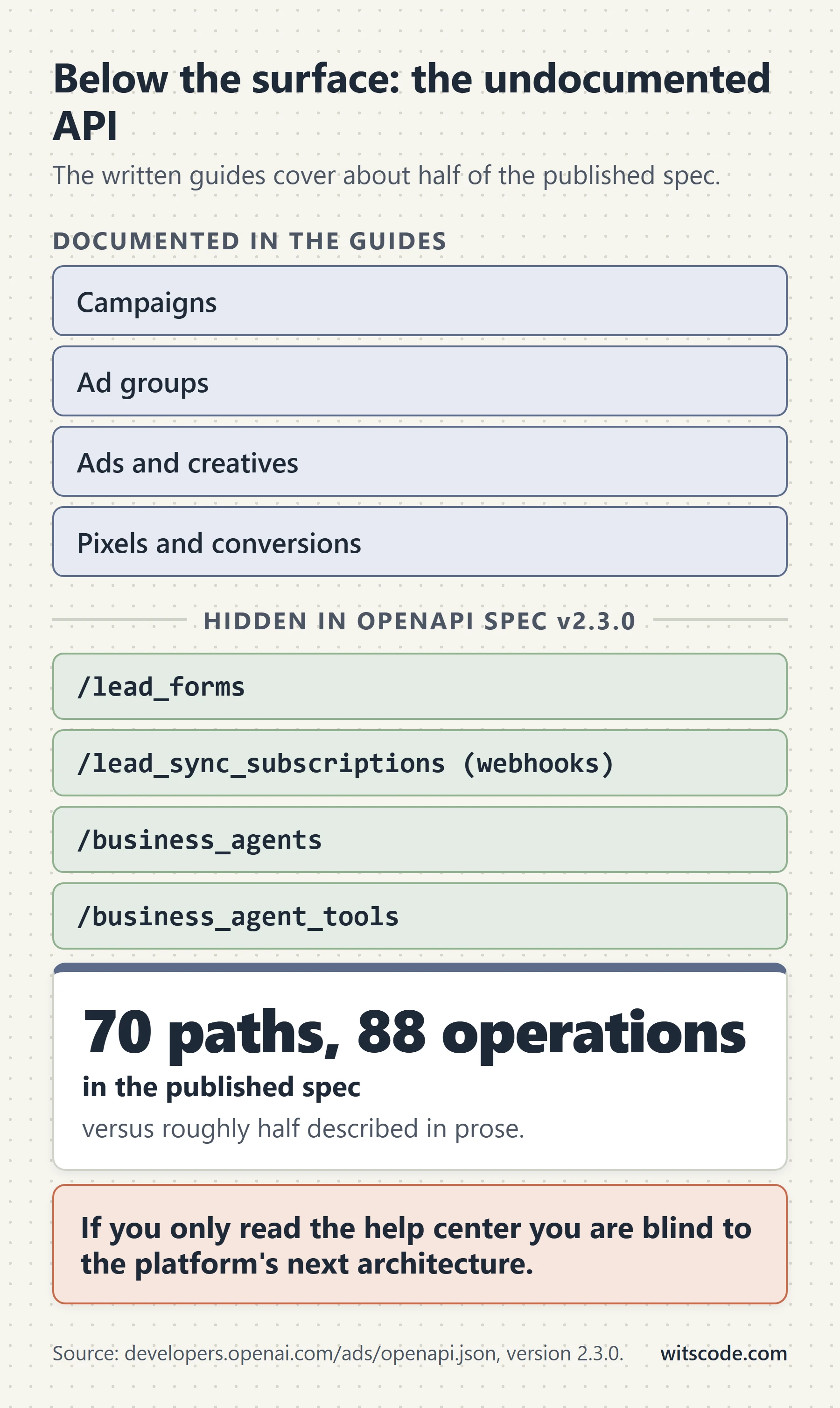
OpenAI publishes a machine-readable OpenAPI specification at https://developers.openai.com/ads/openapi.json. Version 2.3.0 of that file contains 70 paths and 88 operations. The written developer guides cover roughly half of them.
You can check this yourself in one command:
curl -sS "https://developers.openai.com/ads/openapi.json" \
  | python -c "import json,sys; s=json.load(sys.stdin); print(s['info']['version'], len(s['paths']))"
The gap is not trivial padding. It includes three entire product surfaces that the prose documentation never mentions.
A caveat you should carry into every one of these. These endpoints are in the published specification, not in the guides. They may be gated to specific accounts, in limited preview, or subject to change without a documented deprecation path. Confirm behavior with your account representative before you build a business process on any of them. Do not treat anything in this section as a supported contract.
Native lead forms
Multiple published guides state flatly that ChatGPT Ads has no lead forms and no webhooks. That is not what the specification says.
/lead_forms exists with full CRUD, plus /publish, /archive, and /test_submissions. From the schema:
| Property | Constraint |
|---|---|
name |
Required, 1 to 256 characters |
fields |
Required, an array of 3 to 5 fields. Not fewer, not more |
privacy_policy_url |
Optional string |
fields[].field_type |
text or choice. That is the entire enum |
fields[].label |
Required, 1 to 256 characters |
fields[].required |
Required boolean |
fields[].field_id |
Optional, up to 128 characters |
fields[].options |
For choice fields, up to 100 options, each with an id and a label |
A form has a lifecycle: create, then publish. Published forms carry a revision id, in the shape leadformrev_..., alongside the form id leadform_.... /test_submissions lets you push a synthetic submission through the pipeline before real traffic hits it.
Three-field minimum is a strong opinion baked into the schema. You cannot ship a one-field email capture.
Lead sync webhooks
/lead_sync_subscriptions delivers submissions to your endpoint. The create body is small:
| Property | Constraint |
|---|---|
ad_account_id |
Required |
destination_url |
Required, must match ^https://, up to 2,048 characters |
signing_secret |
Optional, exactly 50 characters, matching ^whsec_[A-Za-z0-9+/]{42}[AEIMQUYcgkosw048]=$ |
That signing secret format is a base64-encoded secret with a whsec_ prefix, the same convention Stripe and Svix use. If you have written a webhook verifier before, you already know this shape.
The event that arrives has type lead_form.response.created and a documented envelope:
{
  "id": "evt_...",
  "object": "event",
  "created_at": 1773892800,
  "subscription_id": "leadsync_...",
  "type": "lead_form.response.created",
  "synthetic": null,
  "data": {
    "lead_id": "leadformresp_...",
    "submitted_at": "2026-09-05T12:00:00Z",
    "form_id": "leadform_...",
    "form_revision_id": "leadformrev_...",
    "ad_id": "ad_...",
    "ad_group_id": "adgrp_...",
    "campaign_id": "cmpn_...",
    "ad_account_id": "adacct_...",
    "responses": []
  }
}
Four things in that payload are worth pausing on.
Full campaign attribution comes with the lead. ad_id, ad_group_id, campaign_id, and ad_account_id all ride along. The schema constrains them as all-present or all-null, so you either get the complete chain or none of it. That means a lead landing in your CRM can be attributed to a specific creative without any pixel involvement at all.
synthetic is how you identify test submissions. It is true for a test and absent or null for a real lead. Filter on it or your test data pollutes your pipeline.
Responses are typed and discriminated. Scalar responses carry field_id, field_type (one of name, email, phone, free_form), label, and a value up to 4,096 characters. Multiple-choice responses carry field_id, field_type: "multiple_choice", label, and a selected option object rather than a raw value. Write your parser against the discriminator, not against a guessed shape.
The lead form field types and the webhook field types do not match. You create fields as text or choice. You receive them as name, email, phone, free_form, or multiple_choice. Something in between is classifying the semantic type of a text field. Do not assume a round trip.
Business Agents
Update, 20 September 2026. OpenAI has now announced this product publicly as Sponsored Agents: an ad whose click opens a clearly labeled chat with the advertiser's AI agent inside ChatGPT, with a link to the website when the visitor is ready. It is in a limited US pilot with Wayfair as the only confirmed advertiser, pricing and attribution are still unpublished, and it shipped alongside a Shopify app and a HubSpot integration. We cover the announcement, the Wayfair test, the integrations and the measurement gap in The ChatGPT ad that never sends anyone to your website. The API detail below is unchanged and still the only published description of how the agent is configured.
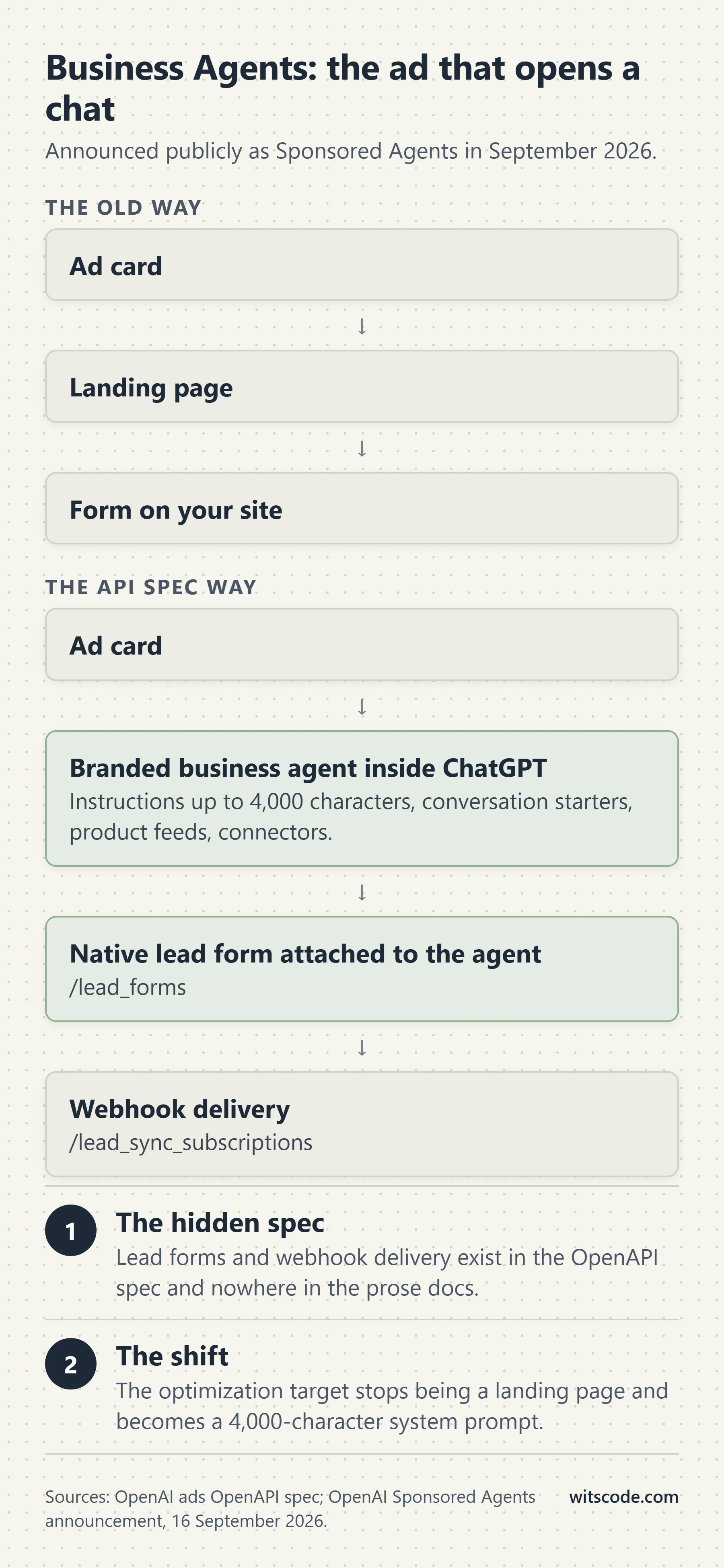
This was the largest omission in the documentation, and it is corroborated outside the spec.
/business_agents supports full CRUD plus /publish and /preview, with a companion /business_agent_tools listing. The create body:
| Property | Constraint |
|---|---|
name |
Required, 1 to 50 characters |
instructions |
Required, up to 4,000 characters |
description |
Up to 300 characters |
conversation_starters |
Up to 12, each up to 300 characters |
product_feed_ids |
Up to 50 |
connector_ids |
Up to 50 |
tools |
Up to 50 |
lead_form |
An object with lead_form_id and lead_form_revision_id, both required if present |
privacy_policy_url |
Optional |
Read that last row again. The lead form attaches to a Business Agent, not to an ad creative. Ads only take chat_card or product_ad_template creatives, and neither has a lead form field. So the lead form product is not a Meta-style instant form on an ad unit. It is a capture step inside a branded conversational agent.
That reframes the whole thing. A Business Agent has instructions, conversation starters, tools, connectors, and product feeds. It is a custom GPT with a brand attached and a lead form at the end of it.
External reporting supports this. Search Engine Roundtable, July 31, 2026 covered an "Agent" campaign type appearing in Ads Manager for select advertisers, based on a discovery by Juozas Kaziukenas. The reported behavior: clicking a traditional online ad opens a website, while these new ChatGPT ads launch a business agent conversation configured with the context of the business. The system scrapes business websites to build profiles, advertisers create agents with custom instructions and product feeds, and campaigns point at the agent rather than a URL. Barry Schwartz noted the option was not visible in his own account.
If that ships broadly, it changes the job. The optimization target stops being a landing page and starts being a system prompt. Your instructions field, capped at 4,000 characters, becomes the most important creative asset in the account. Conversation starters become your equivalent of ad extensions. And the lead form is the conversion event.
Nobody can tell you today how it will be priced, measured, or whether the pixel and Conversions API even apply to an on-platform conversation. Those are open questions. But the plumbing is typed and published, which is a much stronger signal than a rumor.
The rest of the gap
Also present in the spec and absent from the guides:
| Endpoint | What it does | Notable constraint |
|---|---|---|
POST /ad_account/negative_keywords |
Account-level negative keyword list | Up to 100 keywords, each up to 100 characters, for the whole account. No campaign or ad group level |
GET/POST /ad_account/spend_limit_windows |
Dated spend caps with a start date, end date, and amount_micros |
Optional io_id field, which is an insertion order reference. That is a media-agency shape, not a self-serve one |
/feeds full CRUD, /feeds/{id}/sftp_access |
Product feed management, including SFTP credentials with activate and pause | The prose docs say feed creation is not available in the public API. The spec disagrees |
/ad_accounts, /ad_account_creation_sessions |
Multi-account listing and programmatic account creation | The building blocks of an agency or platform integration |
/me, /api_keys |
Identity and key management | |
/partner_data/uploads |
Partner data upload | Undocumented purpose |
/ads/{ad_id}/preview |
Render a preview of an ad | Useful for QA before review |
The io_id field on spend limit windows and the /ad_account_creation_sessions endpoint together tell you something the marketing does not. OpenAI is building for holding companies and platform partners at the same time as it builds self-serve. If you run client accounts, that surface is where your automation eventually lives.
How to use this section responsibly
Do not build a client's lead pipeline on /lead_sync_subscriptions this quarter and assume it will be there next quarter. Do this instead:
- Pull the spec yourself and diff it on a schedule. It is one HTTP request.
- When a new surface appears, ask your OpenAI representative directly whether it is enabled for your account and what the support posture is.
- Design your integration so the undocumented path is additive. If lead sync disappears, your pixel and Conversions API setup should still be measuring everything that matters.
# Cheap change detection. Run it weekly, commit the output, diff it.
curl -sS "https://developers.openai.com/ads/openapi.json" \
  | python -c "
import json,sys
s = json.load(sys.stdin)
print('version', s['info']['version'])
for p in sorted(s['paths']):
    methods = ','.join(m for m in s['paths'][p] if m in ('get','post','put','patch','delete'))
    print(p, methods)
"
ChatGPT Ads vs Google Ads vs Meta Ads vs Perplexity
| ChatGPT Ads | Google Ads | Meta Ads | Perplexity | |
|---|---|---|---|---|
| Status | Live, expanding | Mature | Mature | Wound down in early 2026 |
| Targeting unit | Conversation context via plain-language hints | Keywords, audiences, intent signals | Interests, behaviors, lookalikes on a persistent profile graph | Sponsored follow-up questions |
| Exact match | No | Yes | Not applicable | No |
| Search terms report | No | Yes | Not applicable | No |
| Negatives | Account level only, 100 max | Account, campaign, ad group | Not applicable | Brand-safety term blocking |
| Bidding | CPM, CPC, oCPC | Full suite including tCPA, tROAS, Max Conversions | Full suite including value optimization | CPM only |
| Pay per conversion | No | Available in some products | No | No |
| Measurement | Pixel plus Conversions API, dedup on event id | Google tag, Enhanced Conversions, GA4 | Pixel plus CAPI, dedup on event id | Not applicable |
| Click window | Configured, example shows 30 days | Configurable up to 90 days | Typically 7 days | Not applicable |
| View window | Fixed 1 day, excluded from the conversions total | Configurable | 1 day, included in the default setting | Not applicable |
| Attribution modeling | Last-click style, no data-driven model published | Data-driven attribution | Multiple models | Not applicable |
| Audience reachable | Free and Go tiers only, adults, no Temporary Chats | Everyone | Everyone | Not applicable |
| Category policy | Four consumer verticals plus three case-by-case. Everything else disallowed | Broad, with restricted categories | Broad, with restricted categories | 15 sectors with exclusivity |
| Reported CPM | $60 at launch, $25 to $45 by April 2026 | Google Display around $10 | Facebook around $5, Instagram around $8 | Targeted above $50 |
| Reported CPC | $3 to $5 recommended bid | Varies widely by vertical | Typically below search | Not applicable |
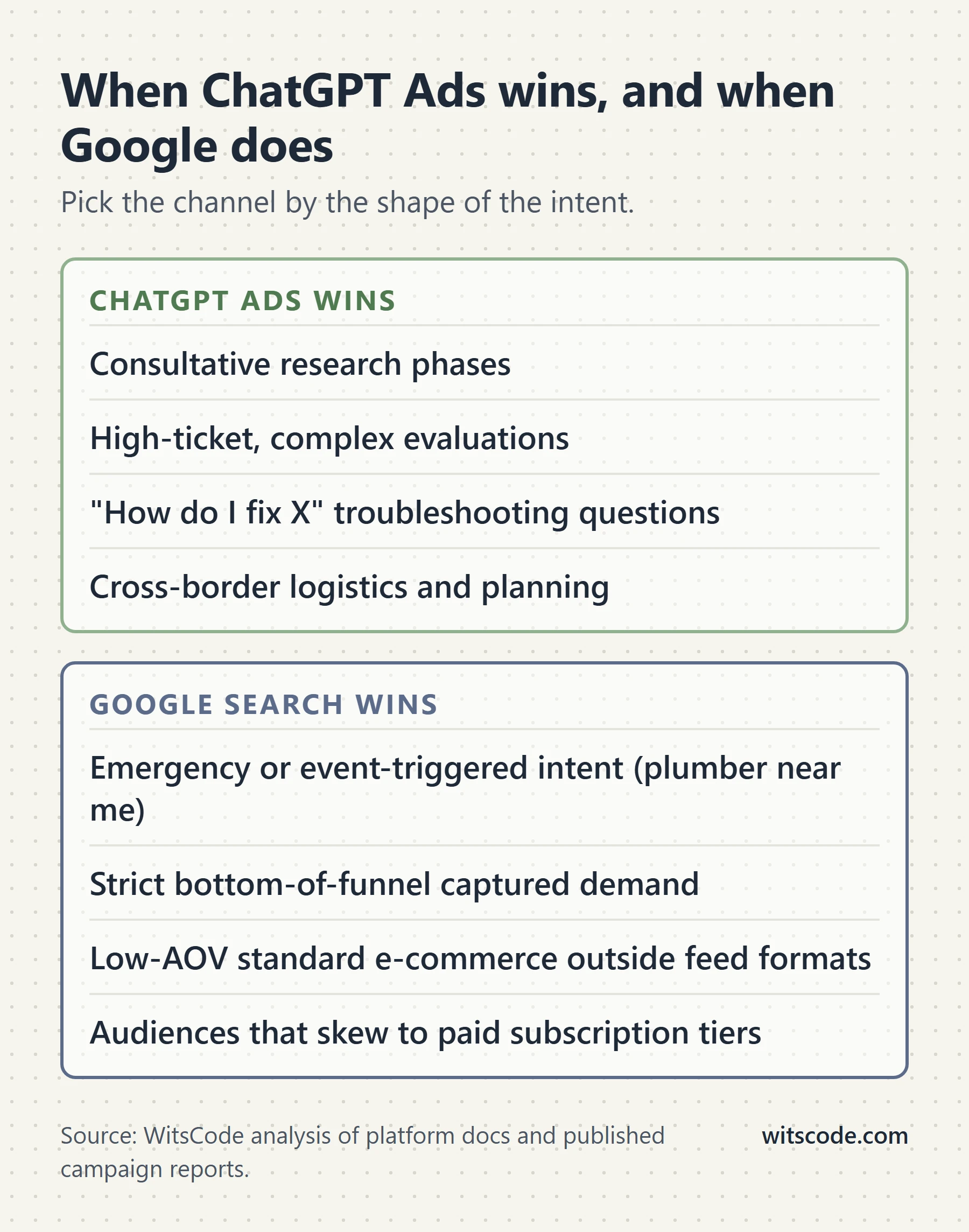
Two conclusions fall out of that table.
ChatGPT's measurement architecture is a close copy of Meta's. Pixel plus server API, deduplication on a shared event id, SHA-256 advanced matching, hashed identity fields. If you have built a Meta CAPI integration, you already understand 80% of this. The differences are naming (event_id versus id, singular versus plural user fields), the separate bzr.openai.com host, and the oppref and obref split.
What it lacks is Meta's profile graph and Google's intent signal. Targeting is session-context first, with audience lists bolted on and unavailable in Europe. There is no behavioral history to optimize against, and no query to match. That is why captured, bottom-of-funnel demand still belongs in keyword-matched Google Ads.
The Perplexity lesson
This is the single most useful competitive data point in the category, and almost nobody puts it in a ChatGPT Ads guide.
Perplexity launched advertising in November 2024: sponsored follow-up questions and paid media adjacent to answers, both labeled, with category exclusivity across 15 sectors. It anticipated rates above $50 CPM. Initial advertisers included Indeed, Whole Foods Market, Universal McCann, and PMG. By March 2025 the company confirmed CPM pricing rather than CPC, and said it was working with fewer than a dozen advertisers.
In October 2025 it stopped accepting new advertisers. In early 2026 it wound the program down, with executives reportedly citing trust, on the argument that ads risk making users suspicious of everything. Note that this account is widely corroborated across trade outlets, but the primary sources sit behind paywalls and bot walls that I could not read directly, so treat the specific reasoning as reported rather than confirmed.
So: one AI assistant aimed above $50 CPM and quit. Another opened at $60 and cut to $25 to $45 within roughly nine weeks while scaling to a $1B annualized run rate. The difference is not the ad product. It is the size of the free-tier audience underneath it.
The other AI ad products
Microsoft Copilot ads are the least structurally novel. Ads are generated from existing Microsoft Advertising assets, placed below the organic Copilot response, with contextual targeting across the whole session rather than the last query. Measurement, attribution, and policy inherit from the Microsoft Advertising stack. Microsoft's own first-party data from February to May 2025, on its owned-and-operated search properties, reported 73% higher click-through rates, 16% stronger conversion rates, 33% shorter paths to conversion, and 59% fewer quick-back-clicks for multimedia ads versus comparable search formats. That is vendor data on its own product, but the methodology and window are at least disclosed. An older 69% and 76% pairing circulates widely and appears to be from October 2024. It is stale.
Google AI Mode ads. Google has announced conversational ad formats for AI Mode, reportedly including creative generated per query, sponsored slots inside AI recommendation lists, a business agent for leads, and AI-powered shopping ads. No pricing, bidding, or performance data has been published. Structurally Google is bringing conversational inventory into a mature auction, measurement, and policy stack. OpenAI is building all three from zero. That is the real competitive asymmetry, and it is not in ChatGPT's favor.
One data point worth carrying: SE Ranking found advertisers were cited as sources in 3.63% of ChatGPT ad placements against 11.53% in Google AI Mode.
What we do not know
A short, honest list. If you see any of these stated as fact somewhere, the author is guessing.
Auction mechanics. Not published. The "relevance-weighted second-price auction" description that circulates has no primary source.
The default and maximum click attribution window. OpenAI's example uses 30 days. The range is not documented.
Cross-advertiser benchmarks. None exist from any credible, methodology-disclosed source. The industry-by-industry CTR and CPC tables you have seen are agency content.
Current bid floors. The spend minimum was removed at self-serve launch. No floor has been published since.
Whether view-through reporting is enabled on your account. OpenAI's docs say it is available "when available for your account" without stating the criteria.
How Business Agents will be priced, measured, or attributed. The endpoints exist. Nothing else about them does.
Whether B2B will be admitted, and when. The policy says categories may expand over time. That is the whole statement.
How ad load will change, and what it does to tolerance. Today's survey data was collected at today's frequency.
A 30-day launch plan
Assumes you have confirmed category eligibility. If you have not, that is week zero and nothing else starts.
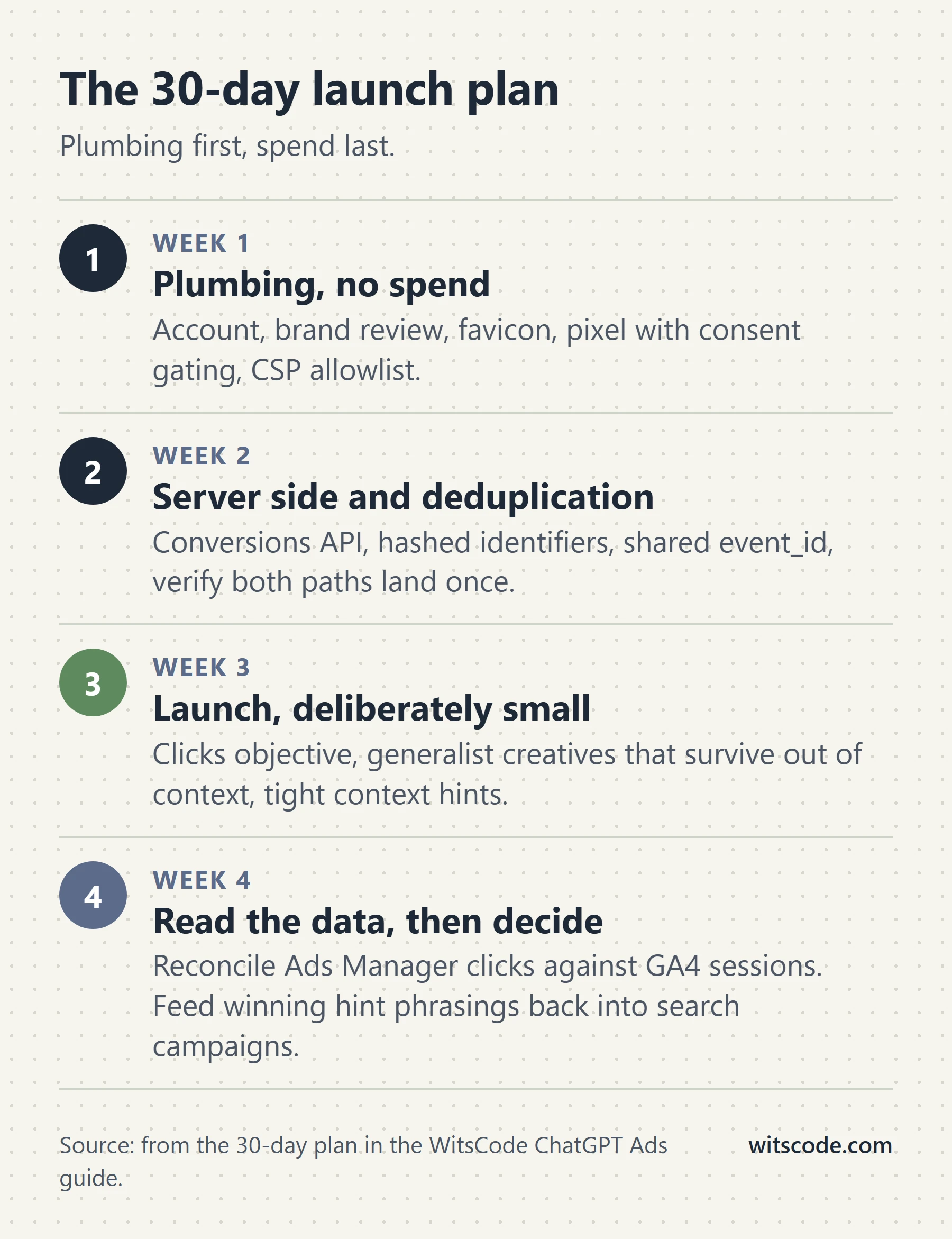
Week 1: plumbing, no spend
GET /ad_account. Confirm the key maps to the account you think it does.- Get brand review to
approved. Fixmissing_faviconif that is the blocker. POST /conversions/pixels. Store theclidsrc_id and the numericpixel_idseparately, labeled, in your secrets store.POST /conversions/api_keys. Server side only.- Install the pixel high in
<head>. Add the four CSP sources. - Wire consent:
oaiq("consent", false)beforeinit, flipped true only on genuine grant. - Fire one test event of each shape you plan to use. Verify with
GET /conversions/events?pid=.
Exit criterion: every event you care about appears in the verification endpoint with the correct event_type and data shape.
Week 2: server side and deduplication
- Build the Conversions API sender. Use
validate_only: trueuntil payloads pass cleanly. - Read
__opprefand__obrefin the browser, post them to your server.opprefat event level,obrefinsideuser. - Implement hashing with the exact normalization rules. Test
JoséandO'Connorexplicitly. - Send the same conversion from both sides with a shared natural key. Confirm you see one conversion, not two.
POST /conversions/event_settingswith your real goal event andattribution_window_days. Save theces_id.
Exit criterion: a real purchase or lead produces exactly one counted conversion, and you can point at which side won the dedup race.
Week 3: launch, deliberately small
- Create the campaign paused, with explicit location targeting. Never leave locations empty.
- Start on
clicks, notconversions, unless you already have conversion volume. You cannot change the bidding type later, but you can build a second campaign. - One theme per ad group. Write context hints as topics, not queries.
- Two to four chat cards per ad group. Title 3 to 50 characters, body up to 100. Nothing that resembles the ChatGPT interface.
- Verify each ad reaches
review_status: "approved"before you activate the campaign. - Set a spend limit window if you want a hard dated cap.
Exit criterion: ads approved, campaign live, spend pacing against a budget you chose on purpose.
Week 4: read the data, then decide
- Pull
POST /conversions/insights. Reportclick_through_conversionsas the conversion number. Reportview_through_conversionsseparately, clearly labeled as supplemental. - Compare realized CPA against your CPC and click volume. Do not compare it against a benchmark table you found online.
- If you have enough conversion volume and conversion bidding is enabled on the account, build a new oCPC campaign against one standard event. Set
max_bid_microsto your genuine CPA target and watch realized CPA daily, not weekly. - Add account-level negative keywords for whatever irrelevant context surfaced. You have 100 slots for the entire account, so spend them on the worst offenders.
Exit criterion: a defensible yes or no on whether the channel clears your cost of acquisition. Not a vibe.
Troubleshooting: the failures we see most
| Symptom | Likely cause | Fix |
|---|---|---|
| Pixel loads, no events arrive | CSP allows bzrcdn.openai.com but not bzr.openai.com |
Add both hosts, plus img-src for the fallback |
| No events at all, no console error | Consent is false, or a stored denial exists |
Check the consent call order. Remember blocked events are never replayed |
| Events land but nothing attributes | Server events sent without oppref and obref |
The Conversions API does not capture oppref. Pass both from the browser |
| Match rate is poor | Hashing normalization is wrong | Accents stripped from names, external ids lowercased, or geo fields hashed. All three are common |
| Duplicate conversions | Browser and server use different ids | Pixel event_id and API id must carry the same value. Use a natural business key |
403 Conversion bidding is not enabled |
oCPC not enabled on the ad account | Contact your representative. No retry fixes it |
| Cannot switch a campaign to oCPC | bidding_type is permanent |
Build a new campaign |
| Whole batch rejected | One invalid event in the batch | Validate per event before assembling. Use validate_only: true |
| Events silently dropped by the API | timestamp_ms outside the last 7 days or more than 10 minutes ahead |
Check for clock skew and for slow ETL |
| Event setting exists but counts nothing | source_ids got the numeric pixel_id instead of the clidsrc_ id |
Use the clidsrc_ value |
| Ad stuck in review, or never serves | Landing page is unreachable to OpenAI's review systems | Ads and pages that cannot be evaluated are not eligible to run. Check your WAF, bot rules, and geo blocks |
| Creative rejected repeatedly | It reads as part of the ChatGPT product | Remove chat-bubble styling, assistant voice, and interface imagery |
| Campaign spending in markets you do not serve | targeting.locations.include omitted |
Omitting locations means all available locations |
| Bid is 1,000x wrong | Micros | A $60 CPM is 60000. A $4 CPC is 4000000 |
Should you run ChatGPT Ads at all?
An honest decision framework, given everything above.
Run it now if: you are in one of the four allowed consumer verticals, your buyer plausibly uses the ChatGPT free tier, you already have working conversion measurement, and you can spend a test budget you are willing to lose without it affecting your quarter.
Run a small test if: you are in a case-by-case category and have approval, or you want a competitive read on inventory before it gets expensive. The channel is cheap to test now in a way it may not be in a year.
Wait if: you sell B2B, your CAC math only works at Google Search efficiency, or your measurement is not already clean on your existing channels. A new channel does not fix a broken measurement stack. It exposes it.
Build the plumbing regardless. The pixel and the Conversions API take a few days. Doing that work now means that when your category opens, or when Business Agents ship, you are launching a campaign rather than starting an integration. That is the highest-return work available on this platform today, and it costs no media spend at all.
Frequently asked questions
How much do ChatGPT ads cost?
ChatGPT Ads launched at a $60 CPM in early 2026, and Digiday reported CPMs falling to a $25 to $45 range by April 2026. For click-based campaigns, the reported recommended maximum bid is $3 to $5 per click. The self-serve minimum daily budget is $25 USD, and the six-figure pilot minimum was removed when self-serve opened on May 5, 2026.
Can I advertise my SaaS on ChatGPT?
Probably not yet. OpenAI's ad policy limits the initial test period to lifestyle and household goods, local services, travel and experiences, and digital products or education, and states that all other categories are disallowed at launch. B2B software is not a named category, so a SaaS product would need to fit "digital products or education" and be confirmed by OpenAI before you build anything.
Does the ChatGPT pixel work with a cookie banner?
Yes, but the call order matters. Call oaiq("consent", false) before oaiq("init", ...), then call oaiq("consent", true) only after the user grants measurement consent. The pixel defaults to consent true, and events blocked while consent is denied are never replayed later, so a banner that resolves after the pixel initializes will have already measured.
How do I install the ChatGPT Ads pixel?
Paste OpenAI's installation snippet as high in the <head> as possible on every page you want to measure, with your Pixel ID in the oaiq("init", { pixelId }) call. The SDK loads from https://bzrcdn.openai.com/sdk/oaiq.min.js. If you enforce a Content Security Policy, add bzrcdn.openai.com to script-src, both bzr.openai.com and bzrcdn.openai.com to connect-src, and bzr.openai.com to img-src.
What is the OpenAI Conversions API?
The Conversions API is a server-to-server endpoint at https://bzr.openai.com/v1/events?pid=<PIXEL-ID> for sending conversion events directly from your backend. It accepts batches of up to 1,000 events, uses a separate API key from the campaign management API, and OpenAI describes it as a more reliable tracking source than the pixel alone. Unlike the pixel, it does not capture the oppref click identifier for you.
How does ChatGPT Ads deduplicate browser and server events?
Deduplication uses your Pixel ID, the event name, and the event id together. Send the same value as the pixel's event_id option and the Conversions API's id field, using the same Pixel ID on both sides. OpenAI keeps the first event it receives for a matching key and ignores later duplicates, so use a natural business key like an order id rather than a randomly generated one.
Do ChatGPT ads use conversion bidding, and do I pay per conversion?
ChatGPT Ads offers conversion-optimized cost per click, or oCPC, and you do not pay per conversion. You set max_bid_micros as a CPA target, and OpenAI uses it to bid more aggressively into auctions where a conversion looks likely, but billing still happens on every valid click. A $100 CPA target does not cap your actual cost per conversion.
Can I change the bidding type on an existing ChatGPT campaign?
No. bidding_type is set when the campaign is created and cannot be changed afterward, and the same is true of the conversion event an oCPC campaign optimizes toward. If you need different bidding, you build a new campaign. This is the single most consequential irreversible decision on the platform.
What are context hints in ChatGPT Ads?
Context hints are plain-language descriptions of the conversations, topics, or keywords where your product may be relevant, set on the ad group as an array of strings. OpenAI states they guide matching but are not exact-match targeting rules, and they do not guarantee your ad appears in any specific conversation. Write them as topics and situations rather than as search queries.
Are view-through conversions included in ChatGPT Ads reporting?
They are reported, but they are not included in your conversions total. View-through uses a fixed one-day window after an eligible impression, and OpenAI's documentation states that view-through conversions are not included in Conversions, which remains the click-through total. CPA, post-click conversion rate, bidding, billing, and optimization are all click-through based.
Who actually sees ads in ChatGPT?
Ads appear only for Free and Go tier users. Plus, Pro, Business, Enterprise, and Edu accounts are ad-free, accounts identified as under 18 do not see ads, and Temporary Chats never show them. This means the users most able to pay have often removed themselves from the inventory, which is a structural constraint no amount of targeting fixes.
Does ChatGPT Ads have lead forms?
The prose documentation does not mention lead forms, but OpenAI's published OpenAPI specification contains a full /lead_forms surface with create, publish, archive, and test-submission endpoints, plus /lead_sync_subscriptions for webhook delivery. Forms require 3 to 5 fields of type text or choice, and they attach to a Business Agent rather than to an ad creative. Treat these as real but unblessed and confirm availability with your account representative before depending on them.
What are ChatGPT Ads Business Agents?
Business Agents are branded conversational agents defined in OpenAI's ads OpenAPI spec, with instructions up to 4,000 characters, conversation starters, tools, connectors, product feeds, and an optional attached lead form. Search Engine Roundtable reported in July 2026 that an "Agent" campaign type was visible in Ads Manager for select advertisers, where clicking the ad launches a business agent conversation instead of opening a website. They are not documented in the written developer guides and no pricing or measurement details have been published.
How do I hash customer data for the ChatGPT pixel?
Normalize first, then compute a SHA-256 digest and send it as a lowercase 64-character hex string. Emails are trimmed and lowercased, phone numbers keep the country code with whitespace and punctuation removed, and names are lowercased with whitespace and ASCII punctuation removed while non-ASCII characters are preserved, so José becomes josé. External IDs are trimmed only and keep their case, and geographic fields are sent raw rather than hashed.
Is there a ChatGPT Ads API?
Yes. Campaign management runs at https://api.ads.openai.com/v1 with bearer token authentication, one key per ad account, at 600 requests per minute per endpoint and 1,200 overall, enforced per account and per IP. The published OpenAPI spec version 2.3.0 contains 70 paths and 88 operations, covering campaigns, ad groups, ads, conversions, custom audiences, feeds, insights, and several surfaces the written guides do not describe.
How does ChatGPT Ads compare to Google Ads?
Google matches on keywords with a mature auction, a search terms report, granular negatives, and configurable attribution up to 90 days. ChatGPT matches on conversation context with plain-language hints, no search terms report, account-level negatives capped at 100, and a fixed one-day view window excluded from the conversions total. On reported cost, ChatGPT CPCs of $3 to $5 sit in a similar band to competitive Google Search clicks, while its CPMs run well above display.
Do ChatGPT ads influence the answers ChatGPT gives?
OpenAI states that ads do not influence answers and that ads run on systems separate from the model. Independent evidence is consistent with that: an SE Ranking study of 50,006 commercial prompts found advertisers were cited as sources in only 3.63% of placements, against 11.53% in Google AI Mode. Buying an ad does not appear to make a brand meaningfully more likely to appear in the response itself.
Are ChatGPT ads working for advertisers?
The published evidence is mixed and thin. An SE Ranking study found ads on 25.94% of commercial prompts with 14.35% having no topical connection to the prompt, and their own test campaigns produced a 1.30% click-through rate, while an Adthena client campaign reported 0.91% against a 6.4% Google Search benchmark. OpenAI counters with a $1B annualized revenue run rate in under 200 days and anonymized advertiser wins including 3x return on ad spend over 28 days.
Can I run ChatGPT ads in Europe?
Yes for delivery, with a significant restriction on targeting. Self-service Ads Manager went live across 31 European markets on August 31, 2026, but personalized ads are not initially available in the European Economic Area or Switzerland, and custom audiences are unavailable for EEA and Switzerland campaigns. European campaigns are contextual and geographic only.
Sources
Primary documentation and policy:
- OpenAI: Reimagining advertising with AI, 16 September 2026
- Sponsored Agents in ChatGPT Ads, help center
- OpenAI Ads developer documentation
- Measurement Pixel
- Conversions API
- Supported Events
- Conversion-Optimized Campaigns
- Campaign Targeting
- Custom Audiences
- API Reference: Campaigns, Ad Groups, Ads, Conversion Setup, Insights
- OpenAPI specification, version 2.3.0
- OpenAI advertising policies
- Ads in ChatGPT, help center
OpenAI announcements:
- Our approach to advertising and expanding access
- Testing ads in ChatGPT
- New ways to buy ChatGPT ads
- ChatGPT Ads expands across Europe
- Expanding access to AI with ChatGPT Ads
Reporting and research:
- Digiday: ChatGPT ads are getting cheaper
- Digiday: OpenAI offers ChatGPT ads to new markets
- Digiday: a bitter pill, where do publishers fit
- PPC Land: ChatGPT ad CPMs drop to $25
- PPC Land: conversion optimization for ChatGPT ads
- Search Engine Land: study, ads on 26% of commercial prompts
- Search Engine Land: the platform cannot tell advertisers if their money is working
- Search Engine Land: advertisers are testing ChatGPT ads but uncertainty remains
- Search Engine Land: ChatGPT ads spotted
- Search Engine Journal: CPC bidding between $3 and $5
- Search Engine Journal: new acquisition channel or another brand tax
- Search Engine Journal: trust in AI search could drop with ads
- Search Engine Roundtable: Business Agent conversation campaign type
- MediaPost: ChatGPT serves ads on irrelevant topics
- eMarketer: ChatGPT ads hit $100 million annualized revenues, doubts remain
- Forrester: what consumers actually think about ads in ChatGPT
- Tom's Guide: the backlash
- TechRadar: I chose ChatGPT's ad-free option
- Adthena: ads in AI search
- Criteo joins the OpenAI advertising pilot
- Retail Dive: Target tests contextual ads in ChatGPT
- AdExchanger: behind the curtain at Perplexity's ads business
- PPC Land: how Perplexity AI ads appear
- Microsoft Advertising: 73% higher CTRs in conversational AI
- SiliconANGLE: OpenAI ad business hits $1B annualized revenue
- Campaign US: underwhelming early returns for ChatGPT Ads
Next step
Keep the guide, or skip straight to the build
If you would rather have the pixel, the Conversions API and the first campaign wired by people who have done it, that is our paid ads work. Fifteen minutes is enough to tell whether your category can even run yet.
Frequently asked questions
How much do ChatGPT ads cost?
ChatGPT Ads launched at a $60 CPM in early 2026, and Digiday reported CPMs falling to a $25 to $45 range by April 2026. For click-based campaigns the reported recommended maximum bid is $3 to $5 per click. The self-serve minimum daily budget is $25 USD, and the six-figure pilot minimum was removed when self-serve opened on May 5, 2026.
Can I advertise my SaaS on ChatGPT?
Probably not yet. OpenAI's ad policy limits the initial test period to lifestyle and household goods, local services, travel and experiences, and digital products or education, and states that all other categories are disallowed at launch. B2B software is not a named category, so a SaaS product would need to fit digital products or education and be confirmed by OpenAI before you build anything.
Does the ChatGPT pixel work with a cookie banner?
Yes, but the call order matters. Call oaiq("consent", false) before oaiq("init", ...), then call oaiq("consent", true) only after the user grants measurement consent. The pixel defaults to consent true, and events blocked while consent is denied are never replayed, so a banner that resolves after the pixel initializes will have already measured.
How do I install the ChatGPT Ads pixel?
Paste OpenAI's installation snippet as high in the head as possible on every page you want to measure, with your Pixel ID in the oaiq("init") call. The SDK loads from https://bzrcdn.openai.com/sdk/oaiq.min.js. If you enforce a Content Security Policy, add bzrcdn.openai.com to script-src, both bzr.openai.com and bzrcdn.openai.com to connect-src, and bzr.openai.com to img-src.
What is the OpenAI Conversions API?
The Conversions API is a server-to-server endpoint at https://bzr.openai.com/v1/events for sending conversion events directly from your backend, with your Pixel ID passed as the pid query parameter. It accepts batches of up to 1,000 events, uses a separate API key from the campaign management API, and OpenAI describes it as a more reliable tracking source than the pixel alone. Unlike the pixel, it does not capture the oppref click identifier for you.
How does ChatGPT Ads deduplicate browser and server events?
Deduplication uses your Pixel ID, the event name, and the event id together. Send the same value as the pixel's event_id option and the Conversions API's id field, using the same Pixel ID on both sides. OpenAI keeps the first event it receives for a matching key and ignores later duplicates, so use a natural business key like an order id rather than a randomly generated one.
Do I pay per conversion with ChatGPT Ads conversion bidding?
No. ChatGPT Ads offers conversion-optimized cost per click, or oCPC, where you set max_bid_micros as a CPA target and OpenAI bids more aggressively into auctions where a conversion looks likely. Billing still happens on every valid click, so a $100 CPA target does not cap your actual cost per conversion.
Can I change the bidding type on an existing ChatGPT campaign?
No. The bidding_type is set when the campaign is created and cannot be changed afterward, and the same is true of the conversion event an oCPC campaign optimizes toward. If you need different bidding, you build a new campaign. This is the single most consequential irreversible decision on the platform.
What are context hints in ChatGPT Ads?
Context hints are plain-language descriptions of the conversations, topics, or keywords where your product may be relevant, set on the ad group as an array of strings. OpenAI states they guide matching but are not exact-match targeting rules, and they do not guarantee your ad appears in any specific conversation. Write them as topics and situations rather than as search queries.
Are view-through conversions included in ChatGPT Ads reporting?
They are reported, but they are not included in your conversions total. View-through uses a fixed one-day window after an eligible impression, and OpenAI's documentation states view-through conversions are not included in Conversions, which remains the click-through total. CPA, post-click conversion rate, bidding, billing, and optimization are all click-through based.
Who actually sees ads in ChatGPT?
Ads appear only for Free and Go tier users. Plus, Pro, Business, Enterprise, and Edu accounts are ad-free, accounts identified as under 18 do not see ads, and Temporary Chats never show them. The users most able to pay have often removed themselves from the inventory, which is a structural constraint no amount of targeting fixes.
Does ChatGPT Ads have lead forms?
The written documentation does not mention lead forms, but OpenAI's published OpenAPI specification contains a full lead_forms surface with create, publish, archive, and test-submission endpoints, plus lead_sync_subscriptions for webhook delivery. Forms require 3 to 5 fields of type text or choice, and they attach to a Business Agent rather than to an ad creative. Treat these as real but unblessed and confirm availability with your account representative.
What are ChatGPT Ads Business Agents?
Business Agents are branded conversational agents defined in OpenAI's ads OpenAPI spec, with instructions up to 4,000 characters, conversation starters, tools, connectors, product feeds, and an optional attached lead form. On 16 September 2026 OpenAI announced the product publicly as Sponsored Agents: clicking the ad opens a labeled chat with the advertiser's agent inside ChatGPT instead of a website. It is in a limited US pilot, with Wayfair the only confirmed advertiser, and no pricing or attribution details have been published.
How do I hash customer data for the ChatGPT pixel?
Normalize first, then compute a SHA-256 digest and send it as a lowercase 64-character hex string. Emails are trimmed and lowercased, phone numbers keep the country code with whitespace and punctuation removed, and names are lowercased with whitespace and ASCII punctuation removed while non-ASCII characters are preserved. External IDs are trimmed only and keep their case, and geographic fields are sent raw rather than hashed.
Is there a ChatGPT Ads API?
Yes. Campaign management runs at https://api.ads.openai.com/v1 with bearer token authentication, one key per ad account, at 600 requests per minute per endpoint and 1,200 overall, enforced per account and per IP. The published OpenAPI spec version 2.3.0 contains 70 paths and 88 operations, covering campaigns, ad groups, ads, conversions, custom audiences, feeds, insights, and several surfaces the written guides do not describe.
How does ChatGPT Ads compare to Google Ads?
Google matches on keywords with a mature auction, a search terms report, granular negatives, and configurable attribution up to 90 days. ChatGPT matches on conversation context with plain-language hints, no search terms report, account-level negatives capped at 100, and a fixed one-day view window excluded from the conversions total. Reported ChatGPT CPCs of $3 to $5 sit in a similar band to competitive Google Search clicks, while its CPMs run well above display.
Do ChatGPT ads influence the answers ChatGPT gives?
OpenAI states that ads do not influence answers and that ads run on systems separate from the model. Independent evidence is consistent with that: an SE Ranking study of 50,006 commercial prompts found advertisers were cited as sources in only 3.63% of placements, against 11.53% in Google AI Mode. Buying an ad does not appear to make a brand meaningfully more likely to appear in the response itself.
Are ChatGPT ads actually working for advertisers?
The published evidence is mixed and thin. An SE Ranking study found ads on 25.94% of commercial prompts with 14.35% having no topical connection to the prompt, and their own test campaigns produced a 1.30% click-through rate, while an Adthena client campaign reported 0.91% against a 6.4% Google Search benchmark. OpenAI counters with a $1B annualized revenue run rate in under 200 days and anonymized advertiser wins including 3x return on ad spend over 28 days.
Can I run ChatGPT ads in Europe?
Yes for delivery, with a significant restriction on targeting. Self-service Ads Manager went live across 31 European markets on August 31, 2026, but personalized ads are not initially available in the European Economic Area or Switzerland, and custom audiences are unavailable for EEA and Switzerland campaigns. European campaigns are contextual and geographic only.
What happened to Perplexity's ads, and does it matter for ChatGPT?
Perplexity launched advertising in November 2024 targeting rates above $50 CPM, stopped accepting new advertisers in October 2025, and wound the program down in early 2026 with executives reportedly citing user trust. ChatGPT opened at $60 CPM, cut to $25 to $45 within roughly nine weeks, and reached a $1B annualized run rate. The difference is not the ad product, it is the size of the free-tier audience underneath it.
Work with us
Where WitsCode can help
The services that turn this playbook into shipped results.